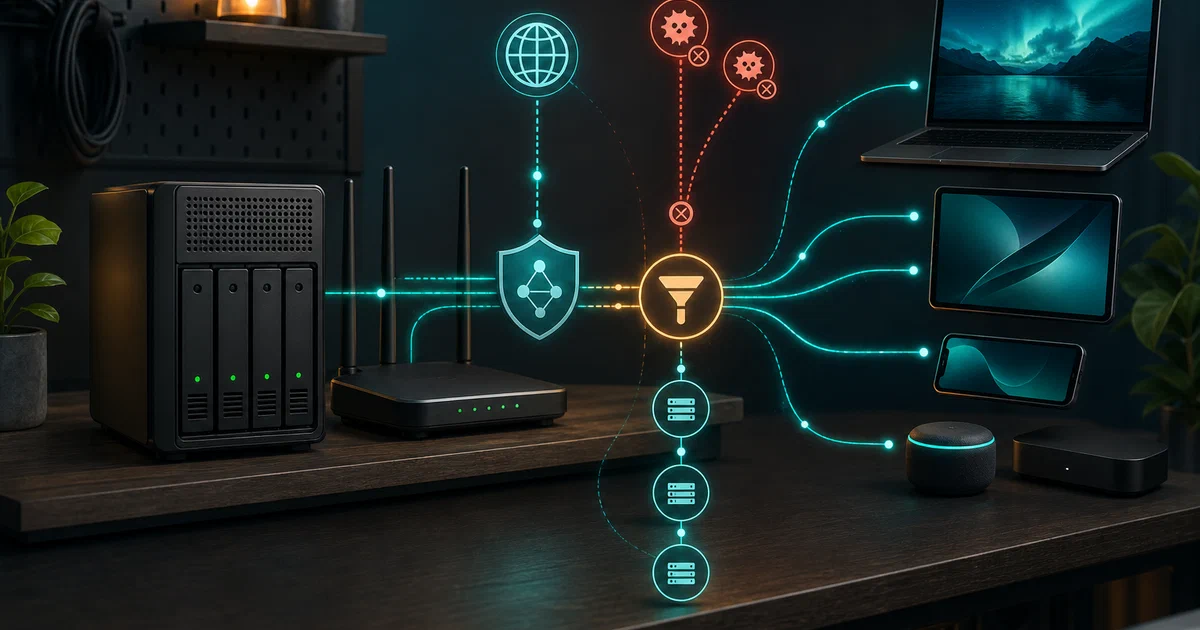

Most homelab DNS setups look like this: Pi-hole for blocking, Unbound for recursive resolution, maybe a separate authoritative server for local zones, stitched together with config files.
Technitium DNS Server replaces all of that with a single process — an authoritative server, a recursive resolver, a block list manager, an encrypted DNS endpoint, a DHCP server, and a web console — deployed in one Docker container.
What is Technitium DNS Server?
Technitium DNS Server is an open-source cross-platform DNS server built on .NET 10.
It acts as both an authoritative name server (hosting your own zones) and a recursive resolver (resolving queries by walking the DNS tree or forwarding to encrypted upstream resolvers).
A rich web console handles all configuration without touching config files.
“Self host a DNS server for privacy & security. Block ads & malware at DNS level for your entire network!”
Technitium DNS Server on GitHub Technitium DNS Server Website Docker Hub
What it covers
- 🚫 Network-wide ad and malware blocking — block list URLs (compatible with Pi-hole lists), CNAME cloaking, REGEX-based rules
- 🔐 Encrypted DNS — serve and forward DNS-over-TLS (DoT), DNS-over-HTTPS (DoH, HTTP/1.1/2/3), DNS-over-QUIC (DoQ)
- 🌐 Authoritative server — host your own domains; Primary, Secondary, Stub, and Conditional Forwarder zones
- 🔄 Recursive resolver — DNSSEC validation, QNAME minimization, latency-based name server selection
- ✍️ DNSSEC signing — sign your zones with RSA, ECDSA, or EdDSA; manage KSK and ZSK from the web console
- 🖥️ Built-in DHCP server — assign IPs and register hostnames in DNS automatically
- 🔗 Clustering — manage two or more instances from one console
- 🔌 DNS Apps — 27+ plugins for geo-DNS, query logging, split horizon, failover, and more
- 🔑 SSO + TOTP 2FA — OpenID Connect SSO (v15.0+) and per-user two-factor authentication
- 📊 Prometheus metrics —
/api/metricsendpoint for Grafana/monitoring integration - ⚖️ GPL v3 licensed — fully open source
Current version
Version 15.2 was released 9 May 2026 — two days before this post. The v15.0 milestone upgraded the runtime to .NET 10, added OpenID Connect SSO, Prometheus metrics, EDNS Client Subnet source address reading, and several DNS amplification vulnerability fixes. Actively maintained with production-grade stability.
Encrypted DNS — Serving and Forwarding
Technitium handles encrypted DNS in both directions:
As a forwarder — instead of sending queries to your ISP’s plain UDP resolver, Technitium forwards upstream using DoT, DoH, or DoQ to providers like Cloudflare, Google, Quad9, or AdGuard. Your ISP sees only encrypted traffic.
As a server — Technitium can terminate DoT (port 853), DoH (port 443), and DoQ (port 853 UDP) for clients on your network. Configure your devices to use your server’s DoH endpoint and their DNS queries are encrypted end-to-end.
This dual capability — encrypt upstream and serve encrypted to clients — is what separates it from Pi-hole, which only does plain DNS locally and relies on Unbound or a forwarder for the upstream leg.
Self-Hosting Technitium with Docker
Get Docker 🐋
Install Docker on your system before proceeding:
- Linux: Official Docker Engine install guide
- Windows / Mac: Docker Desktop
Verify installation: docker --version && docker compose version
Docker Compose
services:
  dns-server:
    container_name: dns-server
    image: technitium/dns-server:latest
    ports:
      - "5380:5380/tcp"   # Web console (HTTP)
      - "53:53/udp"       # DNS
      - "53:53/tcp"       # DNS over TCP
      # Uncomment for encrypted DNS endpoints:
      # - "853:853/tcp"   # DNS-over-TLS
      # - "853:853/udp"   # DNS-over-QUIC
      # - "443:443/tcp"   # DNS-over-HTTPS (HTTP/1.1 + HTTP/2)
      # - "443:443/udp"   # DNS-over-HTTPS (HTTP/3)
      # - "67:67/udp"     # DHCP (requires host network mode instead)
    environment:
      - DNS_SERVER_DOMAIN=dns-server
      - DNS_SERVER_LOG_FOLDER_PATH=/var/log/technitium/dns
      # Set admin password (or use DNS_SERVER_ADMIN_PASSWORD_FILE):
      # - DNS_SERVER_ADMIN_PASSWORD=changeme
      # Forward via DoH to Cloudflare:
      # - DNS_SERVER_FORWARDERS=https://cloudflare-dns.com/dns-query
      # - DNS_SERVER_FORWARDER_PROTOCOL=Https
      # Enable ad blocking:
      # - DNS_SERVER_ENABLE_BLOCKING=true
      # - DNS_SERVER_BLOCK_LIST_URLS=https://raw.githubusercontent.com/StevenBlack/hosts/master/hosts
    volumes:
      - dns-config:/etc/dns
      - dns-logs:/var/log/technitium/dns
    restart: unless-stopped
    sysctls:
      - net.ipv4.ip_local_port_range=1024 65535

volumes:
  dns-config:
  dns-logs:
Open http://your-server:5380 — first login uses admin / admin (or the password you set in the environment variable). You will be prompted to change it on first login.
Linux without Docker
curl -sSL https://download.technitium.com/dns/install.sh | sudo bash
This installs .NET 10, creates a dns-server system user, registers a systemd service, and places config in /etc/dns/. Upgrades run the same script.
Using Technitium as your DHCP server
To run the built-in DHCP server alongside DNS (so hostnames get registered automatically in your local zone), switch to host network mode — Docker’s bridge network can’t receive DHCP broadcast traffic:
services:
  dns-server:
    container_name: dns-server
    image: technitium/dns-server:latest
    network_mode: "host"
    # Remove all ports: entries when using host network mode
    environment:
      - DNS_SERVER_DOMAIN=dns-server
      - DNS_SERVER_WEB_SERVICE_LOCAL_ADDRESSES=192.168.1.x,127.0.0.1
    volumes:
      - dns-config:/etc/dns
      - dns-logs:/var/log/technitium/dns
    restart: unless-stopped
Then configure the DHCP server from the web console: set scope, lease range, gateway, and the DNS Server field to your server’s IP. Leases automatically register hostname.local records in the DNS zone.
Key environment variables
| Variable | Purpose |
|---|---|
DNS_SERVER_DOMAIN |
This server’s own DNS name |
DNS_SERVER_ADMIN_PASSWORD |
Admin web console password |
DNS_SERVER_FORWARDERS |
Upstream forwarder IPs or DoH/DoT URLs |
DNS_SERVER_FORWARDER_PROTOCOL |
Udp / Tcp / Tls / Https / HttpsJson |
DNS_SERVER_ENABLE_BLOCKING |
true to enable block lists |
DNS_SERVER_BLOCK_LIST_URLS |
Comma-separated block list URLs |
DNS_SERVER_RECURSION |
Allow / AllowOnlyForPrivateNetworks / Deny |
DNS_SERVER_RECURSION_NETWORK_ACL |
CIDR ACL (e.g. 192.168.1.0/24, !192.168.1.2) |
DNS_SERVER_PREFER_IPV6 |
Prefer IPv6 for upstream queries |
DNS_SERVER_LOG_USING_LOCAL_TIME |
Use local time in logs |
DNS_SERVER_OPTIONAL_PROTOCOL_DNS_OVER_HTTP |
Enable DoH on port 8053 for reverse proxy TLS termination |
Ad Blocking at the DNS Level
Technitium’s blocking works network-wide — anything that resolves DNS through your server gets filtered, regardless of device type (smart TVs, IoT devices, game consoles, phones). No per-device software required.
Configure block lists from Settings → Blocking — paste any URL that serves a hosts-format or domain list. Compatible with Pi-hole lists:
https://raw.githubusercontent.com/StevenBlack/hosts/master/hosts
https://adaway.org/hosts.txt
https://raw.githubusercontent.com/hagezi/dns-blocklists/main/hosts/pro.txt
The Advanced Blocking DNS App extends this further: different block lists per client subnet, REGEX-based patterns, and a Block Page app that serves an HTML explanation page instead of a silent NXDOMAIN — with optional SSL MiTM so the block page even shows on HTTPS sites (requires installing a root certificate on clients).
The DNS Apps Plugin System
DNS Apps are .NET plugins installed from the built-in app store — no restart required. They hook into the request pipeline at multiple points:
| Plugin | Use case |
|---|---|
| Advanced Blocking | REGEX block lists per client subnet |
| Split Horizon | Return different IPs to internal vs external clients |
| Failover | Health-check-based A/AAAA failover |
| Geo Country / Continent | Geolocation-based DNS responses |
| Query Logs (SQLite / MySQL / PostgreSQL) | Persistent query log storage |
| DNS Rebinding Protection | Block responses with private IPs for public domains |
| DNS64 | NAT64 support for IPv6-only clients |
| Log Exporter | Stream query logs to external sinks |
| Weighted Round Robin | Load-balance across multiple A/AAAA records |
This is where Technitium outpaces Pi-hole or AdGuard Home for advanced homelab use: split horizon DNS (LAN clients resolve your server’s local IP, internet clients get the public IP), automatic failover for self-hosted services, and geolocation routing — all without additional software.
Hosting Your Own Domains
Beyond blocking and forwarding, Technitium is a real authoritative DNS server. From the Zones tab:
- Create a Primary zone — e.g.
home.lanor your actual public domain - Add records — A, AAAA, CNAME, MX, TXT, SRV, and all modern types including SVCB/HTTPS and DANE TLSA
- Enable DNSSEC — sign the zone with ECDSA or EdDSA; the web console manages Key Signing Key (KSK) and Zone Signing Key (ZSK) rotation
- Set up zone transfers — AXFR/IXFR with TSIG authentication and optional TLS transport (XFR-over-TLS) to a secondary server
The ANAME record (proprietary) solves the classic “CNAME at zone apex” problem — point your root domain (@) to a hostname, which resolves to its current A/AAAA — useful for hosting services behind a CDN or load balancer on the root domain.
Technitium vs. Pi-hole vs. AdGuard Home
| Feature | Technitium | Pi-hole | AdGuard Home |
|---|---|---|---|
| Authoritative DNS | Yes | No | No |
| DNSSEC signing | Yes | No | No |
| Serve DoH / DoT / DoQ | Yes | No | Yes |
| Forward via DoH / DoT | Yes | Unbound needed | Yes |
| Built-in DHCP | Yes | Yes | Yes |
| Plugin system | Yes (27+ apps) | No | No |
| Clustering | Yes | No | No |
| SSO (OIDC) | Yes | No | No |
| Prometheus metrics | Yes | Yes (FTL) | No |
| License | GPL v3 | EUPL v1.2 | GPL v3 |
Pi-hole is simpler to get started with. AdGuard Home is strong for encrypted DNS client-side. Technitium wins on depth — it is the only one of the three that can fully replace a traditional DNS infrastructure.
Conclusion
Technitium DNS Server is the most complete self-hosted DNS solution in the GPL ecosystem. It replaces the Pi-hole + Unbound + BIND stack with a single container while adding encrypted DNS endpoints, DNSSEC signing, clustering, SSO, and a programmable plugin system on top.
For a home network: deploy it, point your router’s DHCP at it, add a block list, and your entire network is filtered and using encrypted upstream DNS in under ten minutes. For a more advanced homelab: add your home.lan authoritative zone, use Split Horizon to route traffic correctly from inside and outside, and plug in the Failover app for high availability.
Related tools worth knowing:
- Pi-hole — the original DNS-based ad blocker; simpler, huge community, no authoritative DNS
- AdGuard Home — strong DoH/DoT client support; no authoritative DNS or DNSSEC signing
- Unbound — the gold-standard recursive resolver; no web UI, typically paired with Pi-hole
- Gravity Sync — if you’re staying with Pi-hole and want HA, this syncs block lists between instances
Frequently Asked Questions
Can Technitium replace Pi-hole completely?
Yes — Technitium includes everything Pi-hole does (block lists, local DNS, DHCP) and adds authoritative zones, DNSSEC, encrypted DNS endpoints, and clustering. The transition path is to export your Pi-hole custom DNS and DHCP reservations and import them as records and DHCP reservations in Technitium.
What is actually different compared to Pi-hole?
The short answer: Pi-hole is a blocking layer bolted onto a DNS resolver. Technitium is a full DNS server that also blocks.
Concretely, here is what you get with Technitium that Pi-hole cannot do:
- Authoritative zones — Pi-hole can add custom A/CNAME records for local hostnames, but it cannot host a real DNS zone with SOA, MX, SRV, TLSA, SVCB, or DNSSEC signatures. Technitium can be the actual name server for
yourdomain.com. - DNSSEC signing — Pi-hole does not sign zones. Technitium generates and rotates KSK/ZSK, publishes DS records, and signs every response.
- Serve encrypted DNS to clients — Pi-hole speaks plain DNS only (port 53). Technitium can terminate DoT, DoH, and DoQ for your LAN devices — so a phone configured to use your server’s DoH endpoint gets encrypted DNS end-to-end, not just encrypted upstream.
- Clustering — Pi-hole HA requires Gravity Sync (third-party script). Technitium has clustering built in: promote a second node and both are managed from one console with automatic config sync.
- Plugin system — Pi-hole has no plugin API. Technitium’s DNS Apps let you add Split Horizon, Failover, Geo-DNS, and database-backed query logging without modifying the core.
- SSO and proper multi-user RBAC — Pi-hole has a single admin password. Technitium supports OpenID Connect SSO and non-expiring API tokens per user.
What Pi-hole still does better: community and ecosystem. Pi-hole has years of third-party tooling, Gravity Sync, Teleporter for config backup, and a larger collection of ready-made block list URLs documented in community guides. If you just want ad blocking with minimal setup and you don’t need any of the above, Pi-hole’s simplicity is a feature.
The typical upgrade path: Pi-hole → Technitium when you hit the wall on one of the above — usually when you want DNSSEC, Split Horizon, or a DoH endpoint for mobile devices.
How do I add block lists?
Settings → Blocking → Block List URLs. Add any URL that serves a hosts file or domain list — standard Pi-hole list URLs work directly. After saving, click “Update Now” to download the lists immediately. Technitium refreshes them on the schedule you configure.
Does it work as a public authoritative DNS server?
Yes — expose ports 53, 443, and 853 publicly, configure your registrar to point NS records at your server, and Technitium handles the rest including DNSSEC signatures. Use the TSIG-authenticated zone transfer feature to replicate to a secondary server for redundancy.
How do I enable DoH for my devices?
After deploying, expose port 443. Your DoH endpoint URL is https://your-server-ip/dns-query. Configure this in your browser settings (Firefox: Settings → Privacy → DNS over HTTPS → Custom), your OS resolver (Windows, macOS, iOS, Android all support custom DoH), or your router.
What happens to query logs?
By default, query logs are in the web console and in log files in the mounted volume. Install the Query Logs (SQLite) or Query Logs (PostgreSQL) DNS App if you want persistent queryable history. The Log Exporter App lets you send logs to external sinks (syslog, webhook, etc.).
Is the API stable enough for automation?
Yes — APIDOCS.md documents the full REST API. All web console operations are API calls. Authentication supports Bearer tokens (v15.0+) and non-expiring API tokens for service accounts. The Prometheus endpoint (/api/metrics) integrates with Grafana out of the box.
Comments