
This is the first post in a small Cloudflare-infrastructure series.
The earlier Cloudflare Workers, D1, KV, and R2 post covered the general idea: some apps can replace a VPS and Docker stack with managed edge primitives.
Cloudflare Agentic Inbox is a more opinionated example.
It is not just:
Workers + database + storage
It is:
Workers + Email Routing + Email Service + Durable Objects + R2 + Workers AI + Access + MCP
That makes it useful to study, even if you do not want to run your email from Cloudflare.
What Is Agentic Inbox?
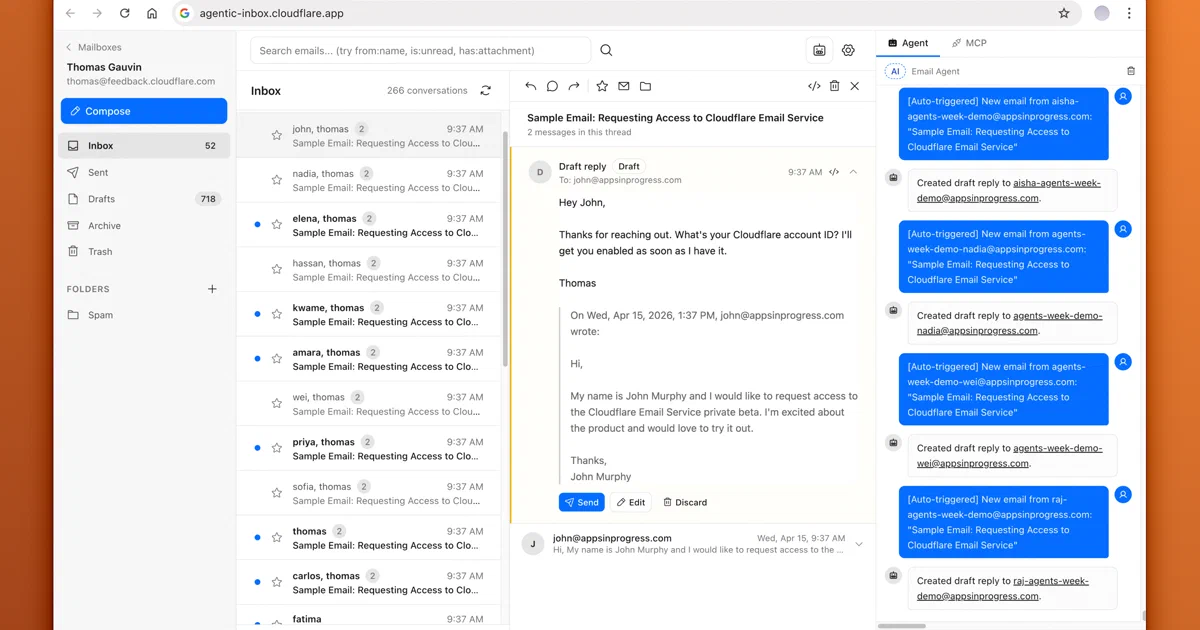
Agentic Inbox is an open-source AI email client from Cloudflare.
I inspected:
repo: https://github.com/cloudflare/agentic-inbox
commit: 48039bb6785af34e592c2966f87cde2b255c4c80
license: Apache-2.0
The app gives you a web inbox, a rich composer, folders, search, threading, attachments, an AI email assistant, auto-drafts on inbound mail, and an MCP endpoint for external AI tools.
The important catch: this is Cloudflare self-hosting.
You deploy it into your Cloudflare account. You do not run it as a normal Docker Compose stack on a VPS.
What You Get
From the repository and code inspection, the current feature set includes:
- email receive and send;
- rich text composer;
- reply and forward threading;
- inbox, sent, draft, archive, and trash folders;
- mailbox search;
- attachments;
- per-mailbox storage isolation;
- AI side panel;
- custom mailbox-level system prompt;
- persistent agent chat history;
- auto-draft generation when new mail arrives;
- prompt-injection scanning for auto-draft input;
- draft verification before saving or sending;
- MCP endpoint at
/mcp.
That is a serious demo of Cloudflare’s modern app surface.
It is also not a generic mail server. There is no IMAP server, POP3 server, local SMTP daemon, or filesystem mailbox format.
Stack
The current stack is:
- Frontend: React 19, React Router v7, Tailwind CSS, Zustand, TipTap, and
@cloudflare/kumo. - Backend: Hono running on Cloudflare Workers.
- Storage: Durable Objects with SQLite for mailbox records.
- Object storage: R2 for attachments and mailbox settings.
- Inbound email: Cloudflare Email Routing into the Worker
email()handler. - Outbound email: Cloudflare Email Service through a
send_emailbinding. - AI: Cloudflare Agents SDK,
AIChatAgent, AI SDK v6,workers-ai-provider, and Workers AI. - MCP:
agents/mcpand the Model Context Protocol SDK. - Auth: Cloudflare Access JWT validation in production.
The Worker config makes the platform dependency very explicit:
{
  "send_email": [{ "name": "EMAIL", "remote": true }],
  "r2_buckets": [{ "binding": "BUCKET", "bucket_name": "agentic-inbox" }],
  "ai": { "binding": "AI" },
  "durable_objects": {
    "bindings": [
      { "name": "MAILBOX", "class_name": "MailboxDO" },
      { "name": "EMAIL_AGENT", "class_name": "EmailAgent" },
      { "name": "EMAIL_MCP", "class_name": "EmailMCP" }
    ]
  }
}
So this is not a React app that merely happens to deploy on Cloudflare.
The application logic is built around Cloudflare bindings.
Cloudflare Dependency Map
| Cloudflare service | Required? | What Agentic Inbox uses it for |
|---|---|---|
| Workers | Yes | Runs the web app, Hono API, email event handler, MCP endpoint, and agent routes. |
| Durable Objects | Yes | Stores mailbox data in per-mailbox SQLite-backed objects and backs the agent/MCP classes. |
| R2 | Yes | Stores mailbox settings and attachment blobs. |
| Email Routing | Yes for inbound email | Sends incoming messages for your domain into the Worker. |
| Email Service | Yes for outbound email | Sends email through the EMAIL send_email binding. |
| Workers AI | Yes for AI features | Runs the email agent, prompt-injection scanner, and draft verifier. |
| Cloudflare Access | Required in production | Protects the app and MCP endpoint with Access JWTs. |
| Cloudflare custom domain | Practical requirement | Needed if you want real email addresses on your own domain. |
This goes beyond the simpler Workers + D1 + KV + R2 pattern from the previous Cloudflare serverless post.
Agentic Inbox uses Durable Objects instead of D1 because each mailbox is naturally modeled as an addressable stateful object with its own SQLite storage. It also uses Cloudflare’s email products, which are not portable primitives.
The Mailbox Data Model
Each mailbox maps to a Durable Object name.
The MailboxDO schema has:
| Table | Purpose |
|---|---|
folders |
System folder list. |
emails |
Message metadata, body, threading fields, read/starred state, and headers. |
attachments |
Attachment metadata associated with emails. |
Attachments themselves are stored in R2.
Mailbox settings are also stored in R2 under keys like:
mailboxes/{email}.json
This is elegant for a Cloudflare Worker because the Worker can route to the mailbox object and avoid a shared database server. But it changes backup and migration thinking. You would need to export both Durable Object SQLite state and R2 objects.
It is not a single Postgres dump.
The AI Agent
The browser agent is implemented with Cloudflare’s AIChatAgent.
It uses Workers AI with:
@cf/moonshotai/kimi-k2.5
The UI agent exposes tools for:
- listing emails;
- reading an email;
- reading a thread;
- searching emails;
- drafting a new email;
- drafting a reply;
- marking messages read or unread;
- moving messages between folders;
- discarding drafts.
The default system prompt is cautious about sending. The agent is supposed to draft replies and let the human review them.
On new inbound mail, the agent can auto-read the email and thread, then create a draft reply. The code tries to reduce email prompt-injection risk by scanning incoming content before auto-drafting. It also verifies drafts before saving or sending so obvious agent/tool artifacts are not included in outgoing mail.
That is useful, but it is not a security proof.
Email content is untrusted input. Any AI email agent should be treated as a system that can be manipulated by the messages it reads.
MCP Endpoint
Agentic Inbox also exposes an MCP server at:
/mcp
The MCP tool surface includes:
list_mailboxeslist_emailsget_emailget_threadsearch_emailsdraft_replycreate_draftupdate_draftdelete_emailsend_replysend_emailmark_email_readmove_email
That is powerful.
It means an external MCP client can read and operate on the mailbox after passing Cloudflare Access. The README explicitly warns that the Access policy is the single trust boundary: any user who passes the shared Access policy can access all mailboxes, and MCP clients can operate on any mailbox by passing mailboxId.
So for a personal deployment, keep Access tight.
For a team deployment, this is not yet a per-user mailbox authorization system.
Can It Be Self-Hosted Locally?
Not in the usual homelab meaning.
There is no clean Docker Compose equivalent where you run:
docker compose up -d
and get the full system on your own server.
Agentic Inbox is self-hosted in the sense that you deploy your own copy into your own Cloudflare account. You own the Worker, bindings, R2 bucket, Access policy, custom domain, and configuration. But the runtime is Cloudflare.
That makes it closer to Sink than to Slite:
| Cloudflare-native app | Local sibling pattern |
|---|---|
| Sink uses Workers, D1, KV, Analytics Engine, R2, and Workers AI. | Slite replaces that with Node, SQLite, DuckDB, memory cache, and local files. |
| Agentic Inbox uses Workers, Durable Objects, R2, Email Routing, Email Service, Access, and Workers AI. | A local equivalent would need a mail server, webmail, object storage, auth proxy, and local AI/MCP services. |
For this one, I would not add a Home-Lab Docker Compose file. It would be misleading unless someone rewrites the platform layer.
Setup Shape
At a high level, you need:
- Cloudflare account;
- domain managed by Cloudflare;
- Email Routing enabled for inbound mail;
- Email Service enabled for outbound mail;
- Workers AI enabled;
- R2 bucket named
agentic-inbox; - Cloudflare Access enabled on the deployed Worker;
POLICY_AUDandTEAM_DOMAINsecrets from Cloudflare Access;- a catch-all Email Routing rule pointing to the Worker.
The repository’s local commands are:
npm install
npm run dev
For deployment:
npm run deploy
Before deploying, set your domain in wrangler.jsonc:
{
  "vars": {
    "DOMAINS": "example.com",
    "EMAIL_ADDRESSES": []
  }
}
The .dev.vars.example file documents the production Access secrets:
POLICY_AUD=your-access-policy-audience-tag
TEAM_DOMAIN=https://your-team.cloudflareaccess.com
Outside local development, the Worker intentionally fails closed if Access is not configured.
What I Could Validate Locally
I cloned and inspected the repository, then installed dependencies with:
npm ci
That completed, but this machine currently has:
Node v18.19.1
The current React Router, Wrangler, Tailwind Oxide, Shiki, and Undici packages require Node 20 or newer.
The build failed with:
Node v18.19.1 detected. react-router requires a Node version greater than 20.
ReferenceError: File is not defined
So I did not run a full local build or deploy from this shell.
That does not change the architecture finding: a meaningful end-to-end test needs Cloudflare account resources anyway, because inbound mail, outbound mail, Access, Workers AI, Durable Objects, and R2 are all part of the actual runtime.
Limitations
The big limitations are operational, not UI-related.
Platform Lock-In
The code expects Cloudflare bindings such as:
env.BUCKET
env.AI
env.EMAIL
env.MAILBOX
env.EMAIL_AGENT
env.EMAIL_MCP
That is the point of the project, but it also means it is not portable without adaptation.
No Per-Mailbox Authorization
Cloudflare Access protects the app.
Inside the app, there is no per-mailbox authorization model. If a user passes the shared Access policy, they can access all mailboxes configured in the app.
That includes the MCP endpoint.
MCP Can Send Mail
The UI agent is designed around drafting and review.
The MCP tool surface includes send_reply and send_email, with descriptions saying they should only be called after confirmation. That is a policy instruction, not a cryptographic permission boundary.
Do not expose /mcp casually.
Backups Are Not Obvious
Mailbox data lives in Durable Object SQLite.
Settings and attachments live in R2.
Deleting a mailbox currently deletes the R2 settings object, and the API code has a TODO for deleting Durable Object data and R2 attachment blobs. So lifecycle and backup behavior should be reviewed before trusting it with important mail.
It Is Not a Traditional Mailbox
This is not a Dovecot/Postfix setup.
There is no standard IMAP mailbox that any mail client can attach to. The web app is the mailbox interface.
Local Self-Hosted Alternatives
There is no exact local drop-in replacement.
You would compose the pieces:
| Agentic Inbox part | Local/self-hostable alternative |
|---|---|
| Workers app/API | Node/Hono, Fastify, Express, Go, Rails, or Django |
| Durable Object SQLite | SQLite or Postgres |
| R2 attachments | Local filesystem, S3-compatible storage, or MinIO |
| Email Routing and Email Service | Stalwart, Mailu, mailcow, Maddy, Postfix/Dovecot, or an external SMTP/IMAP provider |
| Cloudflare Access | Authentik, Authelia, Keycloak, or oauth2-proxy |
| Workers AI | Ollama, LocalAI, LiteLLM, or another OpenAI-compatible gateway |
| MCP Durable Object | A Node MCP server behind your auth proxy |
If you want a traditional self-hosted email stack, look at:
- Stalwart Mail Server;
- Mailu;
- mailcow;
- Maddy;
- Postfix and Dovecot;
- Roundcube or SnappyMail for webmail.
If you want local AI email workflows, a more realistic path is:
IMAP/SMTP provider
  + local workflow engine
  + local LLM gateway
  + MCP server or automation API
That could be built with n8n, Node-RED, Ollama, LiteLLM, and a small service that talks to IMAP/SMTP.
It will not be as clean as the Cloudflare-native architecture, but it will be more portable.
FAQ
Is Agentic Inbox self-hosted?
Yes, but in the Cloudflare-native sense.
You deploy your own instance into your own Cloudflare account. You control the repo, Worker, R2 bucket, Durable Object classes, Access policy, and domain setup.
It is not self-hosted in the local Docker/VPS sense.
Can I deploy it as a static site?
No.
The React UI is only one part of the application. The actual product needs Worker APIs, inbound email handling, outbound email sending, Durable Objects, R2, Workers AI, MCP routes, and Cloudflare Access validation.
Does it use D1, KV, or R2?
It uses R2, but not D1 or KV in the current inspected configuration.
Mailbox records live in Durable Object SQLite. R2 stores mailbox settings and attachments.
Why Durable Objects instead of D1?
A mailbox maps naturally to a stateful object.
Durable Objects let the app address one mailbox at a time, keep strongly consistent per-mailbox state, and use SQLite storage inside that object. That is different from a shared D1 database where all mailboxes are tables in one relational database.
How would I use it if I already bought my domain with Cloudflare?
That is the easiest path.
If the domain is already registered in Cloudflare and using Cloudflare DNS, the remaining work is mostly inside the Cloudflare dashboard and this repo’s wrangler.jsonc.
The practical sequence is:
- Enable Email Routing or Email Service for the Cloudflare zone.
- Let Cloudflare add the required MX, SPF, and DKIM-related DNS records.
- Deploy Agentic Inbox as a Worker.
- Create the R2 bucket used by the
BUCKETbinding. - Keep the Durable Object bindings from
wrangler.jsonc. - Enable Workers AI for the account.
- Enable Cloudflare Access on the Worker.
- Add
POLICY_AUDandTEAM_DOMAINas Worker secrets. - Create an Email Routing rule or catch-all route that sends mail to the Worker.
- Enable outbound Email Service sending for the same domain.
- Open the app and create the mailbox address you want to use.
For example, if your domain is:
example.com
you would set:
"DOMAINS": "example.com"
Then create a mailbox such as:
Incoming email to that address is routed into the Worker. Outgoing email is sent through the Cloudflare Email Service binding.
The important part: Cloudflare DNS is not optional for this workflow. Cloudflare’s own Email Service setup expects the domain to be in Cloudflare DNS so it can configure and validate the mail-routing records.
How is this different from Resend, Mailtrap, Mailjet, or Amazon SES?
Agentic Inbox is an email application.
Resend, Mailtrap, Mailjet, and Amazon SES are email delivery services.
That difference matters:
| Need | Agentic Inbox | Resend / Mailtrap / Mailjet / SES |
|---|---|---|
| Human mailbox UI | Yes | Usually no, or not the main product |
| Inbound mail workflow | Yes, via Cloudflare Email Routing | Provider-dependent |
| Outbound delivery API | Uses Cloudflare Email Service | Core product |
| Templates | Not the main focus | Core feature in most email API services |
| Suppression lists | Not a full ESP feature set | Usually included |
| Webhooks for bounces/events | Not the main focus | Core feature |
| Contact lists and campaigns | No | Provider-dependent; Mailjet, Mailtrap bulk streams, and Resend Broadcasts cover this kind of use case |
| Deliverability tooling | Basic Cloudflare-side sending/logging | Usually stronger provider focus |
| Best fit | AI mailbox, support inbox, agent workflow, email-native app demo | Transactional email, product notifications, campaigns, and deliverability-managed sending |
So I would not think of Agentic Inbox as a replacement for Resend or SES in a SaaS app.
Think of it as a Cloudflare-native inbox with AI and MCP.
If your app needs to send password resets, invoices, onboarding emails, receipts, webhook-driven notifications, or large volumes of templated product email, a dedicated email API is still the cleaner fit.
Can I use it for transactional, marketing, or cold outbound email?
Technically, it can send email.
Practically, the right answer depends on the category.
| Email type | Good fit? | Notes |
|---|---|---|
| Personal / team mailbox replies | Yes | This is the natural use case: read mail, draft replies, send replies, and manage a mailbox UI. |
| Support-style workflows | Maybe | Reasonable for small volumes if you accept the Access and mailbox-permission limitations. |
| Transactional app email | Usually no | Cloudflare Email Service can send transactional email from Workers, but Agentic Inbox is not a transactional email platform with templates, event webhooks, suppression handling, and product-level delivery analytics. |
| Marketing newsletters | No | There is no campaign builder, audience management, consent tracking, segmentation, unsubscribe workflow, or campaign analytics. Use a proper email marketing or bulk email service. |
| Cold outbound | No | Do not use this as a cold email engine. It is not designed for prospect lists, sequencing, warmup, unsubscribe governance, bounce management, reputation protection, or sales engagement compliance. |
My rule of thumb:
- use Agentic Inbox for mailbox-style communication;
- use Cloudflare Email Service directly for small Worker-triggered transactional flows if it fits your needs;
- use Resend, Mailtrap, Mailjet, SES, Postmark, Mailgun, Brevo, or similar services for serious transactional or marketing sending;
- use a dedicated compliant sales engagement platform if you are doing cold outbound at all.
Can I run it on a VPS by replacing Cloudflare later?
Only with significant engineering work.
You would need to replace Workers routing, Durable Object storage, R2 object storage, Email Routing, Email Service, Workers AI, Access, and the MCP Durable Object runtime with local equivalents.
For portability, start with a local mail stack instead.
What is the relation with the Cloudflare serverless post?
The Cloudflare serverless post explains the basic Cloudflare app model.
Agentic Inbox is a more advanced example of the same idea: the app is not a VPS service with containers, but a set of Cloudflare-bound runtime primitives.
What should I use if I want local email instead?
For a local or VPS email stack, look at Stalwart, Mailu, mailcow, Maddy, or Postfix/Dovecot.
For webmail, add Roundcube or SnappyMail.
For AI workflows, connect IMAP/SMTP to n8n, Node-RED, Ollama, LiteLLM, or a custom MCP server.
Verdict
Agentic Inbox is a strong example of where Cloudflare’s platform is going.
It is not merely “hosting an app on Workers.” It combines email ingress, email egress, per-mailbox Durable Object storage, R2 attachments, AI agents, MCP, and Access into one Cloudflare-native product.
For a Cloudflare-heavy workflow, that is compelling.
For a homelab-first workflow, it is the wrong operational shape unless you specifically want to study or depend on Cloudflare infrastructure.
Comments