
After looking at Cloudflare Agentic Inbox, Mailflare is the natural next stop.
It lives in the same broad category: custom-domain email built around Cloudflare infrastructure.
But Mailflare is more product-shaped.
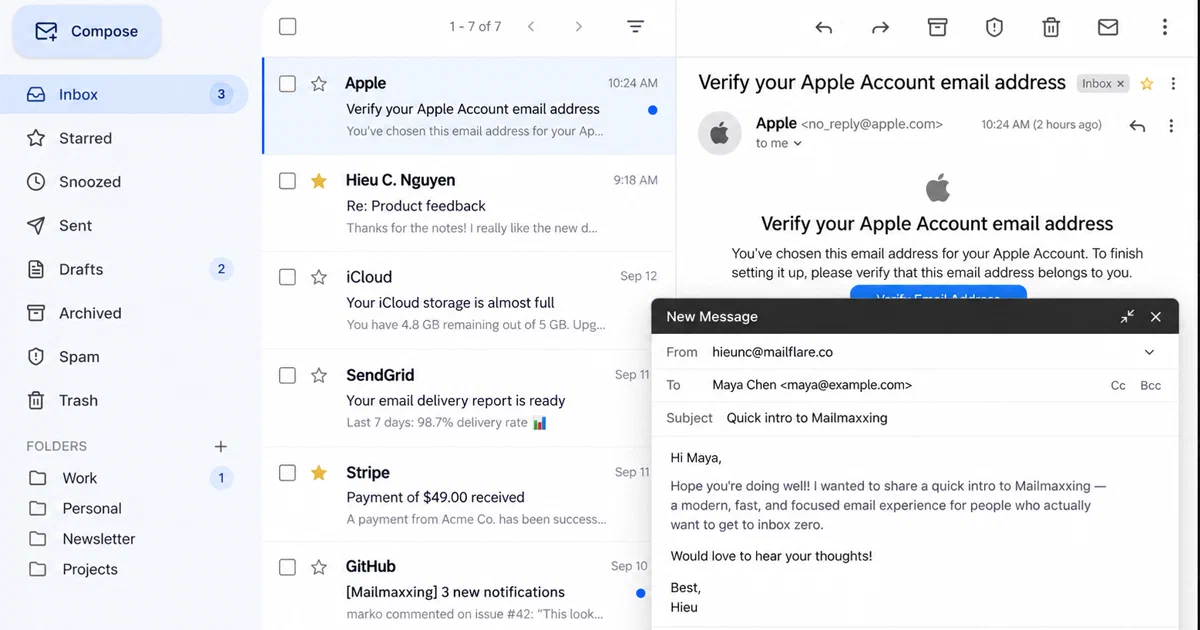
It has a full inbox, domain management, provider choices, routing rules, JMAP, calendar and booking features, API keys, webhooks, backups, an AI assistant, and MCP access.
Most importantly for self-hosters, it has two deployment paths:
Cloudflare-native Worker deployment
Docker / Node.js self-hosted deployment
That makes it more flexible than a pure Cloudflare demo.
What Is Mailflare?
Mailflare is a self-hosted email inbox for custom domains.
- Mailflare GitHub Source Code
- Mailflare Website
- Mailflare Self-Hosting Docs
- Sending and Receiving Providers
I inspected:
repo: https://github.com/hieunc229/mailflare
commit: 48da9fab26029c322b2deb2b8bdd7d4861cec1e8
version: 0.5.0
license: AGPL-3.0
Mailflare is not just a “send email from Cloudflare” helper.
It is closer to a small custom-domain email suite.
What You Get
From the current README, docs, and source inspection, Mailflare includes:
- custom domain setup;
- personal and shared mailboxes;
- rich email composer;
- attachments;
- signatures;
- automatic replies;
- folders, archive, spam, trash, stars, snooze, and search;
- routing rules;
- contacts and blocked senders;
- import and export;
- audit logs;
- backups;
- API keys;
- webhooks;
- calendar and booking pages;
- JMAP support;
- AI assistant;
- MCP endpoint.
That is a much wider surface than the Agentic Inbox project.
It also means Mailflare is operationally more serious. Once it owns real mail for a domain, DNS, backups, provider credentials, deliverability, and security all matter.
Two Deployment Models
Mailflare can run in two different ways.
Cloudflare Worker Mode
The default model runs in your Cloudflare account:
Browser / API / JMAP / MCP
  -> Cloudflare Worker
  -> Next.js/vinext app
  -> D1 database
  -> R2 bucket
  -> Queues
  -> Durable Object realtime hub
  -> Email Routing
  -> Email Sending, Resend, or Amazon SES
  -> Workers AI or OpenAI-compatible AI provider
The important Cloudflare bindings are visible in wrangler.jsonc:
- D1 database named
mailflare; - R2 bucket named
mailflare-raw; - Queues named
mailflare-inbound,mailflare-outbound, andmailflare-agent; - Durable Object class
RealtimeHub; - Workers AI binding;
send_emailbinding;- cron triggers for backups, agent maintenance, and retention jobs.
The Worker also handles inbound email through worker.ts.
When mail arrives through Cloudflare Email Routing, the Worker can reject, forward, store raw MIME in R2, enqueue the message, and process it asynchronously.
Docker Mode
The Docker runtime replaces Cloudflare managed storage with local pieces:
Browser / API / JMAP / MCP
  -> one Node.js container
  -> SQLite under /data
  -> local file bucket under /data
  -> in-process queues
  -> WebSocket realtime server
  -> built-in SMTP listener or Cloudflare relay Worker
  -> SMTP relay, Cloudflare Email Sending, Resend, or SES
That is the part I like for homelab readers.
It means Mailflare is not only a Cloudflare Worker app. You can run it as a container and keep the important state in a single Docker volume.
The code implements local compatibility layers:
server/runtime/sqlite-database.tsmaps D1-style calls tobetter-sqlite3;server/runtime/file-bucket.tsmaps R2-style object operations to files;server/runtime/smtp.tsprovides the inbound SMTP listener;server/runtime/mailer.tssends with SMTP or Cloudflare Email Sending REST;server/index.tsstarts HTTP, WebSocket realtime, queues, migrations, backups, and SMTP.
Sending and Receiving Providers
Mailflare separates sending and receiving per domain.
| Provider | Receiving | Sending |
|---|---|---|
| Cloudflare | Email Routing | Email Sending |
| Resend | email.received webhook |
Resend API |
| Amazon SES | S3 plus SNS notification | SESv2 API |
| Manual / local | SMTP listener or relay Worker | SMTP relay |
This is an important difference from Agentic Inbox.
Agentic Inbox is strongly tied to Cloudflare Email Routing, Cloudflare Email Service, Durable Objects, R2, and Workers AI.
Mailflare still likes Cloudflare DNS, but it gives you more transport choices.
If you want Cloudflare to manage the setup automatically, you need a scoped CF_TOKEN. If you want a more manual Docker setup, you can point DNS records and SMTP relays yourself.
Self-Hosting Mailflare with Docker
I added a reusable Home-Lab compose file:
The site includes the same Compose file from:
assets/snippets/mailflare/docker-compose.yml
Pre-Requisites - Docker
Install Docker on your system before proceeding:
- Linux: Official Docker Engine install guide
- Windows / Mac: Docker Desktop
Verify installation: docker --version && docker compose version
services:
  mailflare:
    build:
      context: https://github.com/hieunc229/mailflare.git#48da9fab26029c322b2deb2b8bdd7d4861cec1e8
      args:
        NEXT_PUBLIC_TURNSTILE_SITE_KEY: ${NEXT_PUBLIC_TURNSTILE_SITE_KEY:-}
    image: mailflare:48da9fa
    container_name: mailflare
    restart: unless-stopped
    ports:
      - "${MAILFLARE_HTTP_BIND:-127.0.0.1:3000}:3000"
      - "${MAILFLARE_SMTP_BIND:-127.0.0.1:2525}:${SMTP_INBOUND_PORT:-2525}"
    environment:
      PORT: 3000
      DATA_DIR: /data
      APP_URL: ${APP_URL:-http://localhost:3000}
      SMTP_INBOUND_PORT: ${SMTP_INBOUND_PORT:-2525}
      MAIL_HOSTNAME: ${MAIL_HOSTNAME:-mail.example.com}
      SMTP_MAX_SIZE: ${SMTP_MAX_SIZE:-37748736}
      SMTP_URL: ${SMTP_URL:-}
      SMTP_TLS_REJECT_UNAUTHORIZED: ${SMTP_TLS_REJECT_UNAUTHORIZED:-true}
      CF_ACCOUNT_ID: ${CF_ACCOUNT_ID:-}
      CF_TOKEN: ${CF_TOKEN:-}
      RESEND_API_KEY: ${RESEND_API_KEY:-}
      AWS_ACCESS_KEY_ID: ${AWS_ACCESS_KEY_ID:-}
      AWS_SECRET_ACCESS_KEY: ${AWS_SECRET_ACCESS_KEY:-}
      AWS_REGION: ${AWS_REGION:-}
      INBOUND_WEBHOOK_SECRET: ${INBOUND_WEBHOOK_SECRET:-}
      TURNSTILE_SECRET_KEY: ${TURNSTILE_SECRET_KEY:-}
      AI_BASE_URL: ${AI_BASE_URL:-}
      AI_API_KEY: ${AI_API_KEY:-}
      AI_MODEL: ${AI_MODEL:-gpt-4o-mini}
    volumes:
      - mailflare-data:/data

volumes:
  mailflare-data:
Prepare the environment:
cd assets/snippets/mailflare
cp .env.sample .env
For a local first-run test, set:
APP_URL=http://localhost:3000
MAILFLARE_HTTP_BIND=127.0.0.1:3000
MAILFLARE_SMTP_BIND=127.0.0.1:2525
SMTP_INBOUND_PORT=2525
Then start:
docker compose up -d --build
Open:
http://localhost:3000/setup
For production, use HTTPS and set:
APP_URL=https://mail.example.com
MAIL_HOSTNAME=mail.example.com
Then decide how inbound mail reaches Mailflare.
Inbound Mail Options
For Docker, you have two main options.
Built-In SMTP Listener
Mailflare can listen for SMTP directly.
That means your domain’s MX record points at the machine running Mailflare.
This is simple conceptually, but hard operationally:
- port 25 must be reachable from the internet;
- many residential ISPs block port 25;
- some cloud providers block or restrict port 25;
- you must care about reverse DNS, SPF, DKIM, DMARC, TLS, and reputation;
- running a public SMTP listener is a security-sensitive operation.
For a real public deployment, use a VPS/provider that permits inbound port 25 and understand the mail DNS records before moving a valuable domain.
Cloudflare Email Routing Relay
If you want to keep MX on Cloudflare, Mailflare ships a relay Worker under:
deploy/cloudflare-email-relay
That Worker receives mail through Cloudflare Email Routing and posts it to your Docker app at:
/api/inbound
The webhook is signed with INBOUND_WEBHOOK_SECRET.
This is usually the more Cloudflare-friendly approach for a homelab: Cloudflare receives the email, your Docker app stores and manages it, and you avoid running public MX directly at home.
Outbound Mail Options
Mailflare can send through:
- SMTP relay with
SMTP_URL; - Cloudflare Email Sending with
CF_ACCOUNT_IDandCF_TOKEN; - Resend API;
- Amazon SES API.
For homelab use, I would usually choose a proper outbound provider instead of sending directly from a residential IP.
That can be:
- Amazon SES;
- Resend;
- Postmark;
- Mailgun;
- Mailjet;
- Brevo;
- a trusted SMTP relay from your provider;
- your own well-configured Postfix relay on a VPS.
Do not assume that running the container means your outbound mail will land in inboxes. Deliverability is its own system.
Core Verdict: Inbox First, Sending Second
The best mental model is:
Mailflare is a personal / small-team webmail workspace first.
Think self-hosted Fastmail or Google Workspace, not Mailchimp, Instantly, or a bulk outbound engine.
It can send email. It exposes sending APIs. It supports high-deliverability providers. But the product shape is still an inbox, mailbox workspace, calendar, routing, search, AI assistant, JMAP, and MCP layer.
Whether it fits transactional, marketing, or outbound work depends on the sending provider behind it.
| Email type | Supported? | Fit and assessment |
|---|---|---|
| Transactional | Yes, good for small-to-medium app sending | Mailflare has a Send API and API keys, and can send through Cloudflare Email Sending, Resend, Amazon SES, or SMTP in Docker mode. This is reasonable for password resets, OTPs, receipts, and direct app notifications if your provider limits and deliverability setup are correct. |
| Marketing newsletters | Poor fit | Mailflare does not provide a full campaign system: audience segmentation, unsubscribe workflows, suppression governance, click/open analytics, drip automation, or campaign reporting are not the core product. Use a newsletter or marketing platform instead. |
| Cold outbound / sales outreach | Not recommended | Mailflare does not provide inbox rotation, warmup ramps, prospect sequencing, spam testing, bounce governance, or cold outreach compliance workflows. Cold sending can damage the domain and provider account behind it. |
If you specifically want a Cloudflare-native customer email/campaign tool, SaaSMail is worth reviewing separately because it is positioned around SaaS customer email timelines and includes campaign-oriented pieces such as unsubscribe handling. I would still inspect it separately before treating it as a drop-in marketing platform.
Do You Need Resend, Mailjet, or SES?
Not always.
You have two broad outbound paths.
Path 1: Pure Cloudflare Outbound
If you use Cloudflare Email Sending, you do not need Resend, SES, Mailjet, SendGrid, or another external SMTP/API provider.
Cloudflare documents that Email Routing is available on Workers Free and Workers Paid, but sending to arbitrary recipients requires Workers Paid. Current Cloudflare Email Service pricing lists 3,000 outbound emails included per account per month on Workers Paid, then $0.35 per 1,000 additional emails. Sending to verified destination addresses is free and does not count against that included quota. Cloudflare Email Service Pricing
That makes the Cloudflare-only path attractive if you already pay for Workers Paid and want the whole mail workflow inside Cloudflare.
Path 2: Free Cloudflare Inbound plus External Sending
If you want to avoid Workers Paid for outbound Cloudflare Email Sending, you need another way to send mail.
For Mailflare, the practical options are:
| Runtime | Good outbound options |
|---|---|
| Cloudflare Worker deployment | Cloudflare Email Sending, Resend API, Amazon SES API |
| Docker deployment | SMTP relay through SMTP_URL, Cloudflare Email Sending REST API, Resend API, Amazon SES API |
So if you are on the Cloudflare free tier and still want arbitrary outbound sending, Resend or SES are the cleanest native provider paths documented by Mailflare.
Mailjet, Postmark, SendGrid, Mailgun, and similar providers can still be useful, but in Mailflare they fit most naturally through Docker’s SMTP_URL path unless you add or maintain an HTTP API integration yourself.
Provider Constraints for Outbound Use
Provider choice changes the operational behavior.
| Provider | Practical notes |
|---|---|
| Cloudflare Email Sending | Good fit for Cloudflare-native transactional flows. Requires Workers Paid for arbitrary recipients. Watch Cloudflare’s limits, suppressions, and anti-abuse expectations. |
| Resend | Developer-friendly API. Resend’s Acceptable Use Policy prohibits unsolicited messages, including cold outreach, purchased lists, and scraped contact data. Resend Acceptable Use Policy |
| Amazon SES | Cheap and scalable, but more operationally involved. New accounts may need production access, and SES pricing/packaging should be checked on the current AWS pricing page before relying on exact numbers. Amazon SES Pricing |
| SMTP relay in Docker | Useful when you already trust a relay provider. Deliverability depends on that relay and your DNS/authentication setup. |
This is why I would use Mailflare’s send API for transactional email, but not for newsletter campaigns or cold prospecting.
Field Note: Docker Build and Smoke Test
I tested the Home-Lab compose with a pinned Git build context.
First, the Compose config rendered correctly:
docker compose --env-file .env.sample config
Then I built the image:
docker compose --env-file .env.sample build mailflare
The image built successfully as:
mailflare:48da9fa
For the smoke test I avoided public port 25 and avoided occupied local ports:
MAILFLARE_HTTP_BIND=127.0.0.1:38111 \
MAILFLARE_SMTP_BIND=127.0.0.1:38125 \
SMTP_INBOUND_PORT=2525 \
APP_URL=http://localhost:38111 \
docker compose --env-file .env.sample up -d
Then:
curl -i http://127.0.0.1:38111/api/setup/status
returned HTTP 200 with:
{"hasAdminAccount":false,"hasPrimaryDomain":false,"primaryDomain":null}
The container also reported healthy. I stopped it after the smoke test.
This validates the image build and first-run setup API on this machine. It does not validate real DNS, real inbound delivery, provider webhooks, Cloudflare token permissions, SPF, DKIM, DMARC, or inbox deliverability.
One upstream note: the self-hosting docs reference .env.docker.example, but that file was not present in the inspected clone. The Home-Lab snippet therefore includes its own .env.sample.
How It Compares With Agentic Inbox
| Question | Agentic Inbox | Mailflare |
|---|---|---|
| Main goal | Cloudflare AI email agent demo | Custom-domain email inbox product |
| Local Docker path | No practical full local stack | Yes, single-container Node runtime |
| Cloudflare storage | Durable Object SQLite plus R2 | D1 plus R2 plus Queues |
| Docker storage | Not applicable | SQLite and local files |
| Provider choices | Cloudflare email products | Cloudflare, Resend, SES, SMTP |
| MCP | Yes | Yes, with scoped keys and send review |
| JMAP | No | Yes |
| Calendar / booking | No | Yes |
| Per-mailbox authorization | Limited Access-bound model | App-level users, mailbox permissions, and scoped keys |
Mailflare is the more complete email application.
Agentic Inbox is cleaner as a focused Cloudflare Agents SDK example.
Limitations
Mailflare is powerful, but email is not casual infrastructure.
Watch these points:
- Cloudflare automatic setup needs correctly scoped API tokens.
- Worker deployment requires the Worker name
mailflare. - Docker deployment still needs a real mail receiving strategy.
- Public SMTP usually needs port 25.
- Outbound deliverability depends on the chosen provider and DNS records.
- Secrets saved in the app can land in the database, so backups need protection.
- The app is AGPL-3.0; network-service modifications carry AGPL obligations.
- Some team and branding capabilities are gated by Pro or Team license checks.
- Resend and SES receiving require
APP_URLto be a public HTTPS URL. - Cloudflare, Resend, and SES have different attachment and routing behavior.
FAQ
Is Mailflare self-hosted?
Yes.
It can be self-hosted as a Docker container with SQLite and local files. It can also be self-hosted in the Cloudflare-native sense by deploying the Worker into your own Cloudflare account.
Is Cloudflare required?
For the Cloudflare Worker deployment, yes.
For Docker, Cloudflare is not strictly required for the local runtime, but it is still central to the automated domain/DNS setup. If you use the Cloudflare relay Worker or Cloudflare Email Sending, you still need Cloudflare account configuration.
Can I use a domain I already bought with Cloudflare?
Yes, that is the smoothest setup.
In Worker mode, deploy Mailflare into the same Cloudflare account, create the scoped CF_TOKEN, open /setup, connect the domain, and let Mailflare configure Email Routing and sending DNS.
In Docker mode, you can still use Cloudflare DNS. Either point MX to the Docker host’s SMTP listener or keep MX on Cloudflare and use the relay Worker.
Should I use Cloudflare, Resend, or SES?
Use Cloudflare if you want the tightest Cloudflare-native flow.
Use Resend if you want a developer-friendly email API and simple provider setup.
Use Amazon SES if you want low-cost, high-scale infrastructure and are comfortable with AWS IAM, sandbox/production access, SNS, and S3.
Use SMTP if you already have a trusted relay or mail server.
Can I use Mailflare for transactional email?
Yes, and this is the strongest non-inbox sending use case.
Mailflare exposes sending endpoints such as /api/v1/send, supports API keys, and can route outbound mail through Cloudflare Email Sending, Resend, Amazon SES, or SMTP in Docker mode.
For serious volume, I would still attach a proper transactional provider and monitor bounces, complaints, suppressions, and DNS authentication carefully.
Can I use Mailflare for newsletters or cold outbound?
I would not.
Mailflare is a mailbox and custom-domain email app, not a campaign platform or sales engagement system. For newsletters, use list-aware tooling with unsubscribe, consent, segmentation, bounce handling, and campaign analytics. For cold outbound, use a compliant dedicated platform if you do it at all.
For cold outreach specifically, use a sales engagement/cold outbound platform such as Smartlead, Instantly, Lemlist, Apollo, or similar. Those tools are built around inbox rotation, sending schedules, throttling, sequence logic, bounce handling, unsubscribe handling, reputation monitoring, warmup workflows, domain/inbox separation, and campaign analytics.
Keep that workflow away from the primary domain used for normal business, transactional, and support mail.
Do I need Resend, SES, Mailjet, or another SMTP/API provider?
Not necessarily.
If you are on Workers Paid, Mailflare can use Cloudflare Email Sending for arbitrary outbound recipients. If you want to stay on Cloudflare Free for the Cloudflare side, then you need another outbound provider such as Resend or Amazon SES.
In Docker mode, you also get the normal SMTP_URL path, so a provider like Mailjet, Postmark, SendGrid, Mailgun, Brevo, or your own relay can fit there.
Does Mailflare support external mail clients?
Yes, through JMAP.
The docs list JMAP discovery at /.well-known/jmap and support for core mail and submission flows. That is not the same as IMAP, but it gives standards-based access for compatible clients.
Does MCP require AI to be configured?
No.
The docs say MCP read and draft tools can work without an AI provider. AI is needed for the built-in assistant model behavior, not for every MCP operation.
Verdict
Mailflare is one of the more interesting projects in this Cloudflare email series because it bridges both worlds.
It can be Cloudflare-native, using D1, R2, Queues, Email Routing, Email Sending, Workers AI, and Durable Objects.
It can also run as a Docker app with SQLite, local files, WebSockets, SMTP, and a normal Docker volume.
That does not make email easy.
But it does make Mailflare much more practical for self-hosters than a project that only works on Cloudflare’s edge runtime.
Comments