
If you like the idea of modeling parts with Python, CadQuery is a strong open-source option.
But a plain text editor does not always give you enough feedback when you are iterating on geometry, selectors, sketches, assemblies, and exports.
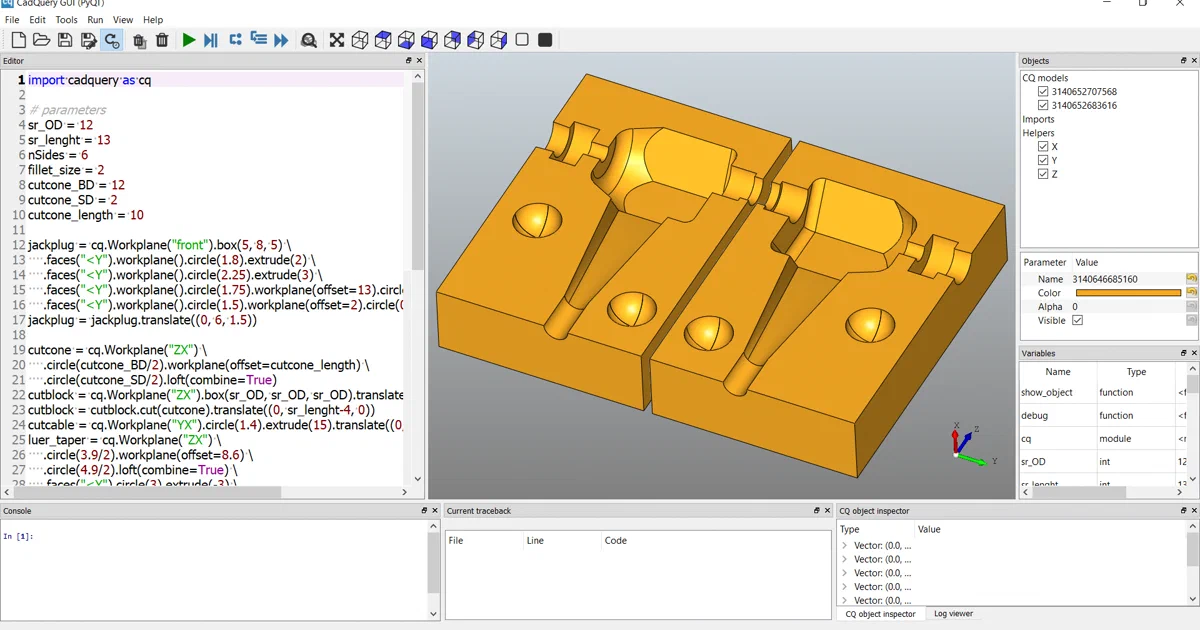
CQ-editor fills that gap: it is a local desktop GUI for CadQuery scripts, with a code editor on one side and an OCCT-backed 3D view on the other.
CQ-editor - A cross-platform CadQuery GUI editor based on PyQt for Linux, Windows, and macOS.
- CQ-editor GitHub Source Code
- CQ-editor Documentation Wiki
- CadQuery Installation Docs
- License: Apache-2.0
What is CQ-editor?
CQ-editor is an IDE-like desktop application for CadQuery, the Python-based parametric CAD library. It gives you a Python editor, live 3D preview, graphical debugger, object tree, CadQuery stack inspector, traceback viewer, console, and export options in one window.
The repository describes the project as a PyQt GUI editor for CadQuery. Its notable features include automatic code reloading, OCCT-based viewing, a graphical debugger, object stack inspection, and export to formats such as STL and STEP.
This is important: CQ-editor is not a self-hosted web service. There is no Docker Compose stack to run behind a reverse proxy. It belongs in the same mental bucket as FreeCAD workbenches, KiCad tools, or a local engineering IDE: install it locally, open a script, render the model, inspect the output, and export files for manufacturing or downstream CAD work.
Why Use a GUI for CadQuery?
- Fast iteration: edit a script and preview the model without switching tools.
- Debugging: step through CadQuery scripts and watch geometry evolve.
- Inspection: inspect Workplanes, Shapes, Assemblies, Sketches, and stack state.
- Export: save selected geometry to STEP or STL from the object tree.
- Local workflow: keep CAD scripts and generated models on your own machine.
Tech Overview of CQ-editor
CQ-editor is a Python package built around PyQt5. The current project metadata declares Python >=3.10,<=3.14 and dependencies including CadQuery, PyQt5, PyQtGraph, QtAwesome, Path, Logbook, Requests, QtConsole, and Packaging.
The app starts through either cq-editor or CQ-editor. It creates a QApplication, opens an optional filename argument, and shows the main window.
Architecture & Components
The main window is the composition root. It creates an OCCT viewer as the central widget, then docks the editor, object tree, traceback pane, console, variables view, CadQuery object inspector, and log viewer around it.
The core render loop lives in the debugger component. CQ-editor compiles the current script, injects helper functions such as show_object, debug, rand_color, log, and cq, executes the code in a temporary module namespace, collects CadQuery objects, and sends the result through Qt signals.
That signal-driven design keeps the panes decoupled. The debugger emits rendered objects, local variables, traceback state, and current line changes. The object tree, viewer, console, traceback pane, and variables table react to those events.
The 3D view uses OCP/OCCT primitives directly. It creates a native OCCT view, sets up lights, antialiasing, display mode, selection handling, orbit controls, grid helpers, screenshots, and platform-specific window bindings for Linux, Windows, and macOS.
Key Technologies
- Language: Python
- GUI: PyQt5
- CAD kernel: CadQuery and OCP/OCCT
- 3D display: OCCT AIS/V3d/OpenGL stack
- Editor features: syntax highlighting, file watching, autocomplete through Jedi
- Console/logging: QtConsole and Logbook
- Packaging: setuptools, conda recipes, constructor, PyInstaller, GitHub Actions
Trying CQ-editor Locally
Because CQ-editor is a desktop app, the practical path is installation, not self-hosting. The CadQuery docs recommend CQ-editor when you want a GUI and document bundled installers, conda/mamba installation, and pip-from-GitHub options.
The conda-style path is often the smoothest because CadQuery and OCCT-style geometry dependencies are more than ordinary pure-Python packages.
Install with conda or mamba
The CadQuery docs show this pattern for adding CQ-editor to an environment:
conda create -n cqdev
conda activate cqdev
mamba install -c cadquery cq-editor=master
cq-editor
The repository also includes cqgui_env.yml, which pins the environment around Python 3.10, PyQt5, PyQtGraph, QtAwesome, Logbook, Requests, QtConsole, and CadQuery.
Install from source with pip
For a source checkout, the repository metadata supports a pip install. The Linux CI workflow uses:
git clone https://github.com/CadQuery/CQ-editor.git
cd CQ-editor
pip install -e .
pip install .[test]
The CadQuery docs also show installing GUI dependencies and then installing CQ-editor from GitHub:
pip install PyQt5 spyder pyqtgraph logbook
pip install git+https://github.com/CadQuery/CQ-editor.git
Expect platform-specific GUI and OpenGL details to matter more than they would for a normal command-line Python package.
Run the test suite like CI
The Linux test workflow installs Xvfb plus Mesa/OpenGL and X11/XCB packages, then runs pytest under a virtual display with software rendering variables:
LIBGL_ALWAYS_SOFTWARE=1 \
MESA_LOADER_DRIVER_OVERRIDE=swrast \
GALLIUM_DRIVER=llvmpipe \
QT_OPENGL=software \
QT_QPA_PLATFORM=xcb \
pytest
That tells you something practical about the app: tests are not just pure unit tests. They exercise a Qt/OpenGL desktop surface, so headless CI needs display and rendering support.
Field Note: Non-Container Static Trial
For this repo analysis I deliberately avoided Docker and existing containers.
I cloned the repository into /tmp/cq-editor-foss-post, checked the source tree for Docker or Compose files, inspected the package metadata and workflows, and ran a bounded Python compilation check:
python3 --version
python3 -m compileall -q cq_editor tests
The environment reported Python 3.12.3, and compileall completed successfully. That only proves the checked Python files can compile to bytecode; it does not prove that Qt, OpenGL, CadQuery, OCP, rendering, or the full test suite works on this host.
I did not install CadQuery/OCP/PyQt dependencies or launch the desktop app during this pass.
Why This is Not a Docker Guide
Searches around CadQuery and CQ-editor can lead to Docker-adjacent material, especially when people compare desktop CQ-editor with notebook or Jupyter workflows. That does not make CQ-editor itself a self-hosted service.
In the analyzed repository, I found no Dockerfile, docker-compose.yml, compose.yml, or Compose-oriented deployment model. There is also no database, web server, REST API, reverse proxy, background worker, or persistent server process to expose.
So the right deployment advice is simple: do not invent a container story for CQ-editor unless you have a specific remote-display use case. For normal use, install it locally with the packaging path that fits your operating system.
Where CQ-editor Fits
Pick CQ-editor if you want a local visual CAD scripting workflow:
- You write parts in Python with CadQuery.
- You want a 3D view beside the script.
- You want to step through model construction.
- You want to inspect CadQuery object stacks.
- You need STEP/STL export from selected objects.
Consider other workflows if you prefer browser notebooks, collaborative cloud CAD, GUI-first modeling, or a heavier integrated CAD system. CQ-editor’s strength is that it stays close to the script.
Conclusion
CQ-editor is a practical companion for CadQuery users who want visual feedback while staying in Python. Its architecture is straightforward: a PyQt desktop shell, an OCCT viewer, a script executor/debugger, and dockable panes that expose the model’s state.
The main caveat is installation complexity. CAD kernels, Qt, OpenGL, and cross-platform GUI packaging are heavier than ordinary Python apps. If you are trying it for the first time, start with the official installer or conda/mamba route before spending time on a custom environment.
For self-hosters, the lesson is mostly categorical: not every useful FOSS tool belongs behind Docker and a domain name. Some tools deserve a good local workstation setup instead.
Comments