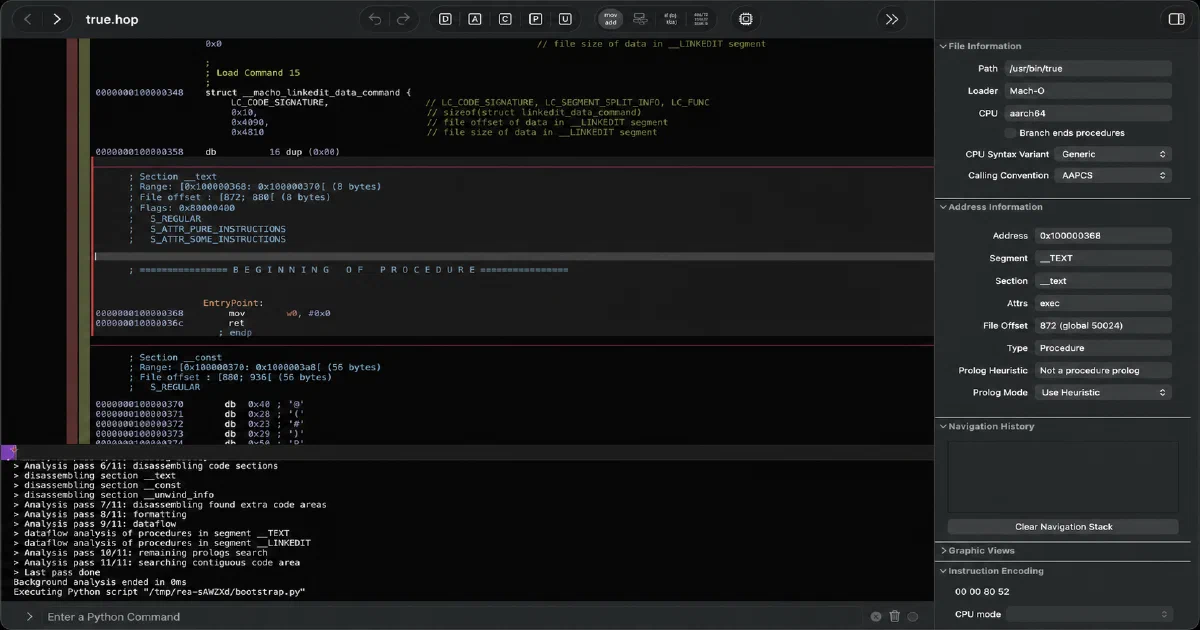

The recent wave of focused open-source alternatives has a less visible enabling layer: better tools for understanding existing software. REA, short for Reverse Engineer Anything, is one of the most ambitious examples. It connects local reverse-engineering workflows to an AI agent through MCP and a CLI, returning evidence instead of vague guesses.
This does not mean “press a button and receive a perfect clone.” REA is an investigation and evidence system. It can help an agent understand an Electron application’s IPC path, inspect a binary, map a website’s behavior, analyze an APK, read a SQLite database, or compare runtime observations. The agent can then implement an independent alternative and test it against lawful fixtures.
What is REA?
REA is an MIT-licensed Node.js package and local MCP server. Its setup command registers the MCP server and matching workflow instructions with supported agents:
npx rea-agents setup
The project currently requires Node.js 22.23.4+, 24.22.1+, or 26.12.1+. It also exposes a regular CLI:
npm install --global rea-agents
rea --help
REA is local software. It has no dashboard, database, cloud account, or Docker Compose stack to deploy. The target stays on the machine during analysis, although findings returned to an agent are subject to the model provider’s data policy.
What can it analyze?
The coverage is much broader than a traditional JavaScript reverse-engineering script:
| Target | Example output | Extra requirement |
|---|---|---|
| JavaScript/Electron apps | Modules, imports, routes, IPC and native add-ons | Node.js; ps on Linux |
| Native binaries | Pseudocode, assembly, strings, symbols and calls | Hopper, Ghidra, IDA, Rizin or objdump depending on workflow |
| Websites | Structure, scripts, network observations and screenshots | Chrome-family browser |
| Android APKs/devices | Manifest, classes, resources, signatures, logs and transfers | JADX/JDK or caller-supplied adb |
| .NET assemblies | Metadata and CIL | No native engine for static inspection |
| Firmware and captures | Regions, protocols, packets and observations | Binwalk, Unblob, tshark or mitmproxy where needed |
| SQLite and model artifacts | Schema, bounded rows, GGUF/safetensors metadata | Local files; bounded readers |
| Rust/Go/WASM/EVM artifacts | Embedded dependencies, sections, imports and selectors | Format-specific local inspection |
The important distinction is that REA does not pretend all analysis is equally deep. Static JavaScript or .NET inspection can run without a native decompiler. Native pseudocode depends on the chosen provider, the target format, and the quality of symbols and metadata available.
The evidence-first workflow
REA returns structured findings with provenance, coverage, and limitations. For large application graphs, save the complete report and inspect a bounded view later:
npx -y rea-agents@latest analyze-javascript-application \
  /absolute/path/to/app --json > app-evidence.json

jq -c '{source: {kind: "inline", evidence: .}, view: {kind: "summary"}}' \
  app-evidence.json > app-view.json

rea inspect-analysis-view app-view.json
This design matters when an agent is involved. The model receives a summary or selected module page instead of a several-hundred-megabyte raw report. Later questions can refer back to the retained evidence, and unknowns are not silently turned into confident claims.
The MCP path follows the same shape:
question -> local workflow -> evidence -> summary/view -> agent explanation or implementation
Every workflow has its own prerequisites and side-effect boundary. Runtime capture can launch or interact with software under the current user’s permissions, so it should be treated like debugging, instrumentation, or device administration.
Is this why OSS clones are appearing?
It could be part of the explanation, but the causal claim should be kept modest. REA lowers the cost of feature archaeology: an agent can inspect how a feature is wired, identify file formats and boundaries, compare behavior, and preserve evidence while implementing a clean-room version. That is useful for interoperability, software preservation, accessibility work, and independent alternatives.
It still does not provide the product design, engineering judgment, tests, documentation, assets, community, or long-term maintenance needed for a credible OSS replacement. The likely future pattern is not automatic cloning; it is a smaller team using tools like REA to understand one narrow workflow and build an independent implementation faster.
For the ArtCraft projects covered recently, REA could theoretically help investigate a proprietary editor’s workflow before building a Rust-native alternative. It would not replace the creative-engineering work inside PhotoCraft, VectorCraft, FilmCraft, LightCraft, EffectCraft, CADCraft or FigCraft.
Legal and ethical boundaries
Use REA only on software, devices, traffic, and data you own or are authorized to examine. The repository explicitly covers lawful research, education, interoperability, software preservation, and authorized analysis. It does not authorize bypassing licensing or access controls.
Commercial providers such as Hopper, IDA Pro/Hex-Rays and JEB must be legally obtained and used under their terms. REA grants no license, activation key, or entitlement. Keep proprietary source code, credentials, private customer data, and unrelated network traffic out of an analysis workspace.
Self-hosting and deployment
There is nothing to self-host in the usual server sense. Install the npm package or run it through npx; the MCP server runs as a local process started by your agent. A practical isolated setup is a dedicated development machine, disposable VM, or container with access only to the authorized target and the external analysis tools you intentionally provide.
This is different from the Home-Lab services in the rest of the series. REA has no web UI to expose, no persistent service port, no database, no API key, and no Docker Compose requirement. Its sensitive assets are the target files, evidence reports, agent configuration, and any provider credentials.
Field note
The review used version 6.8.0 at commit 5d428390996498bc4dcca4da934641557f9109bc.
The host’s system Node.js was 18.19.1, below the project’s declared minimum. A normal npm ci therefore failed with EBADENGINE. After installing dependencies with the engine guard explicitly overridden, the source dependency check ran under Node 22.23.4 supplied through npx. The CLI then correctly reported that a source checkout still needs:
npm ci
npm run build:cached
to generate the compiled dist runtime. No native target or commercial decompiler was run, so this was a toolchain/repository validation rather than a reverse-engineering benchmark.
FAQ
Is REA a code-cloning tool?
No. It is an evidence-producing reverse-engineering toolkit exposed through MCP and a CLI. An agent may use the findings to explain behavior or implement an independent alternative, but REA does not generate a complete clone automatically.
Could REA help create OSS alternatives?
Yes, especially when the alternative needs compatibility with a file format, protocol, UI behavior, Electron boundary, or native component. Use it to separate observations from hypotheses, then write an independent implementation and validate it with authorized fixtures. Respect licenses, terms, trademarks, privacy, and access controls.
Does REA upload my application?
REA analyzes targets locally. If an agent is connected, the resulting evidence is sent to that model provider according to the provider’s policy. Do not assume “local analysis” means “the entire workflow never leaves the machine.”
Do I need Hopper, Ghidra or IDA?
Only for workflows that require their capabilities. Static JavaScript, Electron, .NET, many artifact formats, SQLite, APK signatures and other bounded inspections can run without a native decompiler. Native pseudocode and assembly require a suitable provider, and commercial tools require their own licenses.
Does it have a web UI or Docker image?
No. REA is a Node.js CLI/local MCP server. The agent is the interactive interface. It is not an application to expose at a Home-Lab port and does not need a database or persistent service container.
Which agents can use it?
Any agent that supports local MCP servers can use it. The setup flow configures supported clients, while other clients can use manual MCP registration. It can also be used without an agent through the CLI.
Can I use it on websites and Electron apps?
Yes. Electron workflows can recover modules, imports, routes, IPC and native add-on relationships from an extracted app or ASAR. Website workflows can inspect structure, scripts, network observations and screenshots, with a Chrome-family browser required for browser analysis.
What is the safest way to analyze an untrusted target?
Use an isolated VM or disposable environment, least-privilege credentials, a separate test account, restricted network access, and a copy of the target. Static inspection is safer than runtime execution, but the exact workflow determines side effects. Do not attach personal browser profiles or production devices.
Can I run REA on this host now?
Not with the system Node 18 installation. Install Node 22.23.4 or newer, then run npx rea-agents setup or build the checkout with npm ci && npm run build:cached. The review confirmed the runtime prerequisite and package state but did not run native analysis.
Comments