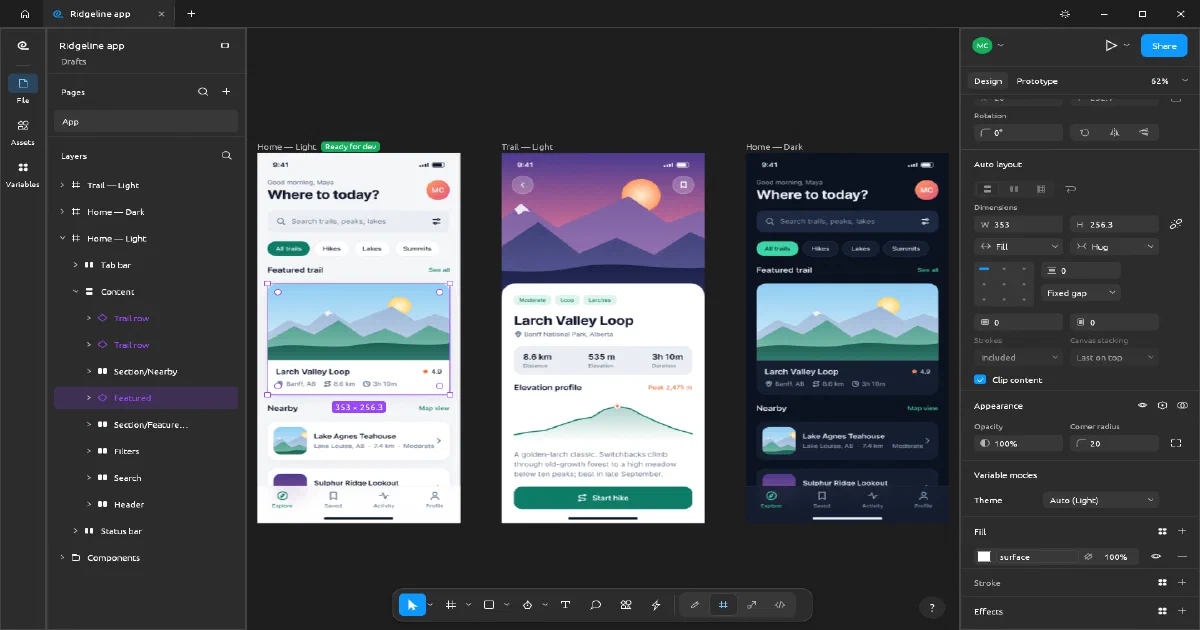

The ArtCraft series now reaches interface design. FigCraft is an open-source, Figma-style editor written in pure Rust, with frames, auto layout, components, variants, vector networks, prototypes, Dev Mode and live collaboration. It ships as a native desktop application, a WebAssembly browser build and an optional collaboration/file server.
That combination makes it interesting for self-hosters: the editor can be delivered as static files, while the server is a small Rust service with one persistent data directory. The important caveat is that the server is still alpha-quality collaboration infrastructure, not a full multi-tenant SaaS with accounts and roles.
What is FigCraft?
FigCraft
is licensed under MIT or Apache-2.0 and aims to provide an open design/prototyping workflow without requiring a cloud account. Local files are .figcraft archives containing the document JSON and images. The native app works offline and does not send files anywhere until a user explicitly shares or publishes one.
The current feature surface includes:
- Frames, pages, layers, components, variants, styles and variables
- Horizontal/vertical auto layout, wrapping, grids and hug/fill/fixed sizing
- Vector networks, editable paths, booleans and typography
- Prototype connections, transitions, back actions and flows
- Dev Mode annotations and generated React-style component code
- SVG, PNG, JPG, WebP and PDF import/export
- CLI, JSON control channel and MCP access to the same command engine used by the UI
- Sandboxed WebAssembly plugins with memory and capability limits
- Live sessions with cursors, selections, avatars, follow mode and per-person undo
FigCraft is explicitly in alpha. .fig import is best effort, browser team-library support is incomplete, and the server has no accounts or organization model yet.
Native, browser and server roles
There are three different deployment choices:
| Route | What it provides | Persistence and access |
|---|---|---|
| Native desktop app | Full local editor, filesystem integration, CLI/MCP and offline work | Local .figcraft files; no account required |
| Static WebAssembly app | Browser editor served from Pages, Nginx, Caddy or any static host | Browser uploads/downloads; starts with a new document |
figcraft-server |
File persistence, live sessions, share links, join codes and team libraries | Files under /data; links are the access credentials |
The browser application is not a hosted SaaS dashboard. It is a static client compiled from Rust to WASM. You can host it on Cloudflare Pages without a Worker, D1, KV, R2 bucket or API key for local editing. The upstream package reports an approximately 18 MiB raw WASM file, with Brotli reducing it to roughly 4.5 MiB.
For remote collaboration, put figcraft-server behind TLS and use its wss:// address. The browser build can join a session but cannot host one. The native app can host a local session or connect to the server.
Self-hosting the collaboration server
The official Dockerfile builds the server from source and produces a distroless non-root image. It listens on port 47900, stores files under /data, and exposes GET /healthz for monitoring. The Home-Lab configuration pins the reviewed upstream commit:
The public source configuration is also available in the Home-Lab repository . Start it from that folder with:
docker compose up -d --build
curl http://127.0.0.1:47900/healthz
The local server does not provide a conventional web UI at http://host:47900/. It is primarily a WebSocket/API endpoint consumed by the FigCraft desktop or browser client. A successful health response is ok; the actual editor remains the native or static web application.
The server key authorizes publishing and administration. Files can also be published to an open server, where the owner receives an owner token. Edit and view links, or short join codes, are then shared with collaborators. There are no usernames, passwords, team accounts or per-person permissions in this release.
For internet exposure, terminate TLS with Caddy or Nginx and forward WebSocket upgrades. Do not expose an unencrypted ws:// endpoint to the public internet. Back up the /data directory, because that contains the files, snapshots, links and server key.
Security and privacy reality
The local editor is private by default, but server collaboration changes the trust boundary. TLS protects traffic between clients and the reverse proxy/server, but the server stores files unencrypted. The operator can read them, and anyone with an edit link can edit the corresponding file. This is closer to a private link-sharing collaboration service than to an authenticated, multi-tenant Figma replacement.
Use a private LAN or VPN for sensitive designs, keep the server key secret, use view links for reviewers, rotate/revoke links when needed, and maintain filesystem backups. The built-in rate limits and link revocation are useful, but they do not replace identity management.
FigCraft compared with the ArtCraft projects
| Project | Main reference | Primary job | Deployment shape |
|---|---|---|---|
| PhotoCraft | Photoshop | Pixel editing and layers | Native plus static WASM |
| VectorCraft | Illustrator | Vectors, paths and typography | Native plus static WASM |
| FilmCraft | Premiere Pro | Video timeline and media editing | Native plus static WASM |
| LightCraft | Lightroom | RAW/photo library workflow | Native plus static WASM |
| EffectCraft | After Effects | Motion graphics and compositing | Native plus static WASM/PWA |
| CADCraft | AutoCAD-style CAD | Technical drafting, DXF/DWG and constraints | Native plus static WASM |
| FigCraft | Figma | UI design, components and prototypes | Native, static WASM, optional server |
FigCraft is not a CAD tool, a general 3D modeller or a document-layout editor. It is the interface/prototyping member of the family.
Field note
The review used upstream release 0.11.2, commit d4a303d4708602a9df1738960852d18b185a616b.
The focused server test completed successfully:
cargo test -p figcraft-server --lib --locked
85 passed; 0 failed
The official Docker build also succeeded. The container started with its /data volume and returned HTTP 200 with ok from /healthz on port 47900. This validates the collaboration server path, not the full browser rendering experience; a WebGPU/WebGL-capable browser is still required for the editor.
FAQ
Can I use FigCraft entirely offline?
Yes, with the native application. It opens and saves .figcraft files locally and does not require an account, server or API key. The static browser version can also edit locally, but browser persistence is based on uploads/downloads rather than a server-side project library.
Can I deploy the editor to Cloudflare Pages?
Yes. Build the web target with Trunk and publish dist/web, or use an upstream web release. Configure correct MIME types for .wasm, enable compression, cache hashed assets and revalidate index.html. The basic static editor needs no Cloudflare Worker, D1, KV, R2 or API key.
Does Cloudflare Pages deployment include collaboration?
No. Pages serves the static WASM editor. Collaboration requires figcraft-server or another compatible server, reachable through WebSocket. A practical setup is Pages for the editor and a private VPS, Home-Lab or TLS-protected server for the collaboration endpoint.
Is the server a normal web UI?
No. Port 47900 serves health checks and the collaboration protocol. Open the static web editor or native app to use the design interface; configure that client with the server address to publish/join files.
Does it have accounts and Better Auth-style permissions?
Not currently. The server uses a server key for operator actions plus owner, edit and view links/tokens. There are no user accounts, SSO, teams, audit identity or per-user roles. Treat links as bearer credentials and keep them private.
Is the server end-to-end encrypted?
No. Use TLS for transport, but the server stores project files in readable form. Run your own trusted server for private designs and back up /data.
How does FigCraft compare with Figma and Penpot?
Figma is the mature proprietary reference with hosted identity, teams, comments, libraries and production-scale collaboration. Penpot is the closest mature open-source web collaboration alternative with a more complete account and team model. FigCraft is more local-first and Rust-native: it offers offline files, a static WASM client, CLI/MCP automation and a small self-hosted server, but it is earlier and less complete.
Is it a replacement for Blender, FreeCAD or CalculiX BESO?
No. FigCraft designs interfaces and prototypes. Blender is for general 3D modelling, animation and rendering; FreeCAD is for parametric CAD solids and engineering workbenches; CalculiX with BESO is for finite-element structural analysis and topology optimization. They are separate workflows, not alternative FigCraft backends.
Can agents automate FigCraft?
Yes. The UI, CLI, JSON control channel and MCP server share the command engine. Agents can create documents, inspect nodes, render/export and drive design operations. Keep control channels and MCP endpoints private because they are automation interfaces, not multi-user security boundaries.
What should I back up?
Back up local .figcraft files, and back up the server’s /data directory if collaboration is enabled. The server directory contains the persisted files, snapshots, link metadata and server key. Export important designs in interoperable formats too, but retain the native file for the best fidelity.
Comments