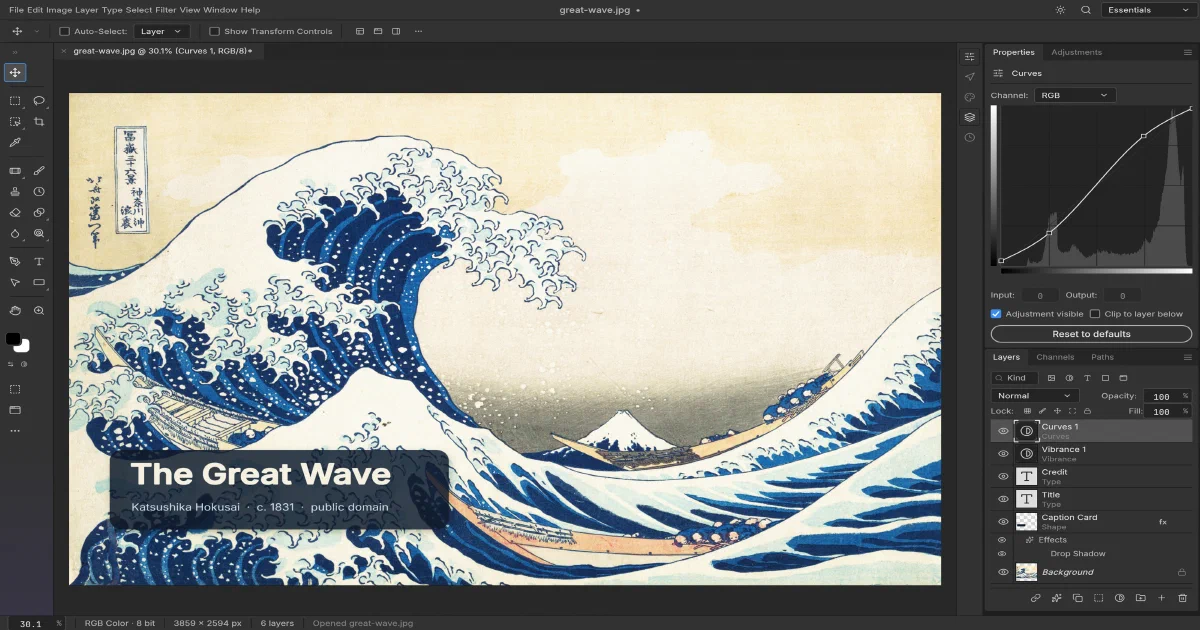

The open-source desktop alternatives to Adobe are not all solving the same problem. GIMP and Krita are mature raster and painting tools, Inkscape is focused on vectors, Blender handles 3D, and the ArtCraft ecosystem is building a family of focused creative applications.
PhotoCraft is the most direct Photoshop-style project in this set. It is a clean-room reimplementation written in Rust, with layers, masks, adjustment layers, layer styles, text, vectors, brushes, filters, colour management, and real PSD/PSB files. It also compiles to WebAssembly, so the editor can be hosted as a static web application.
What is PhotoCraft?
PhotoCraft is dual-licensed under MIT or Apache-2.0. The project uses a pure-data document model and a shared command engine underneath its desktop UI, CLI, browser build, JSON control channel, and MCP server.
The native application is built with Rust, egui/eframe, and wgpu. The browser target uses the same Rust engine compiled to WebAssembly, with WebGPU where available and WebGL2 fallback support.
The editor feature set
PhotoCraft currently includes:
- Layers, groups, clipping masks, pixel/vector masks, channels, paths, and blend modes
- Non-destructive adjustment layers and live filters
- Layer styles such as shadows, glows, bevels, strokes, and overlays
- Text layers with character and paragraph controls
- Shape layers, pen tools, gradients, and vector masks
- Brushes, selections, healing, clone, transforms, and history
- RGB, grayscale, CMYK, and Lab documents at 8, 16, and 32 bits per channel
- PSD/PSB, layered TIFF, OpenRaster, PNG, JPEG, WebP, OpenEXR, SVG, and other formats
- Native
.pcraftdocuments
PSD compatibility is one of the project’s strongest goals. It has its own PSD/PSB crate, preserves unsupported blocks where possible, and tests round trips against real corpora. That is meaningful engineering work, but the project still describes itself as early alpha and does not claim complete Photoshop parity.
PhotoCraft desktop builds
The project provides native builds for macOS, Windows, Linux, and FreeBSD. Linux users can choose AppImage, Flatpak, Debian, RPM, or tarball packages. The native app is the best fit for large documents, GPU acceleration, local files, tablet input, and workflows where you want no browser sandbox.
The repository’s own quick start is:
git clone https://github.com/storytold/photocraft
cd photocraft
cargo run --release -p photocraft -- image.psd
The release page is likely the practical route for regular use. Building locally requires the Rust toolchain and can compile a substantial workspace.
Static browser build
PhotoCraft also runs in the browser. The entire engine and UI compile to WebAssembly, not JavaScript image-processing libraries, Pyodide, or a server-side API.
The browser app uses the local file picker for Open and browser downloads for Save and Export. Preferences use localStorage. There is no server-side document storage, account system, collaboration layer, cloud library, or web autosave. Treat it as a local editor delivered over HTTP, not as a hosted Photoshop workspace.
Cloudflare Pages is a good fit for the release bundle. The project splits compressed WASM into parts below the platform’s per-file asset limit and includes static-host header examples. HTTPS is recommended because WebGPU and clipboard APIs require a secure context outside localhost.
Home-Lab Docker deployment
The Home-Lab profile builds the project’s community Dockerfile from the reviewed commit and serves the static output with Nginx:
After building, open:
http://192.168.1.2:3860
Start it with:
docker compose config
docker compose build
docker compose up -d
The container has no database and no document volume. The Docker build is the expensive part: on the review host the Rust/WASM compilation and optimization took about nine minutes. Once built, the Nginx runtime is small and serves static files only.
CLI and MCP automation
The same command registry powers the UI and automation interfaces:
photocraft-cli run input.psd \
  --cmd filter.sharpen.smartSharpen \
  --params '{"amount":80}' \
  --out output.png

photocraft-cli batch --actions grade.json --in ./raw --out ./graded
photocraft-cli mcp
This makes PhotoCraft unusually interesting for repeatable image pipelines. An agent can invoke editing commands through MCP, while a batch job can apply a known action list to a directory. The desktop application also exposes an authenticated loopback-only control channel for UI inspection and screenshots.
PhotoCraft in the wider creative stack
| Tool | Adobe-style role | Good fit |
|---|---|---|
| PhotoCraft | Photoshop-style pixel/layer editing | PSD workflows, local editing, browser delivery, automation |
| GIMP | Photoshop-style raster editing | Mature general-purpose image manipulation |
| Krita | Painting and illustration | Brush-heavy 2D art and concept work |
| Inkscape | Illustrator-style vector design | SVG, logos, diagrams, vector illustration |
| Blender | 3D and motion foundation | Modelling, animation, rendering, compositing |
| OrcaSlicer | Fabrication workflow | Preparing 3D models for printing, not image editing |
PhotoCraft is therefore complementary to the Blender post and OrcaSlicer guide, not a substitute for them. It can prepare textures, composites, decals, and 2D assets that later become part of a 3D workflow.
Local field note
The focused PSD library test was run with:
cargo test -p photocraft-psd --lib --locked
All 239 tests passed. The web Docker image also built successfully and served both / and /healthz on port 3860. The build emitted a few Rust dead-code warnings from early-alpha code paths, but completed successfully.
FAQ
Is PhotoCraft a full Photoshop replacement today?
Not yet. The project has an ambitious feature surface and strong PSD work, but it explicitly calls itself early alpha. AI/generative features, some tools, professional typography depth, plugin compatibility, and behavioural parity remain incomplete. It is worth trying, but keep GIMP, Krita, or Photoshop available for production-critical files until your own documents round-trip safely.
Does it use WebAssembly?
Yes. The browser edition compiles the Rust engine and egui UI to WebAssembly. It uses WebGPU when available, falls back to WebGL2, and supports a slower CPU path for troubleshooting. It does not use Pyodide or a server-side FFmpeg-style processing service.
Can I deploy it fully statically to Cloudflare Pages?
Yes for the browser editor. Upload the official static web release to Cloudflare Pages or another static host. The static deployment provides the editor, local file access, and downloads, but no account, document database, collaboration, server-side autosave, or shared library.
Does the Home-Lab Docker stack store my files?
No. The Nginx container stores only the static application bundle. The browser opens files locally and downloads exports. There is no persistent document volume by design.
What is the UI port in Home-Lab?
The tested profile maps container port 8080 to host port 3860: http://192.168.1.2:3860 on the LAN or http://localhost:3860 on the host.
Does it require a GPU?
The native and browser builds benefit from GPU rendering through wgpu. The browser target can fall back to WebGL2 and has a CPU option, but large documents and complex effects will be slower. WebGPU and clipboard features require HTTPS outside localhost.
Can I use PSD files safely?
PhotoCraft has serious PSD/PSB round-trip testing and preserves many unsupported blocks, but no independent editor should be assumed to preserve every Photoshop feature. Test copies of your real documents, especially files using plugins, advanced smart objects, uncommon adjustment types, or complex typography.
Can agents automate it?
Yes. The CLI, JSON control channel, and MCP server use the same command registry as the UI. This allows repeatable batch processing and agent-driven edits, but the MCP/control surfaces should be treated as local automation interfaces and not exposed publicly without a deliberate security design.
Does it have an account or cloud sync?
No required account or cloud backend is part of PhotoCraft. The browser version uses local browser storage for preferences, while documents remain in the user’s file system and exports are downloaded.
How does it compare with GIMP and Krita?
PhotoCraft is pursuing Photoshop-like non-destructive layers, PSD compatibility, GPU rendering, and automation from a modern Rust foundation. GIMP is more mature and broadly established; Krita is particularly strong for painting and illustration. PhotoCraft’s advantage is architectural ambition and native browser/CLI/MCP targets, while its main trade-off is early-alpha maturity.
What other open-source alternatives should I consider?
There is no single perfect replacement because the workflows differ:
| Project | Best fit | Main trade-off compared with PhotoCraft |
|---|---|---|
| GIMP | Mature general raster editing, scripting, and plugins | Older-feeling workflow and less complete non-destructive layer editing |
| Krita | Digital painting, illustration, brushes, and animation | Stronger for art than Photoshop-style photo-production workflows |
| Pinta | Simple everyday image edits | Much smaller feature set; not a PSD-focused compositing tool |
| MyPaint | Minimal distraction-free painting | Painting canvas rather than a layered Photoshop replacement |
| Inkscape | Vector illustration, SVG, logos, and diagrams | Not a pixel/layer photo editor |
| darktable | RAW development and photo cataloguing | Replaces the Lightroom part of the workflow, not Photoshop compositing |
| RawTherapee | Detailed RAW processing | A RAW developer rather than a general layer editor |
| miniPaint | Lightweight browser-based editing | More limited than PhotoCraft and less suitable for large layered documents |
PhotoCraft is the closest of these to a Photoshop-style layered editor with PSD ambitions, but GIMP and Krita remain safer mature choices today. A practical OSS stack is often darktable or RawTherapee for RAW development, PhotoCraft or GIMP for compositing, Krita for painting, and Inkscape for vectors.
What are the typical paid alternatives?
The main commercial choices depend on whether you want a subscription, a one-time desktop license, or a browser workflow:
| Product | Positioning | Typical trade-off |
|---|---|---|
| Adobe Photoshop | Industry-standard raster/compositing editor with Adobe ecosystem and generative features | Subscription, account dependency, and cloud-service integration |
| Affinity Photo | One-time-license professional photo and compositing editor | Strong desktop workflow, but compatibility and ecosystem differ from Photoshop |
| Photopea | Browser editor with strong PSD compatibility | Convenient and powerful, but proprietary and web-service dependent; free tier is ad-supported |
| Pixelmator Pro | Native macOS image editor | Apple-platform focus and a smaller cross-platform ecosystem |
| Capture One | Professional RAW, tethering, and catalog workflow | More Lightroom/RAW-oriented than a general Photoshop replacement |
| Corel PaintShop Pro | Windows photo editing and design | Windows-only and less common in cross-platform production pipelines |
Affinity Photo is the most obvious paid local-first comparison, Photopea is the closest browser comparison, and Photoshop remains the compatibility benchmark. PhotoCraft’s differentiators are open licensing, Rust/WASM portability, local processing, and CLI/MCP automation; its disadvantage is that it is still early alpha.
Is it related to the other ArtCraft applications?
Yes. PhotoCraft is one of the project’s “Crafting Apps”. The same family includes VectorCraft, FilmCraft, LightCraft, PdfCraft, EffectCraft, and DesignCraft. The applications share the pure-Rust, native-plus-WASM, command-driven direction, but each solves a different creative workflow.
What license applies?
PhotoCraft is available under either MIT or Apache-2.0. Bundled fonts, icons, sample artwork, and branding have separate notices. The ArtCraft name and logos are not automatically covered by the software license.
Comments