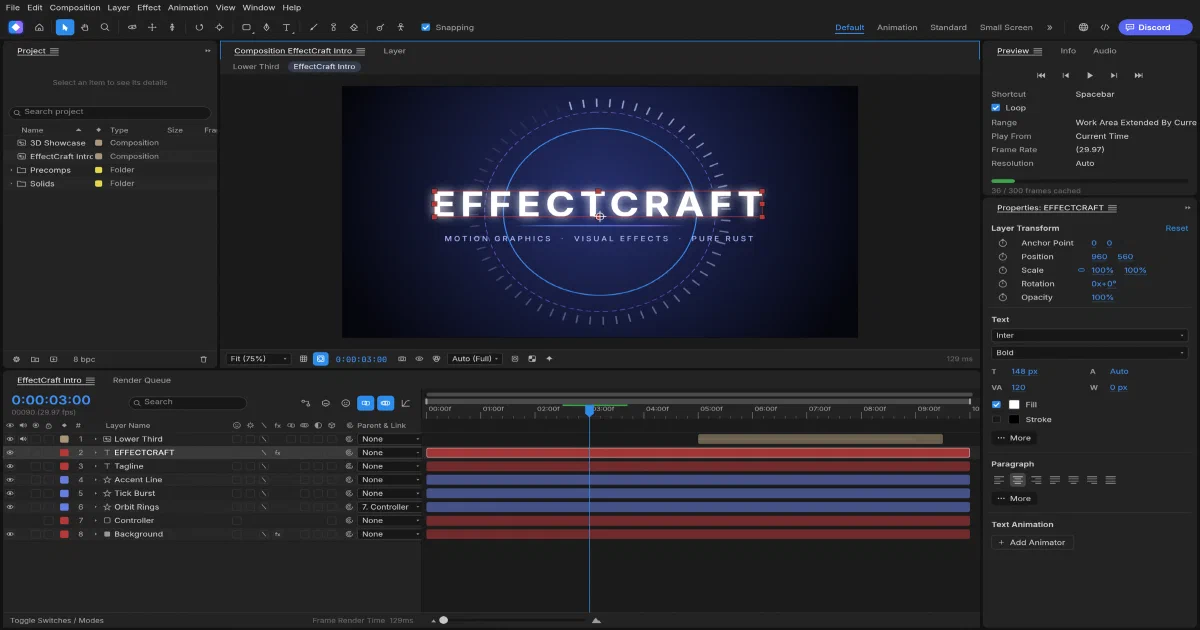
The ArtCraft projects are taking a focused approach to Adobe replacements. PhotoCraft targets Photoshop, VectorCraft targets Illustrator, FilmCraft targets Premiere-style editing, LightCraft targets Lightroom, and EffectCraft takes on motion graphics and visual effects in the After Effects space.
EffectCraft is not just a layer timeline with a few filters. Its repository includes compositions, keyframes, expressions, masks, 3D cameras and lights, 306 effects, Lottie interchange, render queues and the same agent-oriented command architecture used by the other Rust applications.
What is EffectCraft?
EffectCraft is an MIT OR Apache-2.0 licensed compositor for animated titles, motion graphics and visual effects. You build compositions from solids, shapes, text, footage, nested compositions, nulls, adjustment layers, cameras and lights, then animate properties and render the result.
The project is young and alpha. Its README reports about 91% of tracked features present, but around 45% of the way to full professional-production readiness. That is the right framing: broad and technically interesting, but not yet a replacement for every established After Effects workflow.
Animation and composition model
EffectCraft provides an After Effects-like editing model:
- Solids, shapes, text, footage, nested compositions, nulls and adjustment layers
- 3D layers, cameras, lights, depth of field, motion blur and 38 blend modes
- Parenting, track mattes, masks, feather, expansion and vertex editing
- Linear, Bezier, hold, auto/continuous Bezier, roving keys and Easy Ease
- Value and speed Graph Editor, velocity/interpolation dialogs and keyframe copy/paste
- Time remapping, time stretch, freeze frame, markers and exact frame timing
- Shape trim paths, repeaters, round corners, offset, zig-zag, twist, wiggle and merge paths
- Text animators, range selectors and an inline JavaScript expression engine
- Puppet Position, Advanced, Bend, Starch and Overlap tools
The native project format is versioned .ecproj JSON. It is readable and more suitable for Git review than a proprietary binary project, although the media files referenced by a project remain separate assets.
Effects, 3D and rendering
The project documents 306 built-in effects across blur, colour correction, distort, generate, keying, matte, noise, perspective, simulation, stylize, time, audio, text, transitions and utility categories. Layer styles include shadows, glows, bevel/emboss, satin, overlays and strokes.
The 3D tools are compositor-oriented: cameras, depth of field, lights, soft ray-traced shadows, 3D layer intersections and custom views. This is useful for motion design and compositing, but it is not a replacement for Blender’s modelling, simulation or full scene pipeline.
The Render Queue supports H.264 MP4, ProRes MOV with alpha, HEVC, AV1, WebM with VP9/AV1 and Opus, image sequences, GIF and WAV/AIFF. The codecs are implemented in Rust, using pinned FilmCraft codec crates; FFmpeg is not embedded as the runtime engine.
Lottie and web delivery
Lottie import and export are built in. EffectCraft can export compositions to JSON or .lottie, including shape, solid, image, text and null layers, eased/spatial keyframes, masks, mattes, blend modes, time remapping and optionally expressions. Unsupported features are reported because Lottie cannot represent the entire compositor model.
That makes EffectCraft useful for two different outputs:
- Render a finished video or image sequence through the Render Queue.
- Export a supported motion design as Lottie for web or application playback.
Desktop or browser app?
Both. Native applications are available for macOS, Windows, Linux and FreeBSD packaging. The repository also ships an official static WebAssembly build, so EffectCraft is self-hostable without a server backend.
The browser build includes WebGPU with WebGL2 fallback, Web Workers for frame and render jobs, Web Audio, browser file storage and a service worker. It can be installed as a PWA through its manifest and can load offline after the first successful visit.
The browser version is not identical to a native workstation. A browser can keep at most around 4 GiB of WASM address space, and the page shares memory with decoders, frame caches and worker engine instances. Some desktop capabilities are therefore slower or constrained by browser memory, GPU support and storage quotas.
Static self-hosting on Cloudflare Pages
EffectCraft can be hosted on Cloudflare Pages, Netlify, GitHub Pages, Nginx, Caddy or another static server. From the official release, extract effectcraft-web-<version>.zip. From source:
rustup target add wasm32-unknown-unknown
git clone https://github.com/storytold/effectcraft
cd effectcraft
cargo xtask web --serve 8765
For deployment, publish the generated target/web/dist directory. Serve .wasm as application/wasm and JavaScript as text/javascript. Use gzip or Brotli: the upstream documentation says the WASM is roughly 58 MB uncompressed, about 17 MB with gzip and 10 MB with Brotli. Revalidate index.html, JavaScript, WASM and the service worker because filenames remain stable between releases.
HTTPS is required for service workers, WebGPU and clipboard features outside localhost. The upstream headers do not require COOP/COEP for the current build, although the development server sends isolation headers and a future shared-memory threaded build could need them.
Is it really a PWA?
Yes. The release includes manifest.webmanifest, icons and sw.js. The service worker precaches the application and removes older caches when a new build activates. After the first successful online visit, the application shell can load offline.
Offline availability does not mean unlimited offline media. Imported footage, projects and auto-saves are stored in browser storage under the site origin, subject to browser quotas and eviction rules. Render outputs are downloaded. Keep source media and project backups outside the browser.
What does the server do?
Only static delivery. There is no EffectCraft API, database, authentication, cloud rendering queue, R2 storage or collaboration service in the browser package. Every visitor has their own origin-scoped local workspace. A custom server would be needed for shared projects, accounts, centralized media or remote rendering.
Automation and agent workflows
cargo run --release -p effectcraft
cargo run --release -p effectcraft -- --control 9877
cargo run --release -p effectcraft-cli -- render --out intro.mp4
cargo run --release -p effectcraft-cli -- mcp
The UI, CLI, MCP server, native JSON control channel and browser window.effectcraft API share the command registry. Agents can inspect the project and property tree, edit keyframes, render frames, invoke the Render Queue, export Lottie and take screenshots.
The native control channel is TCP/JSON-lines and should stay local or behind deliberate authentication. Browser automation is an in-page JavaScript API, not a public authenticated endpoint.
EffectCraft compared with the ArtCraft series
| Project | Adobe-style role | Main workflow | Browser/self-hosting model |
|---|---|---|---|
| PhotoCraft | Photoshop | Pixels, layers, masks and PSD | Static WASM; local files |
| VectorCraft | Illustrator | Paths, SVG, typography and vectors | Static WASM; local files |
| FilmCraft | Premiere Pro | Video, audio, timelines and codecs | Static WASM; browser media limits |
| LightCraft | Lightroom | Photo library, RAW development and cataloguing | Static WASM; browser-local library |
| EffectCraft | After Effects | Compositing, motion graphics, VFX and Lottie | Static WASM PWA; large bundle and browser limits |
| Blender | 3D/VFX foundation | Modelling, simulation, animation and rendering | Native desktop; different scope |
EffectCraft fills the motion-graphics gap in the family. It complements FilmCraft for editing and delivery, VectorCraft for vector assets, PhotoCraft for raster assets and Blender for full 3D scenes.
Field note
The review checkout was pinned to commit 362474a843ddb67555d4c2d19ad6a590388aad0e (0.17.0, 2026-10-25). I ran the focused Lottie validation with:
cargo test -p effectcraft-lottie --lib --locked
The full native/WASM build and browser smoke suite were not run on the review host because the complete effects, rendering and codec workspace is large and local disk is constrained. The PWA and static self-hosting conclusions come from the repository’s web documentation, packaging files, service-worker implementation and browser storage code.
FAQ
Is EffectCraft desktop-only?
No. It has native desktop builds and a static WebAssembly browser build. The browser release includes a manifest and service worker, making it installable as a PWA and usable offline after its first successful load.
Can I deploy it to Cloudflare Pages?
Yes. Publish the official effectcraft-web-<version>.zip contents or build target/web/dist. You do not need Workers, D1, KV, R2, a database, an API key or a login for the basic static application.
Does the PWA work fully offline?
The application shell does after the first online visit because the service worker precaches the build. Projects, imported media and auto-saves can remain in OPFS/IndexedDB for that origin. Browser storage quotas, memory limits, media size and GPU availability still apply, so offline does not mean unlimited After Effects parity.
Where are projects and media stored?
In browser storage scoped to the exact scheme, host and port. The site stores project files, imported media and auto-saves in OPFS when available, with IndexedDB or memory fallback. Changing from an IP to a domain or changing a port creates another workspace. Save .ecproj files and keep media backups outside the browser.
Is it a hosted collaboration platform?
No. Static hosting delivers the editor but does not provide accounts, shared projects, central media, permissions, remote rendering or backups. Those would require a separate backend and authentication layer.
How large is the browser download?
The upstream documentation reports approximately 58 MB of WASM before optimization, around 17 MB gzip or 10 MB Brotli. Use compression and avoid overly aggressive immutable caching because the release filenames stay stable.
Does it replace After Effects today?
It is a broad and promising alpha project, not a complete drop-in replacement. It lacks proprietary .aep compatibility and After Effects SDK plugins, and fidelity, platform coverage, model quality and real production readiness are still being refined. It is better evaluated as an open foundation with a substantial feature surface.
Does it replace Blender?
No. EffectCraft’s 3D features are for compositing: cameras, lights, depth of field and 3D layers. Blender remains the broader tool for modelling, simulation, rigging, animation and full 3D rendering. The two can complement each other.
Can agents automate it?
Yes. Use effectcraft-cli, MCP, the native control channel or window.effectcraft in the browser. Keep native control ports private and remember that the browser API is in-page automation, not a remote authenticated API.
What license applies?
The source is available under MIT or Apache-2.0. Fonts, icons, demo media and other bundled assets have separate attribution notices. The ArtCraft name and logos are trademarks.
Comments