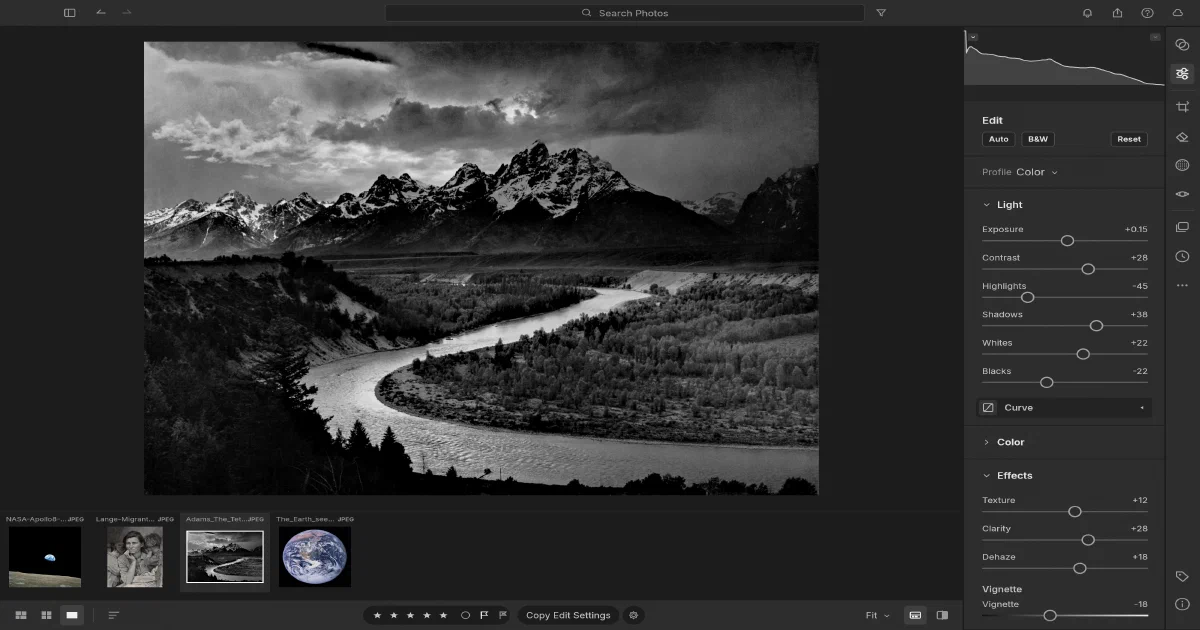

The ArtCraft projects are not one general-purpose Adobe clone. They are a family of focused applications: PhotoCraft targets Photoshop-style raster work, VectorCraft targets Illustrator-style vectors, FilmCraft targets Premiere-style video, and LightCraft targets Lightroom Classic’s photo library and RAW development workflow.
LightCraft is especially interesting for self-hosters because its browser edition is not just a stateless demo. It stores a catalog and imported originals in the browser’s OPFS or IndexedDB storage. That gives you a private photo workspace served from your own domain, while keeping the application itself static and backend-free.
What is LightCraft?
LightCraft is an MIT OR Apache-2.0 licensed photo library and non-destructive RAW developer written in Rust. It runs natively on macOS, Windows and Linux, and it has a WebAssembly browser build.
Its target workflow includes importing a shoot, culling photos, rating and flagging images, organizing albums, developing RAW files, applying masks and colour corrections, then exporting or printing the results. It is much closer to Lightroom than to a simple browser image filter.
Editing and RAW development
The main editing pipeline includes:
- Exposure, contrast, highlights, shadows, whites, blacks and white balance
- Parametric and RGB tone curves, colour mixer, point colour and colour grading
- Texture, clarity, dehaze, grain, vignette, sharpening and noise reduction
- Crop, straighten, geometry, Upright, lens correction, heal, clone and red-eye tools
- Brush, linear/radial, luminance/colour range, subject and sky masks
- HDR merge, panorama merge and HDR panorama to DNG
- JPEG, DNG, CR2/CR3, ARW, NEF, RAF, RW2/RWL, PEF, ORF and other RAW paths
- JPEG, PNG, TIFF, flat PSD, WebP, AVIF, JPEG XL, DNG and original exports
The pipeline is scene-referred and wide-gamut, with CPU and wgpu GPU paths. The project describes resolution-independent edits and a CPU reference path checked against GPU output. Optional AI features include SAM 3 Object/Describe masks and AI denoise, but those models are separately installed and not bundled into the repository.
Photo library and catalog
LightCraft includes the parts that make a RAW developer useful over time:
- All Photos, Recently Added, Picks, date views, albums, nested folders and Recently Deleted
- Ratings, flags and colour labels
- Search expressions such as
rating:>3 flag:pick iso:>800 camera:x2 - Stacks, virtual copies, versions, smart albums and filmstrip/grid views
- People view, face boxes and optional face detection/recognition models
- XMP sidecars, metadata editing, Lightroom Classic
.lrcatimport and GPX tagging - Batch export, contact sheets, print layouts, picture packages and PDF output
The catalog is not a hidden binary-only database. It uses an append-only human-readable operation log with snapshots and background compaction. That makes the library easier to inspect, back up and replay, although your original files still need their own backup strategy.
Is LightCraft desktop-only?
No. It has native desktop applications and a browser/WebAssembly application. The native version is the right choice for large libraries, GPU processing, broad file access, AI models and reliable long-running exports.
The browser version uses:
- WebGL2 for the UI
- Web Workers for rendering jobs
- OPFS for the catalog and imported originals, with IndexedDB fallback
- Browser file pickers and downloads
- A browser-local library backup and restore workflow
The web application currently has more limitations: browser storage can be cleared, only one tab can open a library at a time, some export and AI paths are native-only, and Safari/Firefox testing is still in progress. It is a useful private browser workspace, not a replacement for a centralized multi-user photo server.
Static self-hosting on Cloudflare Pages
LightCraft can be deployed to Cloudflare Pages, Netlify, GitHub Pages, Nginx, Caddy or another static host. The official release contains lightcraft-web-<version>.zip; from source, the documented development command is:
rustup target add wasm32-unknown-unknown
git clone https://github.com/storytold/lightcraft
cd lightcraft
cargo xtask web --serve
For a build intended for deployment, run cargo xtask web and publish the generated target/web-site directory. The upstream package includes Cloudflare/Netlify headers and an Nginx example.
The server must serve .wasm as application/wasm and JavaScript as text/javascript. Revalidate the application files rather than marking them immutable because the filenames stay stable between releases. HTTPS is needed for OPFS, module workers and clipboard features outside localhost.
What gets stored where?
The static host serves only the application. Each browser origin gets its own library:
library/stores catalog and preferencesoriginals/stores imported photos when the browser copy path is usedthumbs/stores thumbnails and previews- OPFS is preferred, with IndexedDB fallback
Nothing is uploaded to the server. A deployment at http://192.168.1.2:8765 and the same app at https://photos.example.com are different storage origins and will show different libraries. Use File > Back Up Library before moving domains, ports or schemes, then restore it at the new origin.
Browser storage is not a substitute for a second copy of your originals. Browsers can clear site data, private windows are temporary, storage pressure may remove data, and browser backups have size/zip64 limitations documented upstream.
There is no required account, API key, database, R2 bucket, Worker or cloud upload service. A Cloudflare Pages deployment is simply a convenient static delivery layer.
Native, CLI and MCP automation
cargo run --release -p lightcraft
cargo run --release -p lightcraft -- ~/Pictures/trip
cargo run --release -p lightcraft -- --control 7980
cargo run --release -p lightcraft-cli -- render photo.jpg -o out.jpg --set light.exposure=0.5
cargo run --release -p lightcraft-cli -- mcp
The same command registry powers the interface, CLI, control channel and MCP. Agents can cull photos, set development controls, create masks, render, export, make contact sheets and inspect screenshots. The desktop control channel is TCP/JSON-lines and needs its token; MCP can run headless against a library or attach to a live desktop app.
The browser has a JavaScript command API, but desktop MCP and TCP control are not available in the static browser build. Keep native control ports local and treat MCP filesystem roots as an explicit permission boundary.
LightCraft compared with the ArtCraft series
| Project | Adobe-style role | Main workflow | Browser/self-hosting model |
|---|---|---|---|
| PhotoCraft | Photoshop | Layers, masks, pixels and PSD | Static WASM; local files, no catalog backend |
| VectorCraft | Illustrator | Paths, SVG, typography and vectors | Static WASM; local files, no catalog backend |
| FilmCraft | Premiere Pro | Video, audio, timelines and codecs | Static WASM; browser media limits |
| LightCraft | Lightroom Classic | Photo catalog, RAW development and export | Static WASM with browser-local catalog/originals |
| PdfCraft | Acrobat | PDF reading and protection | Check project-specific deployment |
| EffectCraft | After Effects | Motion graphics and visual effects | Check project-specific deployment |
| DesignCraft | InDesign | Page layout and publishing | Check project-specific deployment |
LightCraft is the first of these tools where browser persistence is central to the product model. It is still not Immich or PhotoPrism: there are no shared user accounts, server-side originals, remote indexing or centralized backups. The trade-off is a much simpler privacy model and a genuinely static deployment.
Field note
The review checkout was pinned to commit 03c88c166c054c009db2a47187d59991f6232b85 (0.14.0, 2026-10-25). The focused catalog test was run with:
cargo test -p lightcraft-catalog --lib --locked
The full native and WASM builds were not run on the review host because the workspace includes substantial RAW, GPU, image-processing and optional model code, while the host has limited free disk. The static hosting and browser-storage findings come from the repository’s web documentation, packaging files and implementation.
FAQ
Is LightCraft desktop-only?
No. It has native macOS, Windows and Linux builds plus a WebAssembly browser build. Native is recommended for large libraries and demanding RAW/AI workflows. The browser build is suitable for a private, origin-scoped photo library served from a static host.
Can I deploy it to Cloudflare Pages?
Yes. Publish the official lightcraft-web-<version>.zip contents or build target/web-site with cargo xtask web. You do not need Cloudflare Workers, D1, KV, R2, API keys or a database for the basic deployment.
Is the browser library really persistent?
Yes, within that browser origin. The catalog and imported photos use OPFS, with IndexedDB fallback. Persistence is still subject to browser storage rules, site-data deletion, private browsing and storage pressure. Use the built-in library backup and keep the original photos elsewhere.
What happens if I change the URL or port?
The browser treats scheme, host and port as part of the origin. Moving from http://192.168.1.2:8765 to https://photos.example.com creates a separate empty library. Back up the library at the old origin and restore it at the new one.
Is it a replacement for Immich or PhotoPrism?
Not for a shared server photo platform. LightCraft is a local-first catalog and RAW developer with browser-local storage. Immich and PhotoPrism provide server-side originals, centralized indexing, accounts, remote access and multi-device libraries. LightCraft is more private and simpler to deploy, but it does not provide those server features.
Does it support Lightroom catalogs?
It can import Lightroom Classic .lrcat catalogs through a pure-Rust SQLite reader, and it supports XMP sidecars. Validate a copy of your catalog and representative RAW files before migrating an active library.
Does it use AI models?
Some optional features do. Desktop Object and Describe masks use separately installed SAM 3 weights; AI denoise also requires separately installed weights. Subject and Sky selection still include classical heuristic paths. The models are not required for normal browsing, RAW development or export.
Does the browser support MCP or the TCP control port?
No. MCP and the JSON-lines TCP control channel are desktop-oriented because they need local process/socket access. The browser has a JavaScript command API for in-page automation, but it is not a remote authenticated API.
Is LightCraft production-ready?
It is alpha. The project reports strong feature breadth and useful JPEG/DNG/RAW workflows, but camera calibration coverage, some compressed RAW variants, AI quality, HDR display, video, Book/Map modules and portions of browser support remain incomplete. Test real files and maintain backups.
What license applies?
The source is available under MIT or Apache-2.0. Fonts, icons, demo images and other bundled assets retain their own attribution and licenses. The ArtCraft name and logos are trademarks.
Comments