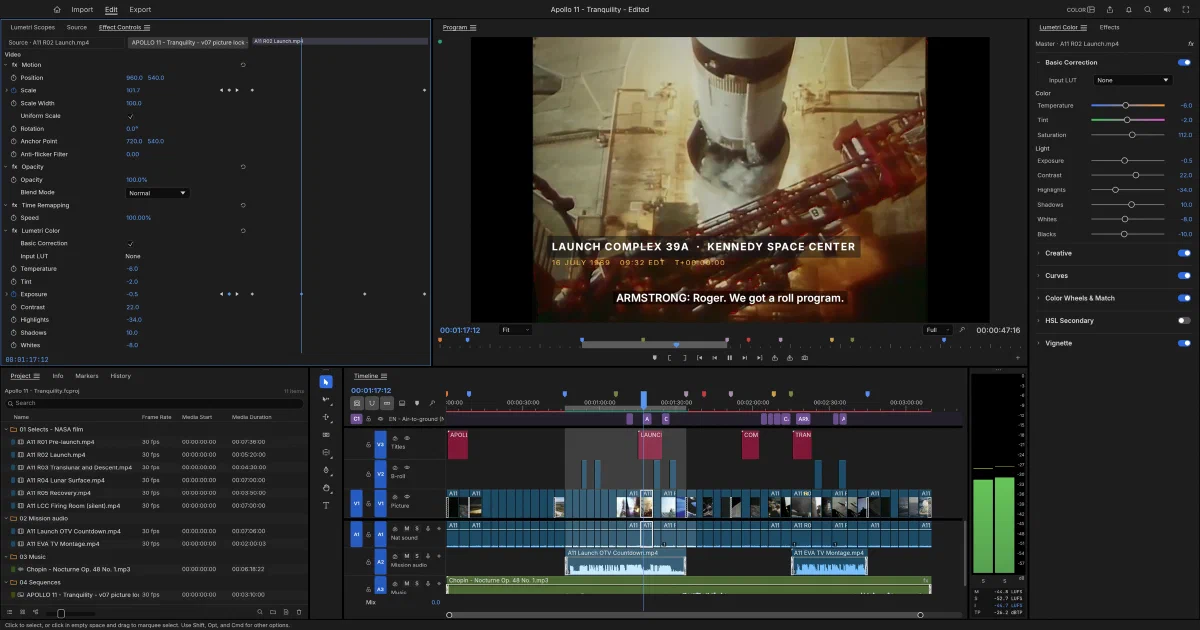

The ArtCraft projects are gradually mapping the main Adobe creative workflows into focused open-source applications. PhotoCraft covers Photoshop-style raster editing, VectorCraft covers Illustrator-style vectors, and FilmCraft takes on non-linear video editing, colour, audio, effects and delivery.
It is an unusually ambitious Rust project. The repository includes its own codecs and containers, a GPU compositor, a professional-style timeline, a CLI/MCP automation surface, and a browser build compiled to WebAssembly. It is also honest about its maturity: FilmCraft is alpha, and its own estimate is much closer to “promising and usable for experiments” than “drop-in Premiere replacement for every production.”
What is FilmCraft?
FilmCraft is dual-licensed under MIT or Apache-2.0. It is a non-linear editor with Source and Program monitors, bins, tracks, trims, transitions, effects, titles, captions, colour correction, scopes, mixing and export.
The project uses exact integer time rather than approximate floating-point frame math. That matters for 23.976, 29.97 drop-frame, 59.94 and audio sample rates, where small timeline errors can become visible over longer edits.
Editing, colour, audio and effects
The main editing workflow includes:
- Source and Program monitors, bins and multi-track timelines
- Three-point editing, insert/overwrite, ripple/roll/slip/slide and rate-stretch trims
- Markers, nesting, snapping, linked selection and unlimited undo
- Motion, opacity, blend modes, keyframes and transitions
- More than 90 video effects across categories such as blur, keying, distortion and lights
- Colour correction, curves, colour wheels, HSL secondary and waveform/vectorscope views
- Audio mixer, loudness standards, EQ, dynamics, limiter, reverb, denoise and automation
- Titles, graphic clips and captions in SRT, WebVTT, SCC, CEA-608 and CEA-708 workflows
This is not merely a timeline around FFmpeg. FilmCraft implements many codecs and containers in Rust and uses FFmpeg as an external test oracle. It supports a broad decode surface including H.264, HEVC, ProRes, VP8/VP9, AV1, DNxHR, AAC and Opus, while export support is narrower. H.264/AAC, ProRes, DNxHR, PNG sequences, GIF and WAV are among the documented outputs.
Formats and interchange
The project supports practical interchange with FCP7 XML, FCPXML, OpenTimelineIO, CMX 3600 EDL, AAF and OMF. That is useful when FilmCraft is one part of a larger production workflow.
The important limitation is that native Premiere .prproj projects are not currently imported. If you are migrating an existing production, plan around XML, AAF or OTIO and test a representative sequence, including media links, audio, captions, effects and timecode.
Is FilmCraft desktop-only?
No. It has native builds for macOS, Windows and Linux, plus an official static WebAssembly release. The browser build is not a thin remote desktop: it runs the editor engine in the browser and maps native services to browser APIs.
Browser-specific capabilities include:
- WebGPU with WebGL2 and CPU fallback modes
- WebCodecs for compatible browser-decoded video
- FilmCraft’s own Rust decoders as fallback paths
- WebAudio for playback and mixing
- OPFS for crash-recovery snapshots and imported-media copies
- Browser file pickers, drag-and-drop and downloads
- A JavaScript
window.filmcraftcontrol and test API
The browser build is single-threaded today. Desktop worker jobs become cooperative work on the UI thread, and commands that need desktop threads, such as some proxy or mask-tracking paths, may report an error on the web. Large media also exposes browser memory and storage limits much sooner than the native application.
Static self-hosting on Cloudflare Pages
FilmCraft can be self-hosted on Cloudflare Pages, Netlify, GitHub Pages, Nginx, Caddy or another static server. The official release contains a filmcraft-web-<version>.zip archive. From source, the documented flow is:
rustup target add wasm32-unknown-unknown
cargo install wasm-bindgen-cli --version 0.2.129 --locked
git clone https://github.com/storytold/filmcraft
cd filmcraft
cargo xtask web
Publish the generated target/web/dist directory. The project includes _headers and an Nginx example. Serve .wasm as application/wasm, compress WASM/JavaScript/HTML, cache hashed assets, and avoid caching index.html. HTTPS is recommended for WebGPU and clipboard features outside localhost.
The static deployment does not provide a hosted media library. Nothing is uploaded to FilmCraft’s server because there is no FilmCraft server in this package. Opened media stays in the browser, exports are downloaded, and OPFS may retain local recovery data. There is no login, database, collaboration workspace, multi-user permission model or cloud rendering queue.
Native application and automation
For the desktop application:
cargo run --release -p filmcraft
cargo run --release -p filmcraft -- --control 9876
cargo run --release -p filmcraft-cli -- commands
cargo run --release -p filmcraft-cli -- mcp
More than 650 engine commands are exposed through the CLI, MCP, JSON control channel and browser API. That means an agent can place clips, adjust effects, inspect the UI, take screenshots, mix audio and export media through the same command model used by the interface.
The native control channel requires FILMCRAFT_CONTROL_TOKEN. Keep it on localhost or behind a deliberate access-control layer; the interface is an automation surface, not a hardened multi-user API.
FilmCraft in the ArtCraft Adobe-replacement series
| Project | Adobe-style role | Main workflow | Self-hosting model |
|---|---|---|---|
| PhotoCraft | Photoshop | Layers, masks, pixels and PSD | Static WASM or native; no backend |
| VectorCraft | Illustrator | Paths, SVG, typography and vectors | Static WASM or native; no backend |
| FilmCraft | Premiere Pro plus colour/audio/effects | Timelines, codecs, grading and sound | Static WASM or native; browser limits are higher |
| LightCraft | Lightroom | Photo library and RAW development | Verify project-specific storage and web targets |
| PdfCraft | Acrobat | PDF reading and protection | Verify project-specific packaging |
| EffectCraft | After Effects | Motion graphics and visual effects | Verify project-specific rendering model |
| DesignCraft | InDesign | Page layout and publishing | Verify project-specific document model |
The common Rust architecture is useful, but FilmCraft has a heavier runtime footprint because video decoding, frame caches, audio clocks and export are much more demanding than editing a single image or vector document.
Field note
The review checkout was pinned to commit bfc23840b603e69c782302c6ed04d4a9f6ec26a8. I ran the focused format validation with:
cargo test -p filmcraft-format --lib --locked
The full native and WASM builds were not run on the review host because they compile a large codec/rendering workspace and the machine has limited free disk. The static deployment conclusion is based on the repository’s web documentation, packaging script, headers, web crate and release layout.
FAQ
Can I use FilmCraft as a web app?
Yes. Download the static web release or build it with cargo xtask web, then serve the generated directory. It uses Rust/WebAssembly, WebGPU with WebGL2 fallback, WebCodecs, WebAudio and OPFS. It is a browser-local editor, not a remote server application.
Can I deploy it to Cloudflare Pages?
Yes. Upload the contents of filmcraft-web-<version>.zip or publish target/web/dist. Configure the WASM MIME type, compression and caching as described by the upstream packaging/web/README.md. No Cloudflare API key, database, worker or R2 bucket is required for the basic editor.
Does the browser version upload my videos?
No. The web documentation states that media stays on the user’s machine. The browser reads selected files, may retain recovery/media copies in OPFS, and offers outputs as downloads. It does not upload media to a FilmCraft backend because the static package has no server-side backend.
Is the browser version as capable as the desktop version?
Not fully. It shares the engine and UI, but browser execution is single-threaded, storage and memory are constrained, WebCodecs support depends on the browser, and some desktop worker-based commands report errors on web. Native FilmCraft remains the better choice for large productions, hardware workflows and long renders.
Does FilmCraft use FFmpeg?
The runtime is not an FFmpeg wrapper. FilmCraft includes its own Rust codecs and containers and compares results with FFmpeg as an external test oracle. Some browser paths use WebCodecs, while unsupported or selected formats use FilmCraft’s own decoders.
Can it open Premiere .prproj files?
Not currently. Use FCP7 XML, FCPXML, OTIO, AAF or OMF where appropriate, and test complex projects before migrating. Native .prproj import is listed as a current gap.
Can it replace Premiere Pro today?
It is a serious alpha project, not a complete drop-in replacement. Editing, colour, effects, captions, mixing, codecs and export exist, but the project’s own estimate is about 56% ready for full real-world production. Plugins, native Premiere project import, broader media testing and AV1 export remain important limitations.
Can agents automate FilmCraft?
Yes. The CLI, MCP server, desktop JSON control channel and browser window.filmcraft API share the command registry. Use read/write roots and tokens carefully, and keep the desktop control port private. These interfaces do not provide tenant isolation or public authentication by themselves.
Does it need a database or account?
No for the native or static browser application. Projects and recovery files are local. A future hosted collaboration service could wrap FilmCraft, but that is not part of the repository’s current deployment model.
What license applies?
FilmCraft is available under MIT or Apache-2.0. Fonts, icons, screenshots and other bundled assets have separate attribution notices. The ArtCraft name and logos are trademarks and are not automatically covered by the software license.
Comments