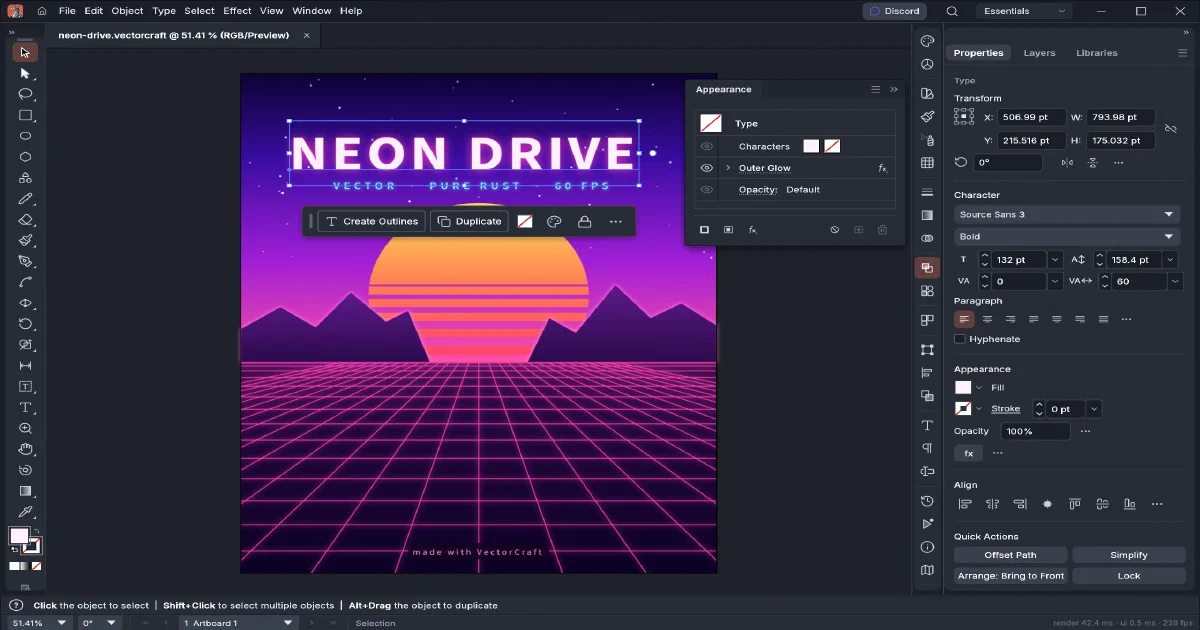

The open-source alternatives to Adobe are becoming more interesting because they do not all try to recreate the same application. PhotoCraft is the ArtCraft project’s Photoshop-style raster editor. VectorCraft is the sibling focused on paths, curves, typography, shapes, SVG and illustration.
The unusual part is its architecture: the editor is written in pure Rust, runs natively on macOS, Windows, Linux and FreeBSD, and also compiles to WebAssembly. That means you can download a desktop build, run it from a browser on a static host, or drive the same command model from a CLI or MCP server.
What is VectorCraft?
VectorCraft is an MIT OR Apache-2.0 licensed vector illustration application from the ArtCraft family. The project describes its current release as alpha and actively developed, with a broad everyday illustration surface but incomplete parity with mature commercial tools.
It is not an online design SaaS. The browser build is a local editor delivered over HTTP: files are opened through the browser, work happens in the WASM application, and exports are downloaded by the user.
What can it do?
The current feature surface includes:
- Pen, node, shape, brush, pencil and selection tools
- Pathfinder and Shape Builder operations
- Layers, groups, artboards, clipping masks and guides
- Fills, strokes, gradients, transparency, appearance and live effects
- Typography, styles, bidirectional text and broad localization
- SVG, PDF, PDF-compatible AI, EPS, DXF and EMF/WMF workflows
- PNG, JPEG, WebP, SVGZ and PSD export paths
- Print, packaging, templates and export for screens
- Initial live Revolve work and Affinity document import paths
Its native .vectorcraft format is JSON-based. That is useful for inspectable, testable documents and automation, but it should not be confused with universal lossless interchange. The project still lists real-world .ai layer exchange, deeper 3D/Materials, scripting, some typography behaviour and generative AI as unfinished areas.
Desktop or web app?
Both. The native application uses Rust, egui/eframe and wgpu. The browser edition uses the same engine and UI compiled to WebAssembly. The browser renderer chooses WebGPU when available and falls back to WebGL2; the project also documents a CPU query flag for compatibility troubleshooting.
The native route is preferable for large documents, tablets, local font access and demanding GPU work. The browser route is convenient when you want to try the editor without installing a desktop package or when you want to publish an internal creative tool at a URL.
Static self-hosting on Cloudflare Pages
Yes, VectorCraft can be deployed as a static site. The repository includes packaging/web/README.md, _headers, .htaccess and a packaging script. A release archive contains index.html, hashed JavaScript, Rust-generated WASM and optional fonts. There is no server-side API in that bundle.
For a source build:
rustup target add wasm32-unknown-unknown
cargo install trunk --locked
git clone https://github.com/storytold/vectorcraft
cd vectorcraft/apps/vectorcraft-web
trunk build --release
Publish dist/web to Cloudflare Pages, Netlify, GitHub Pages, an object-storage website or an Nginx/Caddy static server. Keep the generated files together and preserve relative URLs. The WASM file must be served as application/wasm; the project recommends compression and immutable caching for hashed assets. HTTPS matters for WebGPU and clipboard APIs outside localhost.
This is the same distinction as the earlier PhotoCraft browser deployment: static hosting gives you a URL for the editor, not a cloud document service. There is no account system, shared library, server-side autosave, collaboration or database included.
Desktop, CLI and MCP automation
The normal native quick start is:
git clone https://github.com/storytold/vectorcraft
cd vectorcraft
cargo run --release -p vectorcraft
For headless export and automation:
cargo run --release -p vectorcraft-cli -- run \
  --in examples/ribbons.vectorcraft --export out.pdf

cargo run --release -p vectorcraft-cli -- mcp
The desktop app can also expose a JSON control channel on port 7979. The CLI, control channel, MCP server and UI use the same command registry. An agent can therefore edit or export documents through a documented interface rather than clicking blindly through a desktop window.
Treat this as local automation. Keep the control channel bound to a trusted interface, restrict MCP read/write roots, and do not publish the port directly to the internet.
VectorCraft compared with the surrounding creative stack
| Tool | Best fit | How it relates |
|---|---|---|
| VectorCraft | Vector illustration, paths, SVG, typography and diagrams | Illustrator-style role, with Rust/WASM/CLI/MCP targets |
| PhotoCraft | Raster editing, layers, masks and PSD | Sibling ArtCraft editor for Photoshop-style work |
| Inkscape | Mature open-source SVG and vector workflows | More established today; different implementation and automation story |
| GIMP/Krita | Raster editing and painting | Better for pixels and brushes than vector construction |
| Blender | 3D modelling, animation, lighting and rendering | Use VectorCraft for 2D assets, decals and diagrams feeding a 3D workflow |
| Affinity Designer | Commercial vector and page-design workflow | Strong mature desktop alternative, but not open source or browser-static |
| Adobe Illustrator | Commercial compatibility benchmark | Broader ecosystem and maturity, with subscription and proprietary formats |
VectorCraft is not a replacement for Blender, OrcaSlicer or a CAD tool. It can produce the SVG, PDF, textures and presentation assets that those workflows consume, while remaining focused on 2D vector authoring.
The ArtCraft Adobe-replacement series
VectorCraft is part of a larger family of focused creative applications from the same developer. The useful way to compare the projects is by the Adobe workflow they target, not by treating every repository as a general-purpose “Adobe alternative”:
| ArtCraft project | Adobe-style role | Main format/workflow | Browser or self-hosting angle |
|---|---|---|---|
| VectorCraft | Illustrator | Paths, SVG, typography, vector illustration and PDF | Native desktop plus static WebAssembly |
| PhotoCraft | Photoshop | Layers, masks, raster effects and PSD/PSB | Native desktop plus static WebAssembly |
| FilmCraft | Premiere Pro / video tools | Video editing, colour and sound | Check the project-specific runtime and storage model |
| LightCraft | Lightroom | Photo library and RAW development | Check whether the library layer remains local or needs a service |
| PdfCraft | Acrobat | Reading, organizing and protecting PDFs | Likely a document workflow, not a vector editor |
| EffectCraft | After Effects | Motion graphics and visual effects | Compare rendering, media storage and browser limits |
| DesignCraft | InDesign | Page layout and publishing | Compare document interchange and publishing output |
For every subsequent ArtCraft repository in this series, I’ll keep the same comparison points: the Adobe product it replaces, native versus browser support, file compatibility, local versus server-side storage, automation/API/MCP support, maturity, and whether it can be deployed as a static site or needs a backend. That should make it clear whether a project is a practical replacement today, an experimental complement, or simply a different tool in the same creative stack.
Field note
I started the focused document-format validation with:
cargo test -p vectorcraft-format --lib --locked
The repository was inspected at commit 8bf090b. A full browser release build was not run on the review host because the WASM target and Trunk were not installed and the host had only about 15 GB free. The static deployment claims in this guide come from the project’s own packaging/web instructions, Trunk configuration and release workflow rather than from pretending that a local web build completed.
FAQ
Is VectorCraft desktop-only?
No. It has native desktop builds and a browser edition compiled from Rust to WebAssembly. The browser edition can be hosted as static files, while the desktop edition is the better fit for heavy local work and input devices.
Does the browser edition use WASM or Pyodide?
It uses Rust-generated WebAssembly through the vectorcraft-web crate. It does not use Pyodide, a Python backend, or a server-side image/vector processing API.
Can I deploy it fully statically to Cloudflare Pages?
Yes. Upload the contents of the official vectorcraft-web-<version>.zip, or publish the output of trunk build --release. Cloudflare Pages only serves the HTML, JavaScript, WASM and optional font assets. It does not provide document sync or accounts for VectorCraft.
Can I edit a file and have it saved on the server?
Not with the upstream browser application alone. Open uses the browser file picker, and Save/Export create downloads. Keep the source documents in Git, a synced folder or another storage system if you need backup and version history. A custom collaboration layer would need to be designed around the editor.
Does the web app need a database, API key or login?
No. The static editor has no required database, account, API key or external service. The only hosting requirements are correct static MIME types, relative paths, and a browser with WebGPU/WebGL2 support. HTTPS is recommended for the full browser capability set.
Is there a Docker Compose service or Home-Lab port?
The upstream project does not ship an official Docker Compose deployment. Its supported self-hosting model is a static release bundle, so there is no project-defined Home-Lab port to expose. You can wrap the extracted bundle in Nginx or Caddy, but that would only add a static server around the same files.
How complete is it compared with Illustrator or Affinity Designer?
It is promising but still alpha. The repository reports broad coverage of core tools and formats, while explicitly listing gaps in real .ai layer exchange, interaction fidelity, deeper 3D and Materials, scripting, Variables and some typography. Test copies of important production files before adopting it as your only editor.
Does it support Adobe Illustrator .ai files?
It supports PDF-compatible AI workflows and legacy version 7 AI inputs with layers, groups and type. The project does not claim reliable interchange of all modern Illustrator editing data. Proprietary or complex files should be validated individually.
How is it different from PhotoCraft?
They are siblings with a similar Rust, native-plus-WASM and command-driven architecture. PhotoCraft targets pixels, layers, masks, filters and PSD/PSB. VectorCraft targets paths, curves, SVG, PDF, typography and vector illustration. A practical local creative stack may use both rather than treating them as substitutes.
Is VectorCraft part of an Adobe-replacement suite?
Yes. The ArtCraft repositories are building focused applications rather than one large monolith. VectorCraft maps most closely to Illustrator, PhotoCraft to Photoshop, FilmCraft to video editing, LightCraft to photo-library and RAW workflows, PdfCraft to Acrobat, EffectCraft to motion graphics, and DesignCraft to page layout. Their implementation and deployment details still need to be checked project by project; sharing Rust or a browser target does not guarantee identical feature maturity or self-hosting requirements.
Can agents automate it?
Yes. vectorcraft-cli provides headless commands and an MCP server, and the desktop application exposes a JSON control channel. Restrict MCP automation roots and keep the control channel private: these interfaces are automation surfaces, not a ready-made multi-user security boundary.
What license applies?
The source is available under MIT OR Apache-2.0. Fonts, icons, sample artwork and branding may have their own notices, so review ASSETS.md before redistributing a complete bundle.
Comments