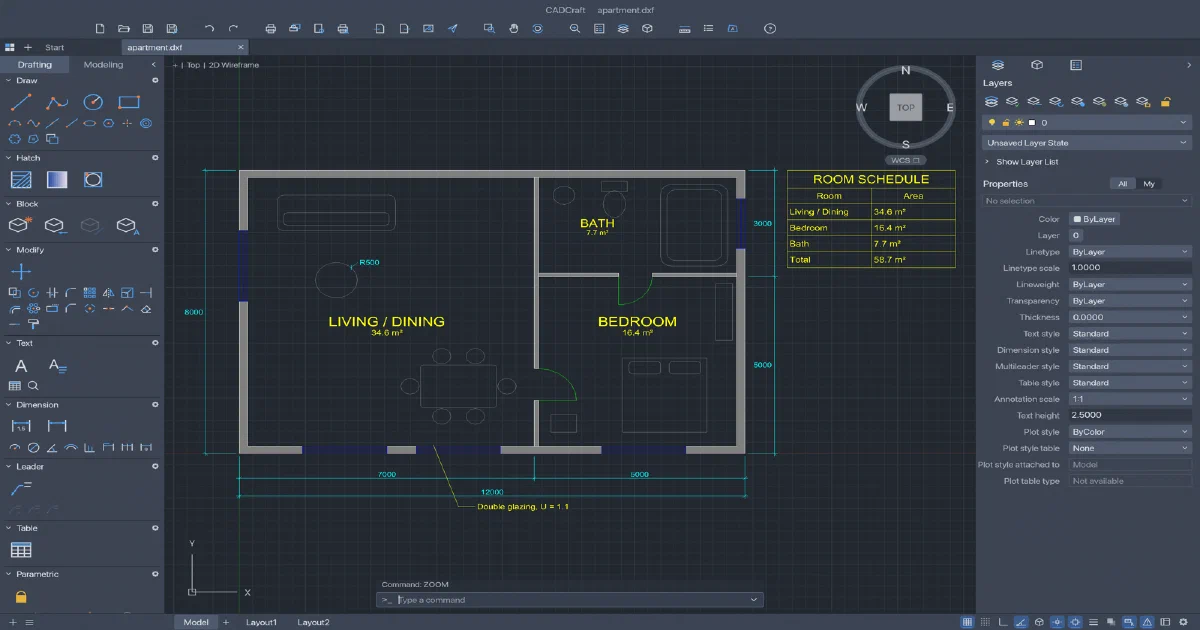

The ArtCraft family is expanding beyond Adobe-style creative tools. PhotoCraft, VectorCraft, FilmCraft, LightCraft and EffectCraft address image, vector, video, RAW and motion workflows. CADCraft moves into engineering drawing: command-line drafting, object snaps, layers, dimensions, hatches, blocks, layouts, constraints and DXF/DWG files.
It is written in Rust, runs natively on macOS, Windows, Linux and FreeBSD, and also ships a browser/WebAssembly build. The browser path is useful for static self-hosting, but there is an important format distinction: native DWG support depends on the acadrust bridge and is not available in WASM.
What is CADCraft?
CADCraft is an MIT OR Apache-2.0 licensed CAD and drafting application. Its interaction model will feel familiar to AutoCAD users: type commands, respond to prompts, use relative coordinates and snaps, then refine the drawing through layers, properties and grips.
The project is in early, fast development. It is already useful for exploring 2D drafting and open CAD interchange, but it is not yet a full replacement for AutoCAD, BricsCAD, FreeCAD Part Design or a mature parametric solid modeller.
Drafting workflow
CADCraft includes:
- LINE, PLINE, CIRCLE, ARC, RECTANG, POLYGON, ELLIPSE and SPLINE
- TEXT, MTEXT, TrueType/OpenType fonts and formatting codes
- ERASE, MOVE, COPY, ROTATE, SCALE, MIRROR, STRETCH, OFFSET, TRIM, EXTEND, FILLET, CHAMFER, BREAK, JOIN, EXPLODE, ARRAY and OVERKILL
- Endpoint, midpoint, centre, quadrant, intersection, perpendicular, tangent and nearest snaps
- Polar tracking, ortho, grid snap, direct distance entry and relative coordinates such as
@5<45 - Layers with on/off, freeze, lock, plot, colour, linetype and lineweight settings
- Properties palette, grips, selection windows and command history
- Dimensions, dimension styles, associative dimensions, leaders, multileaders and tables
- Blocks, inserts, attributes, nested blocks and hatch boundaries with islands
- Geometric/dimensional constraints, expressions, conflict detection and AutoConstrain
Paper-space layouts, viewports, page setups, MSPACE/PSPACE, PLOT and PDF export are also present. That makes it more than a simple geometry viewer: it has the beginnings of a complete technical drawing workflow.
DXF, DWG and export
DXF is CADCraft’s most important open interchange path. It reads ASCII and binary DXF from R12 through 2018 and writes R2000 DXF. It also exports SVG, PNG and PDF, reusing the same display list for screen rendering, plot preview and output.
Native builds add DWG support for R13 through 2018 through the open-source acadrust bridge. CADCraft converts DWG through a DXF boundary, then maps it into its own document model. The dwg crate is native-only, so the browser/WASM build cannot promise the same DWG workflow.
CADCraft stores some application-specific information in xdata, including constraints and associativity details. Unsupported entities may not survive a save. Keep original drawings and validate round trips, especially when files contain entities CADCraft does not model yet.
Is CADCraft a 2D or 3D application?
The project presents itself as 2D and 3D CAD, and it has geometry, view and early 3D-related support. The current architecture documentation is more conservative: it lists no 3D solids, surfaces, meshes, regions/ACIS, multilines, tolerance frames or underlays in the model.
Treat it today as an AutoCAD-style 2D drafting tool with early 3D direction, not as a replacement for Blender, FreeCAD Part Design, OpenSCAD or a full mechanical CAD kernel. It is well suited to floor plans, technical drawings, diagrams and DXF-based workflows.
Desktop or browser app?
Both. The native app is the complete route, including local filesystem access and native DWG support. The browser build uses the shared Rust engine and egui UI compiled to WebAssembly, with WebGPU and WebGL2 fallback.
The browser can open files through a file picker and download DXF, SVG, PNG or PDF outputs. It does not need an account, backend, database or API key. It is particularly suitable for hosting a private drawing viewer/editor at a URL, provided the files are opened locally or uploaded by the user into the browser session.
Static self-hosting on Cloudflare Pages
CADCraft can be deployed to Cloudflare Pages, Netlify, GitHub Pages, Nginx, Caddy or another static server. From source:
rustup target add wasm32-unknown-unknown
cargo install trunk --locked
git clone https://github.com/storytold/cadcraft
cd cadcraft/apps/cadcraft-web
trunk build --release
Publish dist/web. The upstream packaging/web directory includes Cloudflare/Netlify headers and an Nginx example. Serve .wasm as application/wasm, serve JavaScript correctly, compress WASM/JS/HTML, cache hashed assets immutably and revalidate index.html. HTTPS is recommended for WebGPU and clipboard features outside localhost.
This is static delivery, not a CAD collaboration server. There is no shared project database, login, permissions model, R2 bucket, Worker API or server-side render queue. For centralized drawings, add a separate Git/object-storage/application layer around the browser editor, or use the native CLI and a repository-based workflow.
CLI, scripts and agents
cargo run --release -p cadcraft -- --sample
cargo run --release -p cadcraft -- --control 7979
cargo run --release -p cadcraft-cli -- info drawing.dxf
cargo run --release -p cadcraft-cli -- convert drawing.dxf drawing.svg
cargo run --release -p cadcraft-cli -- run --sample \
  --script 'CIRCLE 22,3 1\n' --save out.dxf --export out.png
cargo run --release -p cadcraft-cli -- mcp
MCP exposes command-line input, JSON command execution, drawing inspection, entity queries and rendering. When attached to the native app it can also take screenshots and click UI controls. The command registry is shared by menus, the command line, scripts, CLI, control channel and MCP.
Keep the native control port on localhost or behind intentional authentication. MCP and the control channel are automation interfaces, not multi-user authorization systems.
CADCraft compared with the ArtCraft series
| Project | Main reference | Focus | Browser/self-hosting |
|---|---|---|---|
| PhotoCraft | Photoshop | Pixels, layers, masks and PSD | Static WASM |
| VectorCraft | Illustrator | Paths, SVG, typography and vectors | Static WASM |
| FilmCraft | Premiere Pro | Video, audio, timelines and codecs | Static WASM |
| LightCraft | Lightroom | Photo library, RAW development and cataloguing | Static WASM with local browser library |
| EffectCraft | After Effects | Motion graphics and compositing | Static WASM PWA |
| CADCraft | AutoCAD-style CAD | Technical drawing, DXF/DWG and constraints | Static WASM; DWG native-only |
CADCraft shares the family’s Rust, egui, command registry, native/browser and MCP direction, but its expectations are different. CAD users care about entity fidelity, units, snaps, associative dimensions, plot output and file round trips more than visual effect breadth.
Field note
The review checkout was pinned to commit f2b35e957e208cac1fe72182db214786ad6ffa8b from 2026-10-25. I ran the focused I/O test with:
cargo test -p cadcraft-io --lib --locked
The full desktop and browser builds were not run because the workspace compiles graphics, PDF and CAD-format dependencies and the host has limited free disk. The static deployment and native-only DWG conclusions come from the project’s web package, Trunk configuration and architecture documentation.
FAQ
Is CADCraft desktop-only?
No. It has native desktop builds and a static WebAssembly browser build. Use the native app for full filesystem and DWG workflows; use the browser edition for DXF-oriented drawing and static self-hosting.
Can I deploy CADCraft to Cloudflare Pages?
Yes. Publish the official static release or the output of trunk build --release. No Cloudflare API key, Worker, D1, KV, R2, database or login is required for the basic application.
Does the browser version support DWG?
Not with the same native path. DWG is handled by the native-only acadrust bridge. The browser build should be treated as the DXF/web route, with SVG, PNG and PDF export available through the shared engine.
Is it a replacement for AutoCAD?
Not yet. It has a familiar command workflow and a broad 2D drafting surface, but it is early development. Proprietary DWG fidelity, unsupported entities, full 3D solids, plugins, advanced AutoCAD behaviour and production maturity remain gaps.
Is it a replacement for FreeCAD, CalculiX BESO or Blender?
It overlaps only partially, and CalculiX BESO is a different category altogether.
| Tool | Best fit | Relationship to CADCraft |
|---|---|---|
| CADCraft | AutoCAD-style 2D drafting, DXF/DWG drawings and layouts | Creates and edits technical drawings |
| FreeCAD | Parametric 3D solids, assemblies and engineering workbenches | Stronger for editable mechanical and architectural solids |
| CalculiX + BESO | Finite-element analysis and topology optimization | Optimizes material distribution from structural-load constraints; it is not a CAD editor |
| Blender | General 3D modelling, animation, materials and rendering | Stronger for visual 3D, animation and rendering |
CADCraft can be part of a wider workflow: prepare or annotate a drawing, move geometry through FreeCAD or Blender, and use a CalculiX/BESO pipeline for structural analysis and topology optimization. It does not run CalculiX, provide a finite-element mesh/solver, or perform BESO optimization itself.
Can I use it for house plans?
Yes. The repository includes an apartment-plan example with walls, windows, doors, furniture outlines, room labels, hatches, dimensions, a table and multileader notes. It can complement House Planner or Blender workflows, but it does not yet provide a complete BIM or architectural modelling stack.
Can agents automate it?
Yes. Use cadcraft-cli, scripts, MCP or the native JSON control channel. Agents can type commands, execute JSON commands, inspect entities, render drawings and take screenshots. Keep the control port private because it does not provide public authentication or tenant isolation.
What happens to unsupported CAD entities?
They may not survive a save because CADCraft maps files into its own document model. Preserve originals and test round trips against the project’s file-format parity documentation before using it on important DWG/DXF files.
What license applies?
CADCraft is available under MIT or Apache-2.0. The acadrust bridge and bundled fonts/assets have their own notices. The ArtCraft name and logos are trademarks.
Comments