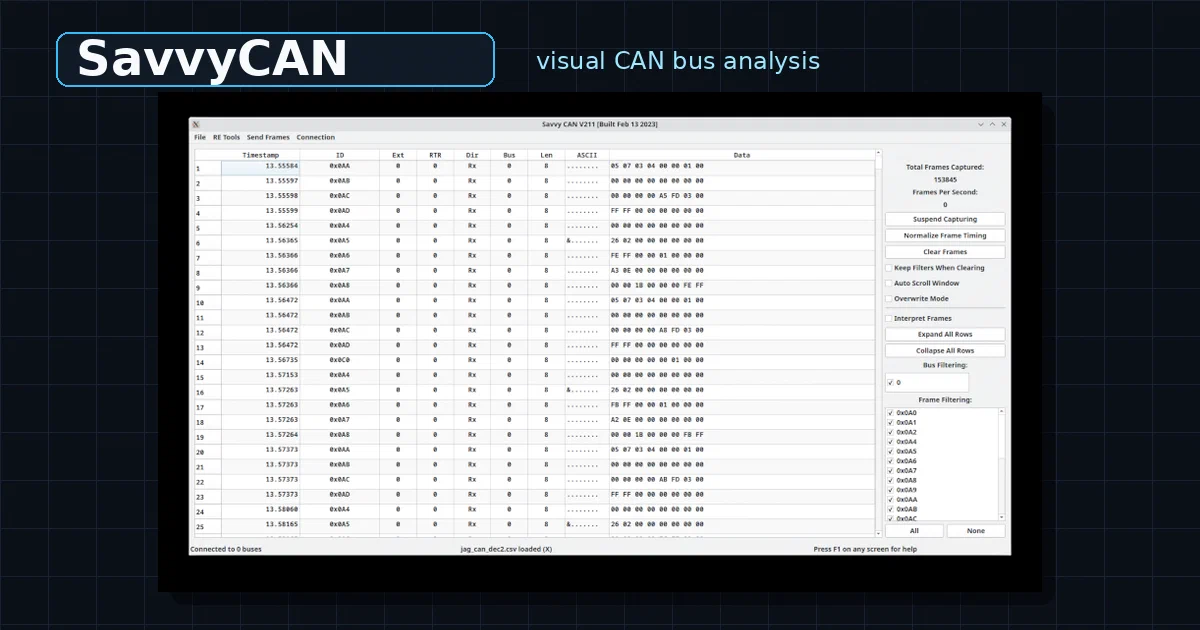

SavvyCAN is the visual half of the CAN-bus workflow.
In the previous post, opendbc gave us DBC files, Python parsers, CAN packers, car interfaces, and safety-oriented vehicle-interface code.
SavvyCAN sits one step earlier in the workflow: looking at CAN traffic, filtering it, graphing it, loading DBC files, and figuring out what the bytes might mean.
SavvyCAN is an open-source Qt desktop application for loading, saving, capturing, visualizing, debugging, and reverse-engineering CAN bus frames.
SavvyCAN GitHub Source Code SavvyCAN Releases License: MIT
What is SavvyCAN?
SavvyCAN is a cross-platform CAN bus desktop tool built with Qt.
It can work with live capture hardware, but that is not required for the first useful experiment.
The repo ships example logs and DBC files, and the README explicitly notes that capture hardware is not required to make use of the program.
The core jobs are:
- load CAN logs
- save CAN captures
- filter frames by ID and bus
- visualize changing bytes and bits
- load and edit DBC files
- interpret frames with DBC signal definitions
- graph decoded signals
- compare files
- replay frames
- send custom frames
- inspect ISO-TP, J1939, and UDS traffic
That makes it a natural companion to opendbc.
SavvyCAN helps you see and reverse-engineer CAN traffic. opendbc helps you package the final understanding into reusable DBC definitions and Python tooling.
Why It Matters
A raw CAN log is difficult to read.
You might see:
13.55584  0x0AA  05 07 03 04 00 00 01 00
13.55597  0x0A8  00 00 00 00 00 00 00 00
13.55598  0x0AC  00 00 00 00 A5 FD 03 00
That is not enough by itself.
You still need to answer:
- Which IDs are active?
- Which bytes change when I press the brake?
- Which bits move when steering angle changes?
- Which frames are periodic background noise?
- Which bus did a frame come from?
- Which DBC file decodes this message?
- Which values are scaled or enumerated?
SavvyCAN gives you a desktop UI for that work.
Its Sniffer view is especially useful for reverse engineering because changing bytes are highlighted, inactive IDs expire, and notching can hide noisy background bits so new changes become visible.
Repository Snapshot
I cloned the repo into:
tmp/foss-post/savvycan
The checkout I inspected:
latest release checked: V220
latest release date: 2025-05-09
license: MIT
language/runtime: C++17 + Qt
Qt requirement in README: Qt 5.14+
local source build status: not attempted; qmake/qmake6 not installed locally
The useful project layout:
| Path | What It Contains |
|---|---|
SavvyCAN.pro |
qmake project file |
connections/ |
GVRET, LAWICEL, SocketCAN, socketcand, MQTT, serial, and Qt SerialBus connections |
dbc/ |
DBC manager, editor, message editor, node editor, signal editor |
bus_protocols/ |
ISO-TP, J1939, and UDS handling |
re/ |
reverse-engineering views: sniffer, graphing, flow, fuzzing, file compare, UDS scanner |
examples/ |
sample logs, DBC files, and scripts |
help/ |
bundled help pages and UI screenshots |
test/ |
Qt test project |
The .pro file pulls in Qt modules including serialbus, serialport, widgets, help, network, and opengl, which explains why a generic minimal Qt install is not enough for source builds.
Installing SavvyCAN
The latest release I checked is V220.
It publishes:
- Linux:
SavvyCAN-7c576c5-x86_64.AppImage - Windows:
SavvyCAN-Windows_x64_CIBuild.zip - macOS Apple Silicon:
SavvyCAN_arm64.dmg - macOS Intel:
SavvyCAN_x64.dmg
Linux AppImage
For Linux, the AppImage path is the simplest:
wget -O SavvyCAN.AppImage https://github.com/collin80/SavvyCAN/releases/download/V220/SavvyCAN-7c576c5-x86_64.AppImage
chmod +x SavvyCAN.AppImage
./SavvyCAN.AppImage
If you use AppImageLauncher, download the AppImage and open it from your file manager. AppImageLauncher should offer to integrate it into your desktop menu.
Windows
Download SavvyCAN-Windows_x64_CIBuild.zip, extract it, and run the included executable.
macOS
Download the correct DMG:
- Apple Silicon:
SavvyCAN_arm64.dmg - Intel:
SavvyCAN_x64.dmg
Then open the DMG and launch SavvyCAN.
Building from Source
The upstream README gives the source build path:
git clone https://github.com/collin80/SavvyCAN.git
cd SavvyCAN
~/Qt/5.14/gcc_64/bin/qmake
make
./SavvyCAN
On Ubuntu-like systems, if qmake fails with missing Qt modules such as qml, serialbus, or help, the README suggests:
sudo apt install libqt5serialbus5-dev libqt5serialport5-dev qtdeclarative5-dev qttools5-dev
What You Can Load
SavvyCAN can load and save several CAN log formats.
The README lists support for:
- BusMaster log files
- Microchip log files
- CRTD / OVMS logs
- GVRET native format
- Generic CSV files with ID and data bytes
- Vector Trace files
- IXXAT Minilog files
- CAN-DO logs
- Vehicle Spy logs
- CANDump / Kayak, read-only
- PCAN Viewer, read-only
- Wireshark SocketCAN PCAP, read-only
The repo also includes example material:
examples/BusMasterLog.log
examples/CRTD_Log.txt
examples/GVRET_Log.csv
examples/GenericID_Log.csv
examples/CarBusAnalyzer.trc
examples/candump.log
examples/LeafPowertrainBus.dbc
examples/ThinkCity.dbc
examples/bms.dbc
That means you can learn the UI without plugging into a vehicle.
Where SavvyCAN Fits with opendbc
SavvyCAN and opendbc are complementary.
| Workflow Step | Tool |
|---|---|
| Load and inspect raw CAN logs | SavvyCAN |
| Watch changing bytes and bits | SavvyCAN Sniffer |
| Graph candidate signals | SavvyCAN graphing tools |
| Create or refine DBC definitions | SavvyCAN DBC editor |
| Reuse DBCs from Python | opendbc |
| Build repeatable parsers and packers | opendbc |
| Maintain vehicle interface code | opendbc |
The practical workflow looks like this:
- Capture or load a CAN log in SavvyCAN.
- Use filters and Sniffer to isolate active IDs.
- Move one vehicle control at a time and watch which bits change.
- Create or refine DBC signal definitions.
- Export or save the DBC.
- Use that DBC from Python with opendbc when you need repeatable tooling.
SavvyCAN is where you explore. opendbc is where you encode the result.
Safety Notes
SavvyCAN is powerful enough to send frames, fuzz messages, bridge buses, run scripts, and inspect diagnostics.
That also means it is not a toy.
Start with saved logs and DBC interpretation.
Do not send frames to a real vehicle unless you understand the bus, the hardware adapter, the vehicle state, and the safety implications.
Keep any active sending, fuzzing, or diagnostic work off public roads and inside a controlled environment.
This is the same boundary as the opendbc post: reading and decoding logs is one risk level; interacting with real vehicle control systems is another.
FAQ
Is SavvyCAN a self-hosted app?
No. It is a desktop Qt application, not a web app.
There is no Docker Compose service to add for it.
Can I use SavvyCAN without CAN hardware?
Yes. You can load saved logs, sample files, and DBC files without a capture device. That is the best first step.
What hardware does it support?
The README recommends CANDue with GVRET firmware and also says SavvyCAN can use Qt SerialBus drivers such as SocketCAN, Vector, PeakCAN, and TinyCAN.
Why use SavvyCAN if I already have opendbc?
opendbc is the reusable Python/API layer. SavvyCAN is the visual exploration layer. Use SavvyCAN when you are trying to discover what messages and signals mean; use opendbc when you want to automate or package that knowledge.
Where do can-utils and python-OBD fit?
can-utils is the Linux SocketCAN command-line toolkit for capturing, sending, replaying, and sniffing CAN frames. python-OBD is a higher-level OBD-II library for reading diagnostic/engine data through common serial adapters. SavvyCAN is the visual exploration layer between raw logs and reusable DBC knowledge.
Can SavvyCAN load DBC files?
Yes. SavvyCAN has a DBC file manager and editor. It can load multiple DBC files and associate them with buses so frames can be interpreted as named signals.
What should I try first?
Open one of the included example logs, load one of the included example DBC files, enable frame interpretation, and then open the Sniffer or Graphing views.
Learn on static logs before touching live hardware.
Comments