

Most CAD software either costs thousands per seat or forces you into a cloud subscription that owns your files.
FreeCAD takes the opposite approach: a fully open-source parametric CAD modeller built on the same professional geometry kernel (OpenCASCADE) used by commercial tools, licensed under LGPL, and capable of running completely without a display server for batch automation and CNC pipelines.
What is FreeCAD?
FreeCAD is a general-purpose parametric 3D CAD modeller aimed at mechanical engineers, product designers, architects, and makers.
Parametric means that every dimension in your model is a parameter — change the diameter of a bolt hole and every pocket, fillet, and drawing that references it updates automatically.
“FreeCAD is a free and open-source general-purpose parametric 3D computer-aided design modeler and a building information modeling software with finite element method support.”
FreeCAD Source Code on GitHub FreeCAD Website FreeCAD Wiki
Why engineers and makers choose FreeCAD
- 📐 Parametric modelling — history-based design where changing one dimension cascades through the entire model
- 🔩 Professional geometry kernel — OpenCASCADE (OCCT), the same technology underlying many commercial CAD tools
- 🏗️ Workbench system — domain-specific toolsets for FEM, CNC, BIM, technical drawings, and more, all in one app
- 🐍 Python scripting — every object, feature, and operation is accessible from Python for automation and custom tools
- 📄 STEP, IFC, STL, DXF — comprehensive import/export for industry-standard CAD interchange formats
- 🖥️ Headless CLI — run FreeCAD on a server without a display, batch-process designs, integrate into CI/CD pipelines
- ⚖️ LGPL v2.1+ — free for commercial use, modifications must be shared, linking in proprietary software permitted
How Parametric CAD Works in FreeCAD
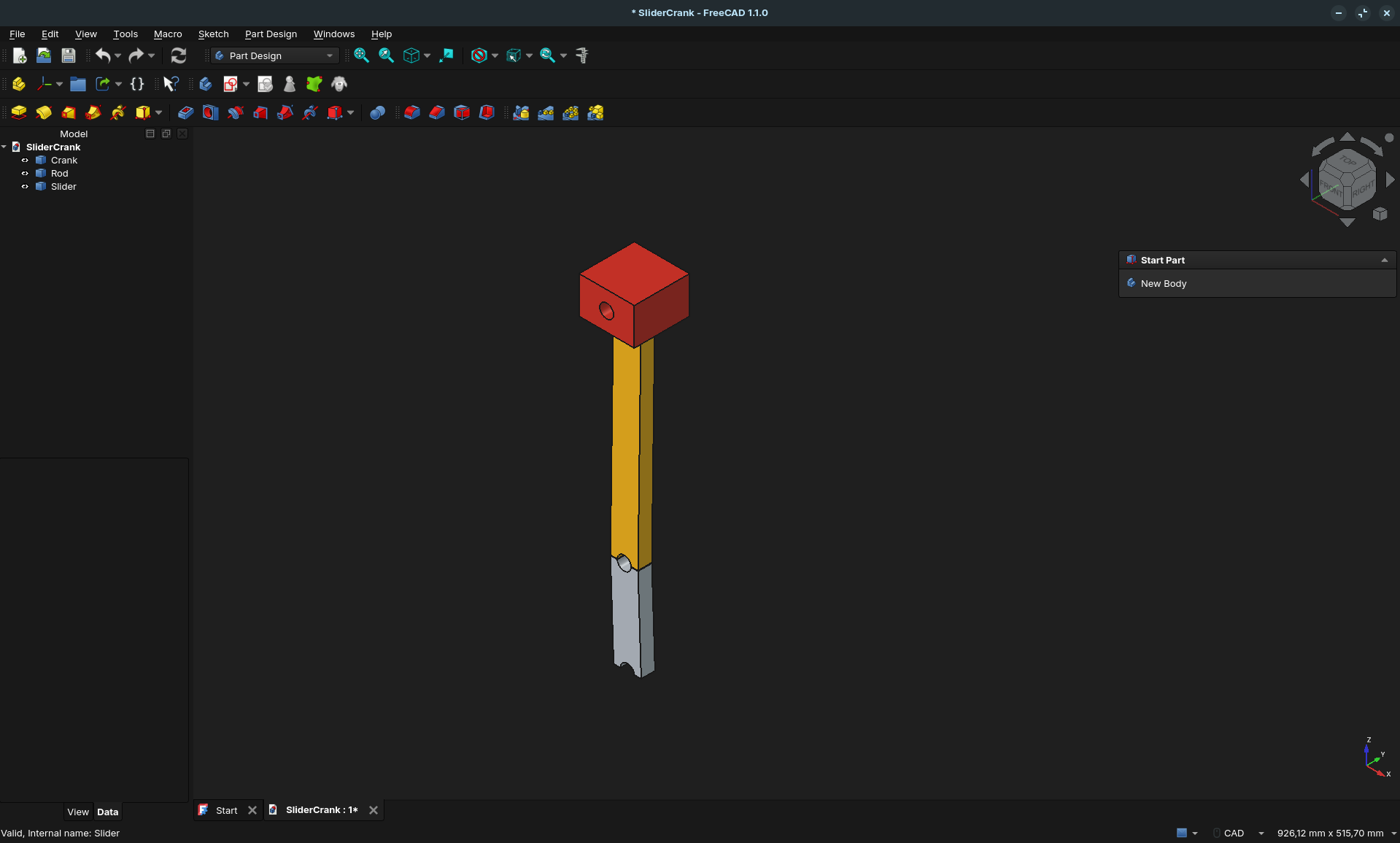
The PartDesign workflow is the recommended approach for solid part modelling:
- Sketch — draw a 2D shape in the Sketcher workbench and fully constrain it with geometric and dimensional constraints
- Feature — apply a 3D operation: Pad (extrude), Pocket (cut), Revolution, Loft, or Sweep
- Refine — add Fillets, Chamfers, Shell operations
- Repeat — build up a feature tree; every step is editable by double-clicking it
Change the sketch dimension or any feature parameter — FreeCAD re-evaluates the entire tree and the model updates.
This is the parametric promise, and FreeCAD delivers it without a subscription.
The Workbench System
FreeCAD organises tools into workbenches — domain-specific toolsets that load on demand.
You switch between them as your workflow moves from sketching to machining to analysis:
Modelling
| Workbench | What it does |
|---|---|
| Sketcher | Constraint-based 2D geometry — the foundation for all PartDesign features |
| Part | Direct CSG modelling — primitives, boolean union/cut/common |
| PartDesign | Feature-based history modelling — the primary workflow for mechanical parts |
| Assembly | Multi-body assemblies with joint-based positioning constraints |
| Surface | Advanced Bézier / B-spline surface modelling |
| Draft | 2D CAD drafting with DXF import/export |
Engineering
| Workbench | What it does |
|---|---|
| TechDraw | Generate technical drawings with orthographic views, sections, annotations, and dimensions — export to PDF or SVG |
| CAM / Path | CNC machining — define toolpaths, simulate material removal, export G-code |
| FEM | Finite Element Analysis — static structural, thermal, and fluid analysis via Calculix |
Architecture
| Workbench | What it does |
|---|---|
| BIM | Building Information Modelling — walls, slabs, roofs, columns, with full IFC 2x3/4 import and export |
Data & Automation
| Workbench | What it does |
|---|---|
| Spreadsheet | Link cells directly to model parameters — data-driven parametric design |
| Material | Material card database (density, Young’s modulus, etc.) shared across FEM and BIM |
| AddonManager | Discover and install community workbenches with one click |
File Format Support
FreeCAD’s geometry kernel (OpenCASCADE) handles the heavy lifting for CAD exchange formats:
| Category | Formats |
|---|---|
| CAD exchange | STEP (with colours), IGES, BREP |
| Mesh / 3D printing | STL, OBJ, 3MF, AMF, PLY, glTF/GLB, Collada |
| Architecture | IFC 2x3, IFC 4, DXF, DWG (via LibreDWG) |
| 2D output | SVG, PDF (TechDraw) |
| Manufacturing | G-code (CAM workbench) |
| Web 3D | glTF / GLB |
| Interchange | Alembic, OpenSCAD CSG |
| Native | .FCStd (zipped XML + geometry) |
STEP import/export is particularly solid — colours, product hierarchy, and metadata survive the round-trip, which is essential for collaborating with teams using commercial CAD tools.
Installing FreeCAD
Desktop (interactive use)
Linux
AppImage — the most reliable way to get the current release on any Linux distribution:
# Download from GitHub Releases
wget https://github.com/FreeCAD/FreeCAD/releases/download/1.0.0/FreeCAD_1.0.0-conda-Linux-x86_64-py311.AppImage
chmod +x FreeCAD_*.AppImage
./FreeCAD_*.AppImage
Flatpak (sandboxed, auto-updates):
flatpak install flathub org.freecadweb.FreeCAD
flatpak run org.freecadweb.FreeCAD
Snap:
snap install freecad
Distribution packages (often lag behind current release):
sudo apt install freecad          # Ubuntu / Debian
sudo pacman -S freecad            # Arch Linux
sudo dnf install freecad          # Fedora
Windows and macOS
Download the installer from GitHub Releases .
- Windows:
.exeinstaller or portable.zip - macOS:
.dmgdisk image — works on both Intel and Apple Silicon
Headless server (no display required)
This is where FreeCAD becomes a pipeline tool. The freecadcmd binary is FreeCAD’s console entry point — no Qt, no Coin3D, no OpenGL:
# On Ubuntu/Debian
sudo apt install freecad-python3

# Run a Python automation script
freecadcmd my_script.py

# Interactive headless session
freecadcmd
>>> import FreeCAD, Part
>>> doc = FreeCAD.open("bracket.FCStd")
>>> Part.export(doc.Objects, "bracket.step")
No DISPLAY variable, no virtual framebuffer, no desktop session.
A plain Ubuntu Server 24.04 VM is sufficient.
Automating FreeCAD with Python
The Python API is first-class — every document object, every workbench operation, every property is accessible programmatically.
This is what enables batch processing, automated design variants, and integration with external data sources.
Create and export a parametric model
import FreeCAD as App
import Part

doc = App.newDocument("BracketBatch")

# Create a box
box = doc.addObject("Part::Box", "Bracket")
box.Length = 80.0   # mm
box.Width  = 40.0
box.Height = 5.0

# Cut a hole
cyl = doc.addObject("Part::Cylinder", "Hole")
cyl.Radius = 6.0
cyl.Height = 10.0
cyl.Placement.Base = App.Vector(40, 20, -2)

cut = doc.addObject("Part::Cut", "BracketHole")
cut.Base = box
cut.Tool = cyl
doc.recompute()

# Export
Part.export([cut], "/output/bracket.step")
cut.Shape.exportStl("/output/bracket.stl")
print("Volume:", cut.Shape.Volume, "mm³")
Run it headlessly:
freecadcmd bracket_gen.py
Drive a model from a spreadsheet
The Spreadsheet workbench lets you link cell values directly to model parameters.
In a headless script you can update those cell values before recomputing — effectively using FreeCAD as a parametric design engine driven by external data:
import FreeCAD as App

doc = App.open("parametric_bracket.FCStd")
sheet = doc.getObject("Spreadsheet")

# Update parameters from external source
sheet.set("B2", "120")   # Length
sheet.set("B3", "60")    # Width
doc.recompute()

import Part
bracket = doc.getObject("Bracket")
Part.export([bracket], "/output/bracket_120x60.step")
Running FreeCAD in Docker
No official image exists, but the headless build runs cleanly in a container:
FROM ubuntu:24.04

RUN apt-get update && apt-get install -y --no-install-recommends \
    freecad-python3 && \
    rm -rf /var/lib/apt/lists/*

ENTRYPOINT ["freecadcmd"]
docker build -t freecad-headless .

docker run --rm \
  -v /path/to/models:/models \
  -v /path/to/output:/output \
  freecad-headless \
  /models/process_all.py
For a more current FreeCAD version, mount the AppImage into the container instead of using the distro package.
The CNC / CAM Pipeline
The CAM workbench (formerly Path) turns FreeCAD into a complete CNC pre-processor:
- Import or model the part — STEP import or native PartDesign
- Define a Job — set the stock material, machine coordinate system, and post-processor
- Add operations — Profile, Pocket, Drilling, Adaptive clearing, Engraving
- Simulate — visualise material removal before cutting
- Post-process — export G-code for your specific controller (LinuxCNC, Mach3, Grbl, etc.)
FreeCAD ships post-processor scripts for the most common controllers.
Custom post-processors are Python scripts — drop one in the appropriate directory and it appears in the Job dialog.
FEM: Finite Element Analysis
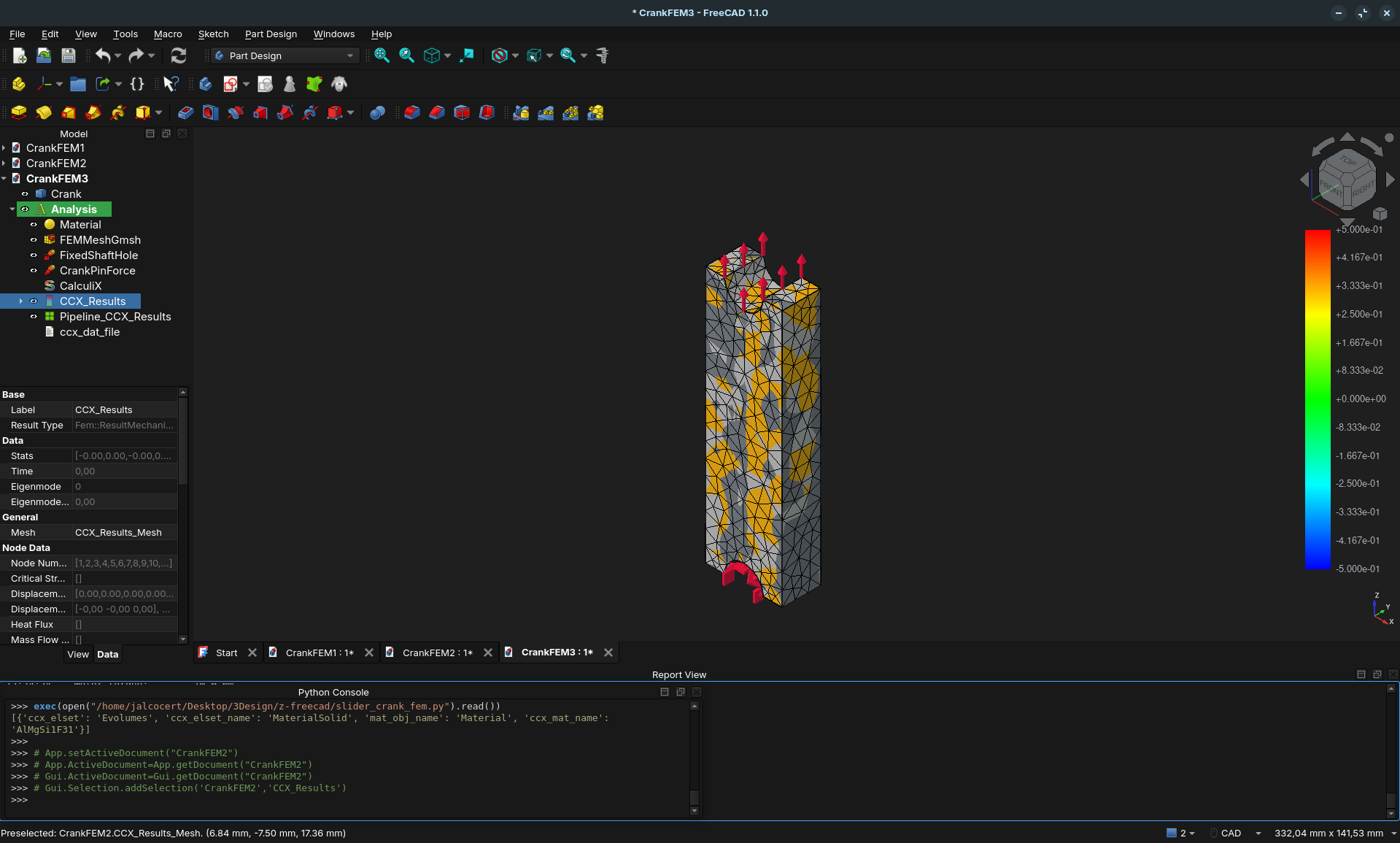
The FEM workbench is a full structural and thermal simulation environment built into FreeCAD.
It uses open-source solvers — primarily CalculiX — with no additional licence cost and no seat limit.
Supported analysis types
| Analysis type | Solver | What you get |
|---|---|---|
| Static stress | CalculiX | von Mises stress, principal stresses, displacements |
| Modal / frequency | CalculiX | Natural frequencies and mode shapes |
| Thermal | CalculiX | Temperature distribution, heat flux |
| Buckling | CalculiX | Critical load factors |
| Fluid (basic) | CalculiX | Laminar flow approximation |
| Electrostatics | Elmer FEM | Electric field and potential |
| Magnetostatics | Elmer FEM | Magnetic flux density |
FreeCAD also supports exporting to Z88 and Mystran solvers for specialised analyses.
Typical FEM workflow
1. Assign a material — the Material workbench ships cards for common metals, plastics, and composites (density, Young’s modulus, Poisson’s ratio, thermal conductivity).
Custom .FCMat cards go in your user material directory.
2. Apply constraints — right-click faces, edges, or vertices:
- Fixed support (all DOF locked)
- Force (distributed or concentrated)
- Pressure (normal to face)
- Displacement (partial constraint)
- Fixed temperature / heat flux (thermal)
- Contact (bonded or sliding between bodies)
3. Mesh the geometry — FreeCAD bundles Salome SMESH and can call Gmsh (install separately).
Choose mesh density per region with mesh refinements on fillets and stress concentrations. Tetrahedral elements for complex organic shapes; hexahedral (Gmsh) for structured grids.
4. Run the solver — CalculiX is launched as a subprocess.
A typical bracket analysis on a modern laptop completes in seconds.
The .inp input file is written to a temp directory and can be inspected or submitted to a remote HPC cluster.
5. Visualise results — the FEM workbench renders colour maps directly in the FreeCAD viewport:
- von Mises stress (identify yield risk)
- Displacement magnitude (deformation scale factor adjustable)
- Principal stress vectors
- Temperature and heat flux for thermal runs
Results can also be exported to VTK format for post-processing in ParaView.
Scripting FEM headlessly
import FreeCAD as App
import ObjectsFem
import femmesh.gmshtools as gmsh

doc = App.open("bracket.FCStd")
analysis = doc.addObject("Fem::FemAnalysis", "Analysis")

# Add material
mat = ObjectsFem.makeMaterialSolid(doc, "Steel")
mat.Material = {"YoungsModulus": "210000 MPa", "PoissonRatio": "0.30"}
analysis.addObject(mat)

# Mesh, solve, export results
# (full scripting documented on wiki.freecad.org/FEM_Scripting)
doc.recompute()
CFD: Computational Fluid Dynamics with CfdOF + OpenFOAM
For actual fluid dynamics — external aerodynamics, internal pipe flow, heat exchangers, fan performance — FreeCAD pairs with CfdOF and OpenFOAM to form a complete open-source CFD pipeline.
CfdOF is a FreeCAD community add-on that provides a GUI front-end for OpenFOAM.
OpenFOAM is the industry-standard open-source CFD solver used by automotive OEMs, aerospace companies, and research institutions worldwide.
CfdOF Source Code on GitHubWhat you can simulate
| Use case | OpenFOAM solver | Example |
|---|---|---|
| Incompressible external flow | simpleFoam |
Drag/lift on a wing or car body |
| Incompressible internal flow | simpleFoam |
Pipe networks, valve pressure drop |
| Transient flow | pimpleFoam |
Vortex shedding, pulsating flows |
| Compressible flow | rhoCentralFoam |
Supersonic nozzles |
| Heat transfer | buoyantSimpleFoam |
Natural convection, cooling fins |
| Rotating machinery | MRFSimpleFoam |
Fans, impellers, turbines |
| Multiphase | interFoam |
Free-surface flows, sloshing |
Installing CfdOF
Step 1 — Install OpenFOAM on the host (not inside FreeCAD):
# Ubuntu 22.04 / 24.04 — OpenFOAM Foundation build
sudo sh -c "wget -O - https://dl.openfoam.org/gpg.key > /etc/apt/trusted.gpg.d/openfoam.asc"
sudo add-apt-repository http://dl.openfoam.org/ubuntu
sudo apt-get update
sudo apt-get install openfoam11

# Source the environment
echo "source /opt/openfoam11/etc/bashrc" >> ~/.bashrc
source ~/.bashrc
Step 2 — Install CfdOF via FreeCAD AddonManager:
Tools → AddonManager → search “CfdOF” → Install
Or manually:
cd ~/.local/share/FreeCAD/Mod
git clone https://github.com/jaheyns/CfdOF
Step 3 — Install cfMesh (the mesher CfdOF uses by default):
In FreeCAD: CfdOF → CfdOF Preferences → Install cfMesh
CFD workflow in FreeCAD + CfdOF
1. Create or import your geometry — model the fluid domain in PartDesign, or import a STEP file.
For external aero, create a wind-tunnel box around the object using Part boolean operations and subtract the body (difference()) to get the fluid volume.
2. Set up the analysis — switch to the CfdOF workbench, create a CFD Analysis object, and choose the solver type (simpleFoam for steady incompressible, etc.).
3. Mesh with cfMesh or snappyHexMesh — CfdOF calls cfMesh automatically. Configure:
- Base mesh cell size
- Surface refinement on walls and edges
- Boundary layer (prism layers) for accurate near-wall treatment
CfdOF → Mesh → Create → Set cell size → Run cfMesh
4. Set boundary conditions — click each face of the fluid domain and assign:
- Inlet: velocity or pressure (U = [30 m/s, 0, 0])
- Outlet: zero-gradient pressure
- Walls: no-slip (solid surfaces)
- Symmetry planes: for half-domain simulations
5. Set physics — turbulence model (k-omega SST is the standard for external aero), fluid properties (density, viscosity), solver iterations and convergence tolerance.
6. Run OpenFOAM — CfdOF writes the OpenFOAM case directory (constant/, system/, 0/), then launches the solver as a subprocess. Residual plots update live in FreeCAD.
7. Post-process in ParaView — CfdOF opens ParaView automatically on completion. Visualise:
- Pressure coefficient distribution
- Velocity streamlines
- Wall shear stress
- Force and moment coefficients (drag, lift)
The OpenFOAM case directory
CfdOF writes a standard OpenFOAM case structure you can inspect, tweak, and rerun from the terminal:
MyAnalysis/
├── constant/
│   ├── polyMesh/          # Mesh from cfMesh
│   └── transportProperties
├── system/
│   ├── controlDict        # Time steps, output frequency
│   ├── fvSchemes          # Discretisation schemes
│   └── fvSolution         # Linear solver settings
└── 0/
    ├── U                  # Initial/boundary velocity
    ├── p                  # Initial/boundary pressure
    ├── k                  # Turbulence kinetic energy
    └── omega              # Specific dissipation rate
This means advanced users can bypass CfdOF entirely and run OpenFOAM from the command line — CfdOF is a convenience layer, not a lock-in.
Running CFD on a remote server
OpenFOAM scales to HPC clusters via MPI. Run the mesh generation locally in FreeCAD+CfdOF, then copy the case directory to a server and run:
# On the HPC node
source /opt/openfoam11/etc/bashrc
cd MyAnalysis
decomposePar                         # split domain across cores
mpirun -np 32 simpleFoam -parallel   # run on 32 cores
reconstructPar                       # reassemble for post-processing
The FreeCAD model and the OpenFOAM case are separate — the simulation runs on whatever hardware you have, while the geometry stays in FreeCAD.
LGPL Licence — What It Means
FreeCAD is licensed under LGPL v2.1+, which is significantly more permissive than GPL:
- ✓ Use FreeCAD for commercial projects — no restrictions
- ✓ Distribute FreeCAD with your product — fine with attribution
- ✓ Link against FreeCAD libraries in proprietary software — permitted (unlike GPL)
- ✗ Modify FreeCAD and distribute the modified binary — you must share the modifications
This makes FreeCAD genuinely usable as the backend for commercial design tools, SaaS services that process CAD files, and in-house engineering automation.
Conclusion
FreeCAD has crossed from “promising open-source CAD” to “genuinely useful for real engineering work” with its 1.0 release.
The combination of OpenCASCADE’s professional geometry kernel, the modular workbench system, and a fully scriptable Python API puts it in a category of its own in the FOSS world.
For self-hosters and DevOps engineers: the headless freecadcmd CLI and the Docker-friendly architecture make FreeCAD a first-class automation engine for parametric design pipelines, automated STEP/STL exports, and CNC job preparation.
Related tools worth knowing:
- CadQuery — Python-first parametric CAD also using OpenCASCADE; code-only, no GUI, great for programmatic part generation
- OpenSCAD — CSG modelling via a scripting language; simpler, less capable, beloved by the maker community; FreeCAD can import .scad files
- KiCad — FOSS PCB design; FreeCAD is the standard companion for the 3D mechanical enclosure
- Blender — complements FreeCAD for rendering and organic shapes; STEP export from FreeCAD → Blender is a common workflow
Frequently Asked Questions
What is the difference between Part and PartDesign workbenches?
Part is for CSG (Constructive Solid Geometry) modelling — you combine primitives with boolean operations. PartDesign is feature-based: you sketch a 2D profile and apply operations (Pad, Pocket, Revolution) to build a feature history.
For mechanical parts, PartDesign is the recommended workflow.
Part is useful for quick operations and working with imported geometry.
Can FreeCAD open Fusion 360 or SolidWorks files directly?
Not natively. Fusion 360 can export STEP or STL, and FreeCAD imports both. SolidWorks files (.sldprt, .sldasm) are proprietary — you need the source application to export to STEP first. Once you have a STEP file, FreeCAD imports it with full geometry and optionally colours.
Is FreeCAD suitable for large assemblies?
FreeCAD handles moderately complex assemblies well. Very large assemblies (thousands of bodies) can be slow due to the full re-evaluation on parameter change. The Assembly workbench is newer and still maturing. For mechanical complexity beyond a few dozen parts, some users use FreeCAD for individual parts and handle assembly in a dedicated tool.
Does the headless mode support all workbenches?
The headless freecadcmd runs any Python that does not require the GUI layer (FreeCADGui). Part, PartDesign, Sketcher, CAM, and Mesh operations all work headlessly. Anything that opens a dialog or renders a 3D viewport requires the GUI. TechDraw export to SVG/PDF can be scripted headlessly with some workarounds.
How do I install community add-ons without the GUI?
Via AddonManager in the GUI, or manually: clone the add-on repository into FreeCAD’s Mod/ user directory (typically ~/.local/share/FreeCAD/Mod/). The add-on loads automatically on next startup.
What is the .FCStd file format?
A .FCStd file is a ZIP archive containing an XML document tree (Document.xml) and separate binary files for geometry (BREP format via OpenCASCADE). It is fully documented and can be read with any ZIP tool. Geometry is stored in OCCT’s native BREP format — not proprietary binary blobs.
Comments