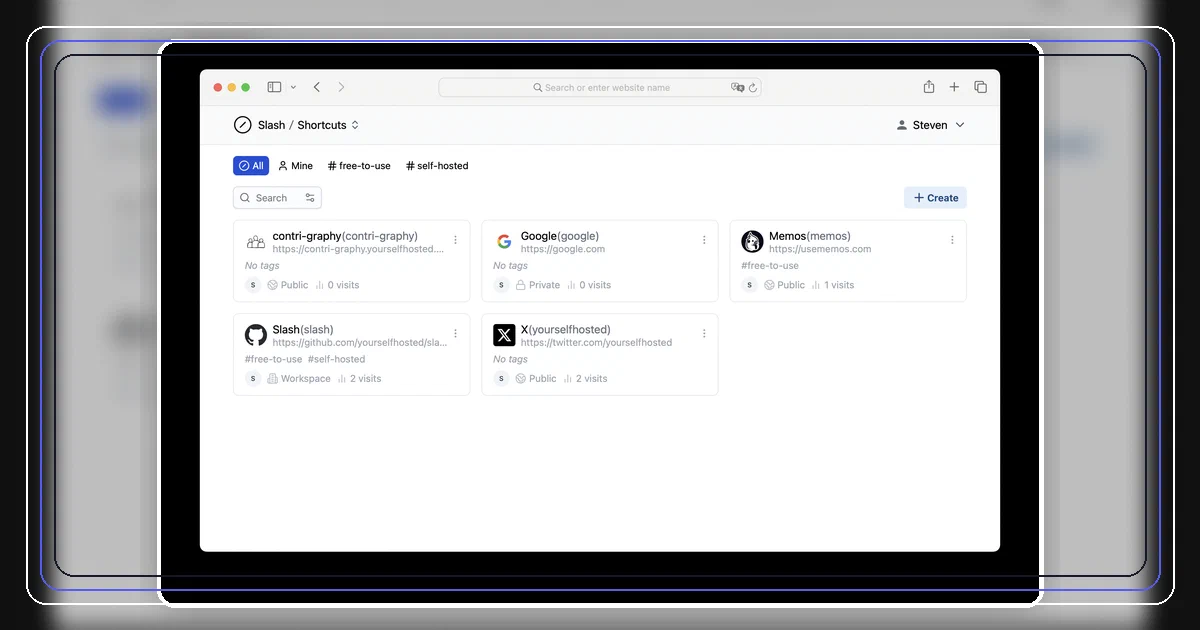

Slash is a useful change of pace in this link-shortener series.
It can shorten links, but the product feels closer to an internal “go links” system: memorable shortcuts, tags, collections, browser extension access, and shared team navigation.
Think s/docs, s/payroll, s/router, or s/client-brief.
Not every link tool needs to be Dub. Sometimes you just want a private, self-hosted place where important links stop disappearing into chat history.
What is Slash?
Slash is an open-source, self-hosted platform for managing and sharing frequently used links.
- Slash GitHub Source Code
- Slash Docker Install Docs
- Slash Shortcuts Docs
- Slash Collections Docs
- License: AGPL-3.0
I inspected:
repo: https://github.com/yourselfhosted/slash
commit: e5a4508b797a5fbdd7c633146152b14a5aba9061
tested image: docker.io/yourselfhosted/slash:latest
tested image digest: sha256:ce3cc51f39f0a55fc7d493e0968949bf3b2d78fe7f5b0f8376f38f4390aaca5d
runtime-reported version: 1.0.0
license: AGPL-3.0
The upstream README describes Slash as:
an open source, self-hosted platform designed to help you organize, manage, and share your most important links.
That wording matters. Slash is not only a URL shortener. It is a shortcut library.
What You Get
Slash gives you:
- human-readable shortcuts under
/s/{name}; - collections under
/c/{name}; - public, workspace, and private visibility options;
- tags and search;
- shortcut titles and descriptions;
- Open Graph metadata;
- basic traffic analytics;
- browser extension support for address-bar shortcuts;
- email/password accounts;
- optional OAuth2 SSO on higher plans;
- SQLite by default;
- PostgreSQL as an optional database backend.
The direct access pattern is the main draw.
If you create a shortcut named router, the access URL is:
https://slash.example.com/s/router
With the browser extension configured, the workflow becomes typing:
s/router
That is why Slash is interesting for a homelab. It can become a personal or family index for admin panels, dashboards, docs, dashboards, invoices, playbooks, Git repos, support portals, and frequently used public links.
Tech Overview
The current stack is:
| Layer | Technology |
|---|---|
| Backend | Go |
| HTTP server | Echo |
| API | gRPC, gRPC-Gateway, gRPC-Web |
| Frontend | React 18, Vite 6, TypeScript, Tailwind, Radix UI |
| Frontend state | Zustand |
| Default database | SQLite |
| Optional database | PostgreSQL |
| Auth | Email/password, JWT cookie |
| Optional SSO | OAuth2 identity providers |
| Browser extension | React/TypeScript extension |
| Container | Alpine runtime image |
The backend runs the HTTP app on port 5231 in Docker. Internally, it also starts a gRPC server on port + 1, then exposes gRPC-Gateway JSON routes and gRPC-Web routes through the same public HTTP service.
For normal Docker users, that internal gRPC detail does not require another published port.
How Slash Redirects
This part surprised me a little.
Slash does not behave like a pure backend 302 redirect service.
For /s/{shortcutName}, the backend:
- looks up the shortcut;
- records a view activity with IP, referrer, user agent, and query parameters;
- injects metadata into the HTML app shell;
- returns the React frontend.
Then the React page fetches the shortcut and, if the target is a URL, redirects the browser with:
window.location.href = target
That is fine for a shortcut manager, but it is different from Shlink or YOURLS style server-side redirects.
If your goal is ultra-fast anonymous redirects at high volume, use Shlink, Kutt, YOURLS, Snapp, or Dub depending on your needs.
If your goal is a convenient self-hosted shortcut dashboard with human-readable internal links, Slash is more natural.
Self-Hosting Slash with Docker
The upstream one-command path is:
docker run -d \
  --name slash \
  -p 5231:5231 \
  -v ~/.slash/:/var/opt/slash \
  yourselfhosted/slash:latest
I added a reusable Home-Lab compose here:
includeyaml: file not found or not allowed by security.filesystem.allow: assets/snippets/slash/docker-compose.yml
The default setup uses SQLite and stores data in the slash_data Docker volume.
Create the .env file from the sample:
cp .env.sample .env
Then start it:
docker compose up -d
Open:
http://localhost:5231
or from another machine on your LAN:
http://YOUR_SERVER_IP:5231
The first account you register becomes the admin user.
Field Note: Local Docker Test
I tested the official Docker image with the default SQLite path.
Commands:
docker run -d \
  --name slash-smoke-20261006 \
  -p 5231:5231 \
  -v /tmp/slash-smoke-20261006/data:/var/opt/slash \
  yourselfhosted/slash:latest

curl -fsS http://127.0.0.1:5231/healthz
Result:
Service ready.
The container logged:
dsn: /var/opt/slash/slash_prod.db
port: 5231
mode: prod
version: 1.0.0
The mounted data directory contained:
slash_prod.db
slash_prod.db-shm
slash_prod.db-wal
I also tested the new Home-Lab compose. It reached Docker health status healthy and returned Service ready. from /healthz.
The first startup logged a warning about missing migration history because the database was empty. After that, Slash created the schema normally.
SQLite or PostgreSQL?
SQLite is the default and the right starting point for a small homelab.
Slash stores the database at:
/var/opt/slash/slash_prod.db
PostgreSQL is supported if you prefer a separate database service:
SLASH_DRIVER=postgres
SLASH_DSN=postgresql://slash:password@postgres:5432/slash?sslmode=disable
For this Home-Lab snippet, I stayed with SQLite because it keeps Slash in the “one container and one volume” category.
Safe Exposure Notes
Slash can be exposed behind Caddy, Traefik, Nginx Proxy Manager, Pangolin, or Cloudflare Tunnel, but use HTTPS if you expose it beyond your LAN.
A few practical notes:
- use a real hostname before configuring the browser extension for daily use;
- make sure
X-Forwarded-FororX-Real-IPheaders are set correctly if you care about analytics; - private links should still be treated as sensitive metadata;
- do not put secrets in shortcut names, titles, or descriptions;
- remember that public shortcuts are intentionally easy to type and easy to guess.
The code path for /s/{name} looks up the shortcut on the backend before the React app finishes its client-side access flow. That is useful for metadata and analytics, but it also means your naming and metadata hygiene matter when the app is internet-facing.
How Slash Compares
| Project | Best fit |
|---|---|
| Slash | Personal/team go links, bookmark shortcuts, collections |
| Snapp | Modern Postgres-backed short links with teams and analytics |
| Kutt | Classic self-hosted shortener with optional Redis |
| Shlink | Mature API/CLI-first URL shortener |
| YOURLS | Lightweight PHP/MySQL classic |
| Sink | Cloudflare-native URL shortener |
| Slite | Local Sink sibling with SQLite and DuckDB |
| Dub | Enterprise-grade attribution and marketing analytics |
| ha.mr | Static URL compression without a backend database |
Slash is the one I would use for “where is that dashboard again?”
It is not the one I would choose for a public marketing campaign with conversion attribution.
FAQ
Is Slash a URL shortener?
Yes, but it is more accurate to call it a shortcut and link-sharing platform. It creates /s/name links, but the UI, browser extension, tags, and collections make it feel like a go-links/bookmark manager.
Does Slash need PostgreSQL?
No. SQLite is the default and works with the single-container Docker deployment. PostgreSQL is optional if you prefer server-style database administration, backups, and monitoring.
What database file should I back up?
With the default Docker setup, back up the Slash data volume. If you copy files while the container is running, include slash_prod.db, slash_prod.db-wal, and slash_prod.db-shm. The cleaner option is to stop the container before copying the database file.
Does Slash use DuckDB like Slite?
No. Slash uses SQLite by default and can use PostgreSQL. Its analytics come from the activity table, where shortcut view events are stored and later aggregated by referrer, device, and browser.
Are all features free when self-hosted?
No. The code is AGPL-3.0, but the product has subscription limits and feature gates. The free plan in code allows 5 seats, 100 shortcuts, and 5 collections. SSO, advanced analytics, unlimited usage, and custom branding are gated behind license features.
Is Slash good for a homelab?
Yes, especially as a memorable shortcut layer for internal services. Examples: /s/router, /s/nas, /s/grafana, /s/paperless, /s/wiki, or /s/cloudflare.
Is Slash a good Shlink or YOURLS replacement?
It depends on the use case. Use Slash if you want a dashboard, tags, collections, and browser shortcut ergonomics. Use Shlink or YOURLS if you want a more traditional redirect-focused URL shortener.
What if I want a more traditional URL shortener?
I covered several options in this series, and Slash is only one branch of the decision tree.
Use these posts depending on what you want:
| Option | Best fit |
|---|---|
| Shlink | Mature API-first URL shortener with CLI, web client, multiple database options, and optional extras |
| YOURLS | Classic PHP/MySQL shortener with a long-running plugin ecosystem |
| Kutt | Practical Node.js shortener with SQLite/Postgres/MySQL options and optional Redis |
| Snapp | Modern SvelteKit/Postgres shortener with teams, settings, analytics, and API access |
| Slite | Local Docker sibling of Sink with SQLite for links and DuckDB for analytics |
| Sink | Cloudflare-native shortener using Workers, D1, KV, and optional Analytics Engine |
| Dub | Heavy link-attribution SaaS stack with MySQL, Redis/QStash, Tinybird/ClickHouse, and object storage |
| ha.mr | Minimal static URL compressor with no backend database |
Pick Slash when the main job is memorable team or homelab shortcuts. Pick Shlink, YOURLS, Kutt, Snapp, or Slite when the main job is operating a normal redirect service.
Does Slash perform server-side redirects?
Not in the classic shortener sense. The /s/name route serves the app shell and the React frontend redirects with window.location.href after fetching the shortcut. That is good enough for personal/team shortcut workflows, but it is not the same as a raw backend 302.
What port does Slash use?
The Docker image exposes the web UI on port 5231. The Home-Lab compose maps ${SLASH_PORT:-5231}:5231, so the default URL is http://localhost:5231.
Conclusion
Slash earns its place in the short-link series because it answers a slightly different question.
Dub asks: how do we run link attribution like a SaaS?
Shlink and YOURLS ask: how do we run a traditional URL shortener?
ha.mr asks: what if the link contains the destination?
Slash asks: how do we make important links memorable for a person or small team?
For a homelab, that last question is practical. A single container, SQLite by default, a tested /healthz endpoint, and shortcuts like /s/router are enough to make daily navigation cleaner.
Comments