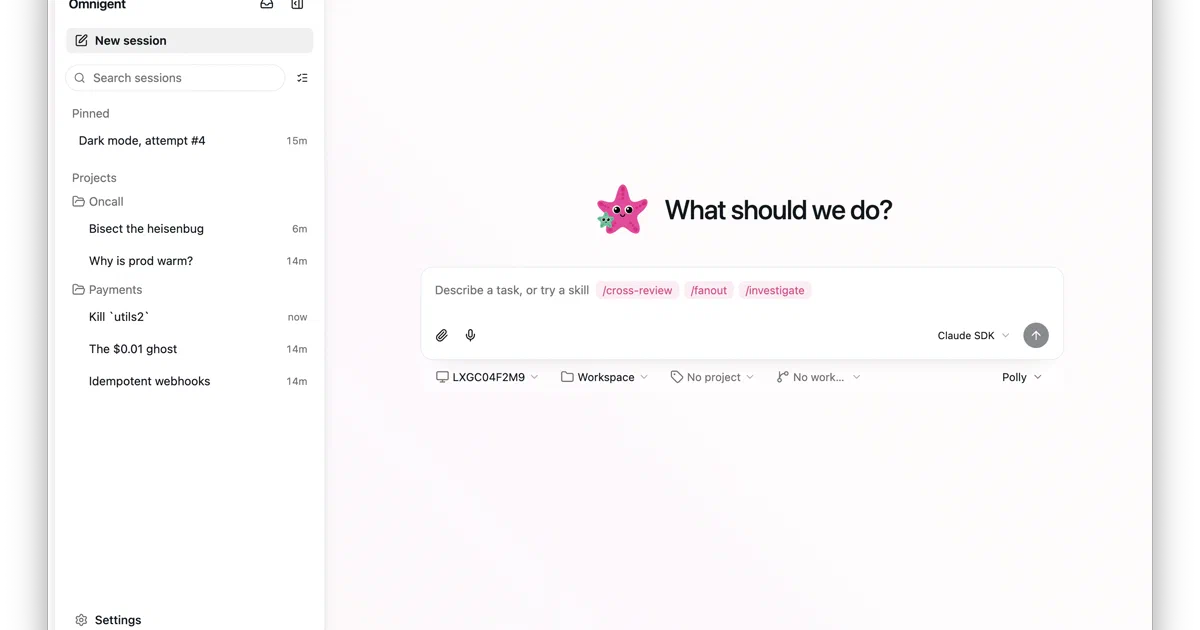

Omnigent is trying to solve a problem that becomes obvious once you use more than one coding agent.
Claude Code has one workflow. Codex has another. Cursor has another. OpenCode, Hermes, Pi, Kiro, Qwen, Kimi, and custom ACP agents all have their own assumptions.
That is fine when you only use one tool.
It gets messy when you want to compare them, delegate work across them, collaborate with teammates, or enforce a common set of safety rules.
Omnigent calls itself a meta-harness.
That is a good description: it is not just another model wrapper. It is a control plane for agent runtimes.
Omnigent - the open-source meta-harness for all your AI agents.
- Omnigent GitHub Source Code
- Omnigent Website
- Omnigent Deployment Guide
- Agent YAML Spec
- Policy Guide
- License: Apache-2.0 ✅
What is Omnigent?
Omnigent is an open-source orchestration layer for AI agents.
It lets you run and supervise agents from a terminal, browser, phone, or desktop app, while keeping sessions, files, terminals, sub-agents, and messages in sync.
The main idea is simple: define or launch an agent once, then decide which harness should run it.
Supported paths include Claude Code, Codex, Cursor, OpenCode, Hermes, Pi, Kiro, Antigravity, Qwen, Kimi, Goose, Copilot, Devin, OpenAI Agents, and custom ACP agents. The repo also includes example agents such as Polly, Debby, Deep Research, Sentinel, Scribe, Remy, and AWS Analyst.
This makes Omnigent interesting for people who are already experimenting with multiple AI coding tools. Instead of treating each agent CLI as a totally separate world, Omnigent gives them a shared session model, web UI, policy layer, and deployment story.
Why Self-Host Omnigent?
The self-hosting angle is not “run a local LLM in Docker.” Omnigent is more like an agent coordination server.
You self-host it when you want:
- a persistent web UI for agent sessions;
- a server your phone or desktop app can reach;
- shared sessions for a team;
- built-in accounts or OIDC login;
- policy controls around file access, shell commands, cost, tools, and routing;
- remote or cloud-hosted agent runners;
- a common layer above several AI agent CLIs and SDKs.
The key design choice is the server/runner split.
The server handles coordination: HTTP routes, WebSockets, auth, persistence, the web UI, policies, host registry, projects, comments, scheduled tasks, and sharing.
The runner or host does the actual agent work. It runs on your laptop, dev machine, or a managed sandbox, then connects back to the server over a WebSocket tunnel. That means the server does not have to contain every agent CLI, every workspace, or every model credential.
Tech Overview
Omnigent is primarily a Python 3.12+ project. The CLI uses Click. The server uses FastAPI, Starlette, Uvicorn, SQLAlchemy, Alembic, Pydantic, WebSockets, and a PostgreSQL or SQLite database.
The web UI is a React and Vite app with TypeScript, Tailwind, xterm, Monaco, Tiptap, React Query, Radix, lucide-react, Three.js, and other interface libraries. The repo also includes Electron desktop packaging, iOS and Android shells, deployment recipes, SDK folders, OpenAPI output, and a large test suite.
For agent definitions, Omnigent uses YAML. A simple agent can declare a prompt, executor, model, tools, sub-agents, OS access, terminals, and policies.
name: hello_agent
prompt: |
  You are a concise assistant.

executor:
  harness: claude-sdk
  model: databricks-claude-sonnet-4-6
Tools can be local Python functions, MCP servers, inherited tools, or sub-agents. OS access is explicit through an os_env block, where the agent can define a working directory and sandbox settings.
Policies Are the Important Part
The most practical part of Omnigent is the policy system.
Policies inspect agent behavior and return one of three outcomes:
ALLOW: let the action continue.DENY: block it.ASK: pause and ask the user for approval.
They can be configured at three levels:
- session policies, controlled by the current user;
- agent policies, written into an agent spec;
- server-wide policies, controlled by an admin.
Built-in policies cover things like maximum tool calls, shell/file approval gates, blocked skills, enforced sandboxes, cost budgets, routing rules, PII checks, GitHub rules, Google workspace rules, and CEL expressions.
That matters because agent orchestration without guardrails is just more ways to run code. If you want a shared team server, or you want agents to operate on real projects, policies become part of the product rather than an afterthought.
Installing Omnigent
The README shows a bootstrap installer:
curl -fsSL https://raw.githubusercontent.com/omnigent-ai/omnigent/main/scripts/install_oss.sh | sh
Manual installs use Python 3.12+:
uv tool install omnigent
or:
pip install "omnigent"
The local CLI is available as both:
omnigent
omni
The project documents Node.js 22 LTS or newer for web UI development, plus tmux for native terminal wrappers. On Linux, native wrappers use bubblewrap for OS sandboxing; on macOS they use the built-in seatbelt sandbox.
Running Your First Agent
After installation, the basic local flow is:
omnigent
or start a specific runtime:
omnigent claude
omnigent codex
omnigent cursor
omnigent opencode
omnigent hermes
omnigent pi
To start the local server and register your machine as a host:
omnigent start
The local web UI runs on:
http://localhost:6767
That local UI is useful when you want browser access without standing up a remote deployment.
Self-Hosting with Docker
Omnigent ships a Docker Compose stack under deploy/docker/.
The stack has two services:
postgres: PostgreSQL 16 Alpine.omnigent: the Omnigent server image, normally pulled from GHCR or built locally.
The upstream quick start is:
cd deploy/docker
./bootstrap.sh
docker compose up -d
docker compose logs -f omnigent
The Docker server listens on:
http://localhost:8000
From your laptop, you then connect a runner to that server:
omnigent run path/to/agent.yaml --server http://localhost:8000
I am not embedding a Home-Lab Compose file for this one because I did not run or validate the Docker stack in this pass. Use the upstream deploy/docker/docker-compose.yaml until you have tested the exact image tag, auth mode, base URL, reverse proxy, and persistence model you want.
Docker Environment Notes
At minimum, the Compose stack requires a Postgres password:
POSTGRES_PASSWORD=change-me
The bootstrap.sh helper can generate the database password and cookie secret into .env.
For anything public, pay attention to these settings:
OMNIGENT_ACCOUNTS_BASE_URL=https://omnigent.example.com
OMNIGENT_ACCOUNTS_INIT_ADMIN_PASSWORD=<strong-password>
OMNIGENT_AUTH_PROVIDER=accounts
or use OIDC:
OMNIGENT_DOMAIN=omnigent.example.com
OMNIGENT_OIDC_ISSUER=https://github.com
OMNIGENT_OIDC_CLIENT_ID=...
OMNIGENT_OIDC_CLIENT_SECRET=...
The upstream .env.example is unusually explicit about a real risk: if a public instance is exposed before the first admin is created, the first visitor can claim it. Pre-seed the initial admin password or keep the service private until setup is complete.
Deployment Options
Docker is not the only path. The repo includes deploy guides for:
- Render;
- Railway;
- Fly.io;
- Hugging Face Spaces;
- Modal;
- Cloudflare Containers, D1, and R2;
- Databricks Apps;
- Tailscale;
- Cloudflare quick tunnel;
- sandbox providers such as Modal, Daytona, Blaxel, Islo, E2B, OpenShell, CoreWeave, Kubernetes, and Boxlite.
For production-style usage, PostgreSQL is the normal database choice. SQLite is documented for demos and single-instance lite deployments.
Field Notes From This Review
I kept this pass non-invasive. I did not start Docker, Podman, Compose, seeders, managed sandboxes, model calls, or agent sessions.
What I did run:
python3 --version
# Python 3.12.3

node --version
# v18.19.1

python3 -m compileall -q omnigent tests
# completed successfully
The repo’s Python package metadata says requires-python = ">=3.12", which matches this machine. The repo documents Node.js 22 LTS or newer for frontend development; this machine has Node 18.19.1, so I did not run the Vite build.
The clone was about 224 MB at review time. The package metadata showed version 0.12.0.dev0, 39 core Python dependencies, and optional extras for Databricks, Bedrock, Vertex, Modal, Daytona, Blaxel, Boxlite, CoreWeave Sandbox, E2B, Islo, Kubernetes, OpenShell, S3, Slack, tracing, dictation, Copilot, Cursor, and others.
Who Should Try It?
Omnigent is best for people already deep enough into AI coding agents that one CLI is no longer enough.
Try it if you want to:
- compare several agent harnesses in one workflow;
- define reusable YAML agents;
- supervise multiple agents and sub-agents;
- expose sessions through a web UI;
- collaborate with teammates;
- keep policy controls close to agent execution;
- deploy an agent coordination server and attach local or sandboxed hosts.
Skip it for now if you only need a simple one-off chat UI, a single local model runner, or a basic wrapper around one provider API. Omnigent is more ambitious than that, and the complexity comes with the ambition.
Conclusion
Omnigent is one of the more interesting open-source projects in the agent tooling space because it focuses on the layer above individual agents.
The project is early, but the shape is clear: CLI, server, web UI, desktop/mobile clients, YAML agents, policy controls, managed hosts, deployment recipes, and adapters for many agent runtimes. That is a lot of surface area, but it also targets a real pain point: AI agent workflows are fragmenting faster than teams can standardize them.
For self-hosters and engineering teams, the practical question is not whether Omnigent replaces Codex, Claude Code, Cursor, or OpenCode. It is whether you want a shared control plane above them.
FAQ
Is Omnigent open source?
Yes. The repository is published under the Apache-2.0 license.
Does Omnigent run local models?
It can work with compatible gateways, including local or self-hosted OpenAI-compatible endpoints, but Omnigent itself is primarily an agent orchestration layer.
Does the server run my code?
The normal model separates the server from the runner. The server coordinates sessions, while a host or runner executes the agent work on a user’s machine or in a managed sandbox.
Can I run it on Docker?
Yes. The repo includes a Docker Compose stack with PostgreSQL under deploy/docker/.
Should I expose it publicly without auth?
No. Use accounts, OIDC, or a trusted auth proxy. Also finish first-admin setup before exposing the instance publicly.
Did you test the Docker stack here?
No. This review avoided interacting with containers and existing local services. I only performed non-container source checks.
Comments