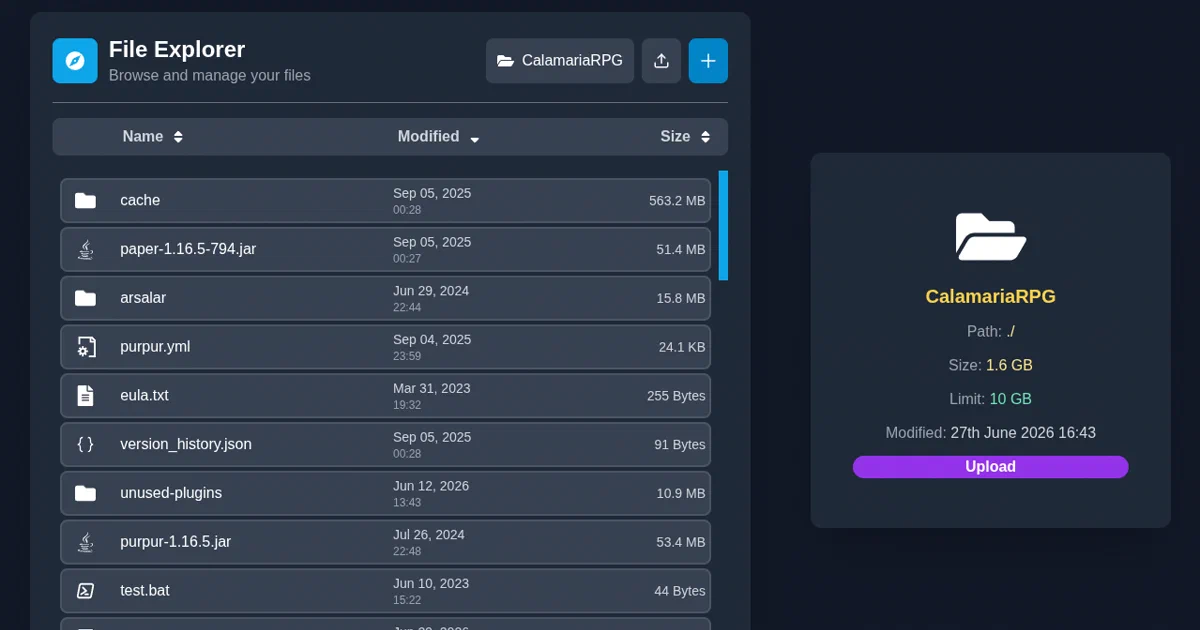

FolderHost is for the moments when you want a private file cloud, but you do not want to deploy a whole platform.
It is a Go application with an embedded React frontend and SQLite database.
You can run it as a single binary or as a Docker container.
Once running, it gives you a browser-based file explorer, users, permissions, uploads, downloads, sharing, a recovery bin, logs, and realtime editing through Monaco Editor.
That makes it a much smaller alternative to something like Nextcloud. It is not trying to be a complete groupware suite.
It is trying to be a practical file cloud you can start quickly.
FolderHost - self-hosted cloud platform in a single binary.
- FolderHost GitHub Source Code
- FolderHost Website
- FolderHost Releases
- FolderHost Changelog
- License: GPL-3.0 ✅
What is FolderHost?
FolderHost is a self-hosted file manager and lightweight cloud platform. It stores files in a configured folder, tracks application state in SQLite, and serves a web UI for file operations and collaboration.
The core features are straightforward:
- browser file explorer;
- upload, download, rename, move, copy, delete, and create operations;
- chunked uploads for larger files;
- users and permissions;
- public share links;
- recovery bin;
- activity logs;
- Monaco-based code editor;
- WebSocket-backed realtime editing;
- optional service management for server-side processes.
The README positions FolderHost as a lightweight alternative to Nextcloud. That comparison is useful as long as expectations are clear: FolderHost is much smaller and simpler, while Nextcloud is a mature ecosystem with many apps, clients, integrations, and enterprise patterns.
Why Self-Host FolderHost?
FolderHost makes sense when you want a small private file UI over a folder.
Good use cases:
- a home lab file drop;
- a LAN file manager;
- a small VPS file browser;
- a quick admin panel for server files;
- a shared folder for a trusted group;
- a Minecraft or game-server management helper;
- a lightweight code/file editor exposed through a browser.
The single-binary design is the main attraction. There is no external database to provision. The backend uses embedded SQLite, and the frontend is embedded into the Go binary after build.
The tradeoff is that this is still a file-management web app. It touches sensitive surfaces: filesystem paths, uploads, downloads, public shares, archives, authentication, WebSockets, and optional process control. Keep it private until you have configured it properly.
Tech Overview
FolderHost is built with Go and React.
The backend uses:
- Go 1.25 module;
- Fiber v2 for HTTP routing;
- SQLite through
modernc.org/sqlite; - JWT for sessions;
- Argon2 for password hashing;
- WebSockets for realtime functionality;
- filesystem watching;
- optional TLS certificate helpers.
The frontend uses:
- React;
- TypeScript;
- Vite;
- Tailwind CSS;
- Monaco Editor;
- axios;
- react-router;
- react-icons.
The main backend entrypoint is main.go. It loads configuration, initializes SQLite, starts background tasks, wires the Fiber app, registers API routes, registers WebSockets, and serves the embedded web/dist frontend in production mode.
Configuration
On first run, FolderHost creates a config.yml file. The default config observed in the repo includes:
port: 5000
folder: "./host"
storage_limit: "10 GB"
secret_jwt_key: "auto"
admin:
  username: "admin"
  password: "123"
  email: "[email protected]"
recovery_bin: true
bin_storage_limit: "5 GB"
log_activities: true
clear_logs_after: 7
ssl:
  enabled: false
  type: "self_signed"
The important part is the admin account.
Default credentials are:
admin / 123
Change them before exposing FolderHost to your network. That is not optional. The README says the same thing.
The default file root is:
./host
For binary installs, create a dedicated FolderHost directory first. The app creates config.yml, database.db, hosted files, and runtime state relative to the working directory.
Running with Docker
The README shows a direct Docker run command:
docker run -d \
  --name folderhost-server \
  -p 5000:5000 \
  -v folderhost_data:/app \
  --restart unless-stopped \
  mertjsx/folderhost:latest
The production compose file in the repo is similarly small:
services:
  folderhost:
    image: mertjsx/folderhost:latest
    container_name: folderhost-server
    ports:
      - "5000:5000"
    volumes:
      - folderhost_data:/app
    restart: unless-stopped

volumes:
  folderhost_data:
Then open:
http://localhost:5000
I did not add a Home-Lab Compose snippet for this pass because I did not run or validate Docker. Use the upstream Docker instructions until you have tested the exact image, volume, reverse proxy, HTTPS, and backup plan you want.
Pre-Requisites - Docker!
Install Docker on your system before proceeding:
- Linux: Official Docker Engine install guide
- Windows / Mac: Docker Desktop
Verify installation: docker --version && docker compose version
Running as a Binary
FolderHost also supports binary releases. The Linux quick start from the README is:
wget https://github.com/MertJSX/folderhost/releases/latest/download/folderhost-linux-amd64.tar.gz
tar -xzf folderhost-linux-amd64.tar.gz
chmod +x folderhost-linux-amd64
rm -rf folderhost-linux-amd64.tar.gz
./folderhost-linux-amd64
Run it inside a dedicated directory:
mkdir -p ~/folderhost
cd ~/folderhost
./folderhost-linux-amd64
That keeps config.yml, database.db, and your hosted files in one predictable place.
Security Notes
FolderHost has useful built-in security features, but you should not treat defaults as production-ready.
Do these first:
- change the admin username and password;
- set a real JWT secret instead of relying on generated state you do not understand;
- put it behind HTTPS if reachable outside localhost;
- avoid exposing it directly to the public internet unless you understand the risk;
- back up both the hosted folder and
database.db; - test recovery before trusting the recovery bin;
- use separate accounts instead of sharing the admin login.
The auth middleware verifies username/password or token, hashes passwords with Argon2, and checks JWTs. It also keeps a token fingerprint cache tied to IP address and user-agent. That can reduce token replay risk, but it also means switching networks or devices can log a user out.
FolderHost also checks selected path-like query parameters before file operations. That is important, but filesystem apps remain high-risk. If you expose it broadly, pay attention to path traversal, symlinks, archive extraction, public share links, raw file routes, upload limits, and service-management permissions.
For maximum safety, the README suggests keeping FolderHost local and reaching it through SSH tunnels or a VPN. That is a sensible default for a personal setup.
Field Notes From This Review
I kept this pass non-invasive: no Docker, no containers, no public exposure, and no long-running service.
Environment:
go version
# go version go1.25.0 linux/amd64

node --version
# v18.19.1
The first Go test run from a clean clone failed because the Go binary embeds the frontend output:
main.go:41:12: pattern web/dist/*: no matching files found
The working sequence was:
cd web
npm ci
npm run build
cd ..
go test ./...
go build -o /tmp/folderhost-foss-post/folderhost-review .
After web/dist existed, go test ./... passed and the Go binary build succeeded.
There were two frontend caveats:
npm cicompleted on Node 18.19.1, but some packages reported engine warnings requiring Node 20+.- npm audit reported
11 vulnerabilities:1 moderateand10 high.
I did not run npm audit fix, because that can change the dependency tree and should be done as a separate maintenance pass.
Recent Release Notes
The latest tag observed locally was v26.8.0. The changelog for that release mentions:
- image viewer access from sidebar preview;
- permission tooltips;
- share links with expiration dates or passwords;
- admin management of user shared links;
- login tracking for IP addresses and user-agents;
- Docker versioning fixes;
- database deadlock fixes;
- recovery UI fixes.
Those are meaningful improvements for a young file-cloud project. The share-link and login-tracking additions are especially relevant for real deployments.
Who Should Try FolderHost?
FolderHost is a good fit if you want a small web file manager and you value simplicity over a large ecosystem.
Try it if:
- you want a single binary or one-container file cloud;
- SQLite is enough;
- your users are a small trusted group;
- you want browser editing for code/config files;
- you want a quick private UI over a server folder.
Look elsewhere if:
- you need sync clients across many devices;
- you need calendars, contacts, office editing, federated sharing, or app plugins;
- you need mature enterprise auth and audit workflows;
- you need a battle-tested internet-facing document platform.
Conclusion
FolderHost is refreshingly direct. It gives you a self-hosted file cloud with a Go backend, embedded React UI, SQLite, users, permissions, sharing, recovery, logs, and browser editing without asking you to deploy a database stack.
That smallness is the selling point.
The main warning is also simple: change the default credentials, keep the deployment private while you configure it, use HTTPS or a private tunnel, and remember that web file managers deserve careful security review.
For a home lab, LAN utility, or lightweight private cloud, FolderHost is worth testing.
FAQ
Is FolderHost open source?
Yes. The repository is licensed under GPL-3.0.
Does FolderHost need a database server?
No. It uses SQLite locally.
Can FolderHost run without Docker?
Yes. The project publishes single-binary releases for several operating systems.
What is the default port?
FolderHost uses port 5000 by default.
What are the default credentials?
The default admin login shown in the config is admin / 123. Change it immediately.
Did you test Docker here?
No. I did not run Docker or interact with existing containers in this review.
Comments