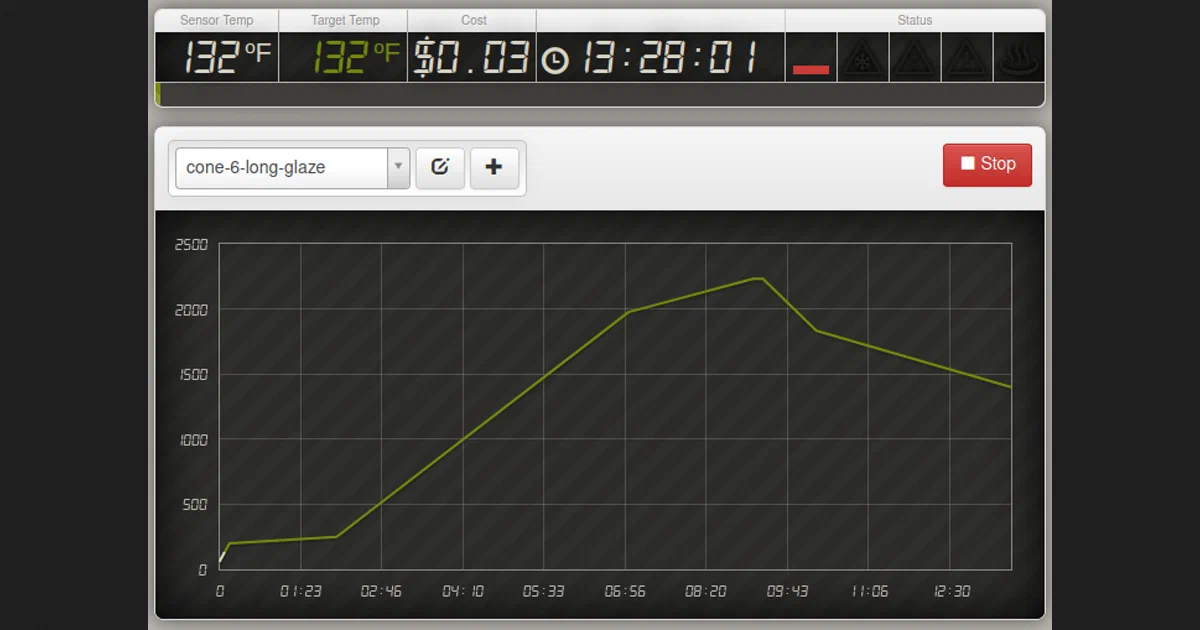

Some self-hosted projects manage notes, bookmarks, or dashboards. This one manages heat.
Kiln Controller is a GPL-licensed project that turns a Raspberry Pi into a web-enabled controller for an electric kiln. It reads kiln temperature through an Adafruit thermocouple breakout, controls kiln power through a solid state relay, and gives you a browser UI for schedules, live temperature, cost estimate, status, and PID tuning.
That makes it much more interesting than a typical Raspberry Pi weekend build, and also much less forgiving. A kiln controller is switching high voltage and high current around equipment that can reach ceramic firing temperatures. Treat this as an engineering project with physical safety systems, not as “just another web app”.
Kiln Controller Source on GitHubWhat Is Kiln Controller?
Kiln Controller is a Python application for electric kiln automation. The common setup is a Raspberry Pi, an Adafruit MAX31855 or MAX31856 thermocouple board, a kiln-rated thermocouple, and a properly sized solid state relay.
The web UI lets you pick and edit firing profiles, start a run, watch the live schedule graph, view current sensor temperature, see the target temperature, estimate firing cost, and monitor whether the controller is actively heating.
Its feature set is aimed at real kiln workflows:
- JSON firing schedules under
storage/profiles/. - Simulation mode for trying the UI before connecting hardware.
- PID control with tuning docs.
- Support for schedule catch-up when the kiln cannot heat quickly enough.
- Seek-start support when the kiln is already above the profile’s starting temperature.
- Automatic restarts after short power interruptions.
- A separate Slack watcher for alerting when the controller is unreachable or the kiln is outside its expected temperature range.
How It Works
The backend is a small Python web app built with Bottle, gevent, and gevent-websocket. kiln-controller.py starts the app, loads config.py, selects either a simulated oven or a real oven, and exposes static UI files plus HTTP and WebSocket endpoints.
The heart of the project is in lib/oven.py. That file contains the simulated oven model, the real oven implementation, temperature sensor access, GPIO relay output, profile tracking, PID calculation, cost/runtime state, and automatic restart behavior.
The controller’s default duty cycle is two seconds:
sensor_time_wait = 2
Every cycle, the app samples the thermocouple, calculates the current target from the active firing profile, updates runtime and cost estimates, decides how much heat is needed, and drives the relay output for the computed portion of the duty window.
There is one important architectural detail to notice: the app exposes control endpoints and binds to 0.0.0.0 by default. I did not find authentication in the Bottle route handlers. Keep this on a trusted LAN, behind a VPN, or behind an authenticated reverse proxy and firewall. Do not put the controller API directly on the public internet.
Hardware Stack
The documented hardware path includes:
- Raspberry Pi, or another Blinka-supported board with SPI.
- Adafruit MAX31855 or MAX31856 thermocouple breakout.
- A heavy-duty kiln thermocouple.
- Breadboard or proper wiring interface.
- Solid state relay sized for the kiln load.
- SSR heat sink.
- Electric kiln.
MAX31855 is K-type only. MAX31856 supports multiple thermocouple types, including K, J, N, R, S, T, E, and B.
The README also calls out a practical wiring issue: Raspberry Pi GPIO current may not be enough to switch some SSRs directly. The project’s schematic uses a transistor stage to drive the relay input.
Supported Boards NotesThe Safety Part
This deserves its own section.
Kiln Controller includes a software emergency cutoff temperature:
emergency_shutoff_temp = 2264
But config.py is clear about the limit of that safety mechanism. If the SSR fails closed, software can stop the profile and the kiln can still receive full power. That means a serious build needs independent physical protection: kiln-sitter or equivalent cutoff, proper fusing, rated contactors or relays, correctly sized wiring, safe enclosure, grounding, heat sinking, and work that follows local electrical code.
The Slack watcher is useful for alerts. The web UI is useful for visibility. Neither should be treated as the final safety layer.
Installing It
This project does not ship a Dockerfile or Docker Compose setup. That is appropriate for the target use case: the application is meant to run on the board connected to the thermocouple and relay hardware.
The documented install path is a Python virtual environment:
sudo apt-get update
sudo apt-get dist-upgrade
git clone https://github.com/jbruce12000/kiln-controller
cd kiln-controller
python3 -m venv venv
source venv/bin/activate
pip install -r requirements.txt
For a real Raspberry Pi deployment, enable SPI:
sudo raspi-config
Then choose:
Interfacing Options -> SPI -> Yes
After that, review config.py carefully before running anything against real hardware.
Trying Simulation Mode
The default config uses simulation mode:
simulate = True
That is the right way to explore the interface. In simulation, you can start the controller, open the web UI, select a profile, and watch the simulated kiln follow the schedule without toggling real relay output.
Start the app:
source venv/bin/activate
./kiln-controller.py
Open:
http://<pi-ip>:8081
For local-only development on the same machine:
http://127.0.0.1:8081
I did not start the server during this analysis, because the request was to avoid interacting with existing containers and the project is hardware-facing.
Real Deployment Checklist
Before changing simulate to False, I would check at least these items:
- Thermocouple board type matches
max31855ormax31856inconfig.py. - Thermocouple type matches the breakout board and configured type.
- SPI pins and chip select match the wiring.
gpio_heatmatches the actual relay-control output.gpio_heat_invertmatches the relay driver circuit.- SSR is rated for the kiln voltage and current.
- SSR has a suitable heat sink.
- The kiln has independent cutoff protection.
- The Pi and controller are on a trusted network.
- PID values have been tuned for the specific kiln.
The repo includes both manual PID tuning docs and an autotuner. Be careful with the autotuner: the documented flow heats the kiln to 400F and should only be run on a real, supervised, correctly wired setup.
Ziegler Tuning Autotuner DocsAPI Notes
The HTTP API is small but powerful. For example, starting a run:
curl -d '{"cmd":"run", "profile":"cone-05-long-bisque"}' \
  -H "Content-Type: application/json" \
  -X POST http://<pi-ip>:8081/api
Stopping a run:
curl -d '{"cmd":"stop"}' \
  -H "Content-Type: application/json" \
  -X POST http://<pi-ip>:8081/api
Pausing and resuming:
curl -d '{"cmd":"pause"}' \
  -H "Content-Type: application/json" \
  -X POST http://<pi-ip>:8081/api

curl -d '{"cmd":"resume"}' \
  -H "Content-Type: application/json" \
  -X POST http://<pi-ip>:8081/api
Those endpoints should not be reachable by untrusted clients.
Field Notes From This Review
I kept this review intentionally static and non-invasive. I cloned the repository to /tmp/kiln-controller-foss-post, read the code and docs, and ran syntax compilation only.
python3 --version
# Python 3.12.3

python3 -m compileall -q .
# passed

python3 -m pytest Test -q
# failed: /usr/bin/python3: No module named pytest

du -sh .
# 7.1M
I skipped:
./kiln-controller.py, because it starts the web/control process.kiln-tuner.py, because real-mode tuning heats a kiln.test-output.py, because it toggles relay output.test-thermocouple.py, because it expects thermocouple hardware.gpioreadall.py, because it probes board GPIO state.- Docker and Compose commands, because this repo does not ship a container path.
Who This Is For
Kiln Controller is a good fit for people who are already comfortable with Raspberry Pi hardware, Linux services, basic Python operations, kiln firing profiles, and electrical safety constraints.
It is not a good fit for someone who wants a plug-and-play appliance. The project gives you useful software, but the real work is in the build: wiring, relay selection, sensor placement, enclosure design, fail-safe planning, and tuning.
FAQ
Does Kiln Controller support Docker?
Can I test it without a kiln?
simulate = True is the default in config.py. That lets you explore the UI and profiles without driving real hardware.
Is the web UI safe to expose publicly?
Which thermocouple boards are supported?
What is the default port?
8081, configured in config.py.
Final Thoughts
Kiln Controller is a sharp example of open-source software crossing into physical process control. The simulation mode, firing profiles, PID docs, automatic restarts, Slack watcher, and straightforward Python stack make it approachable for a technical builder.
The tradeoff is that the software is only one layer. If you build around it, design the physical system so that a Python exception, network request, failed SSR, bad thermocouple, or reboot cannot become the only thing standing between a normal firing and a dangerous one.
Kiln Controller GPL License
Comments