

Self-hosting location history is one of those ideas that sounds niche until you remember how much personal context lives in your timeline: trips, commutes, photos, visits, family check-ins, and the routes that connect them.
Dawarich gives you a self-hosted Google Timeline alternative, with imports, mobile tracking, maps, trips, stats, and photo integrations living on your own infrastructure.
Dawarich is a self-hostable web app designed to replace Google Timeline, also known as Google Location History.
What is Dawarich?
Dawarich is an AGPL-3.0 licensed location history web app. It stores GPS points, visualizes them on an interactive map, detects visits and trips, and can import history from Google Maps Timeline, OwnTracks, GPX, GeoJSON, and other sources.
It also fits nicely into a broader self-hosted travel/photo setup. Dawarich can integrate with Immich and Photoprism for geotagged photos, and recent releases include an AirTrail integration for drawing flight history on the map.
License: AGPL-3.0 .
Why Self-Host Dawarich?
- Keep location history private: GPS history is sensitive. Running it yourself keeps the database and uploads under your control.
- Replace Google Timeline workflows: Import historical exports, then keep collecting future points through mobile trackers.
- Connect travel context: Trips, stats, countries, cities, visits, and photos become part of one local timeline.
- Use open tooling: The stack is Rails, PostGIS, Redis, Sidekiq, and Docker Compose.
Tech Overview of Dawarich
Dawarich is a Ruby on Rails application backed by PostgreSQL with PostGIS. That database choice matters: location history is not just stored as generic JSON. Dawarich uses geospatial columns and indexes so it can query points, places, visits, tracks, countries, and map layers efficiently.
The Docker setup has four moving parts:
- Rails web app: Serves the UI and API.
- Sidekiq worker: Runs imports, stats, visit detection, reverse geocoding, and integrations.
- PostGIS database: Stores points, places, trips, visits, users, imports, photos, and geospatial indexes.
- Redis: Backs queues and cache-like coordination.
The frontend uses Hotwire/Turbo, Stimulus, Tailwind, DaisyUI, Leaflet, and MapLibre GL.
The API includes tracker-friendly endpoints for OwnTracks, Overland, Traccar, imports, points, visits, stats, photos, and mobile authentication.
Self-Hosting Dawarich with Docker
The official repository ships a Docker Compose file under docker/docker-compose.yml. For the Foss Engineer/Home-Lab version, I kept the same service shape but changed the public snippet to require real secrets instead of copying weak defaults.
Pre-Requisites - Docker
Install Docker on your system before proceeding:
- Linux: Official Docker Engine install guide
- Windows / Mac: Docker Desktop
Verify installation: docker --version && docker compose version
Docker Compose Configuration
The reusable Home-Lab compose is here:
Dawarich Home-Lab Docker configAnd the site includes the same snippet below:
# https://github.com/Freika/dawarich
# https://dawarich.app/docs/intro
# Validated with: POSTGRES_PASSWORD=replace-me SECRET_KEY_BASE=replace-me docker compose config

name: dawarich

services:
  redis:
    image: redis:7.4-alpine
    container_name: dawarich_redis
    command: >
      redis-server
      --save 900 1
      --save 300 10
      --appendonly no
    restart: unless-stopped
    volumes:
      - dawarich_shared:/data
    healthcheck:
      test: ["CMD", "redis-cli", "--raw", "incr", "ping"]
      interval: 10s
      timeout: 10s
      retries: 5
      start_period: 30s

  db:
    image: postgis/postgis:17-3.5-alpine
    container_name: dawarich_db
    shm_size: 1g
    restart: unless-stopped
    environment:
      POSTGRES_USER: ${POSTGRES_USER:-dawarich}
      POSTGRES_PASSWORD: ${POSTGRES_PASSWORD:?Set POSTGRES_PASSWORD in .env}
      POSTGRES_DB: ${POSTGRES_DB:-dawarich_production}
    volumes:
      - dawarich_db_data:/var/lib/postgresql/data
      - dawarich_shared:/var/shared
    healthcheck:
      test: ["CMD-SHELL", "pg_isready -U $${POSTGRES_USER} -d $${POSTGRES_DB}"]
      interval: 10s
      timeout: 10s
      retries: 5
      start_period: 30s

  app:
    image: freikin/dawarich:${DAWARICH_VERSION:-1.10.0}
    container_name: dawarich_app
    restart: unless-stopped
    entrypoint: web-entrypoint.sh
    command: ["bin/rails", "server", "-p", "3000", "-b", "::"]
    ports:
      - "${DAWARICH_APP_PORT:-3000}:3000"
    environment:
      RAILS_ENV: production
      REDIS_URL: redis://redis:6379
      DATABASE_HOST: db
      DATABASE_PORT: 5432
      DATABASE_USERNAME: ${POSTGRES_USER:-dawarich}
      DATABASE_PASSWORD: ${POSTGRES_PASSWORD:?Set POSTGRES_PASSWORD in .env}
      DATABASE_NAME: ${POSTGRES_DB:-dawarich_production}
      APPLICATION_HOSTS: ${APPLICATION_HOSTS:-localhost,127.0.0.1,::1}
      APPLICATION_PROTOCOL: ${APPLICATION_PROTOCOL:-http}
      TIME_ZONE: ${TIME_ZONE:-Europe/London}
      SECRET_KEY_BASE: ${SECRET_KEY_BASE:?Set SECRET_KEY_BASE in .env}
      RAILS_LOG_TO_STDOUT: "true"
      SELF_HOSTED: "true"
      STORE_GEODATA: ${STORE_GEODATA:-true}
      WEB_CONCURRENCY: ${WEB_CONCURRENCY:-1}
      PROMETHEUS_EXPORTER_ENABLED: ${PROMETHEUS_EXPORTER_ENABLED:-false}
    volumes:
      - dawarich_public:/var/app/public
      - dawarich_watched:/var/app/tmp/imports/watched
      - dawarich_storage:/var/app/storage
      - dawarich_db_data:/dawarich_db_data
    depends_on:
      db:
        condition: service_healthy
      redis:
        condition: service_healthy
    healthcheck:
      test: ["CMD-SHELL", "wget -qO - http://127.0.0.1:3000/api/v1/health | grep -q '\"status\"[[:space:]]*:[[:space:]]*\"ok\"'"]
      interval: 10s
      timeout: 10s
      retries: 30
      start_period: 30s

  sidekiq:
    image: freikin/dawarich:${DAWARICH_VERSION:-1.10.0}
    container_name: dawarich_sidekiq
    restart: unless-stopped
    entrypoint: sidekiq-entrypoint.sh
    command: ["sidekiq"]
    environment:
      RAILS_ENV: production
      REDIS_URL: redis://redis:6379
      DATABASE_HOST: db
      DATABASE_PORT: 5432
      DATABASE_USERNAME: ${POSTGRES_USER:-dawarich}
      DATABASE_PASSWORD: ${POSTGRES_PASSWORD:?Set POSTGRES_PASSWORD in .env}
      DATABASE_NAME: ${POSTGRES_DB:-dawarich_production}
      APPLICATION_HOSTS: ${APPLICATION_HOSTS:-localhost,127.0.0.1,::1}
      APPLICATION_PROTOCOL: ${APPLICATION_PROTOCOL:-http}
      SECRET_KEY_BASE: ${SECRET_KEY_BASE:?Set SECRET_KEY_BASE in .env}
      RAILS_LOG_TO_STDOUT: "true"
      SELF_HOSTED: "true"
      STORE_GEODATA: ${STORE_GEODATA:-true}
      BACKGROUND_PROCESSING_CONCURRENCY: ${BACKGROUND_PROCESSING_CONCURRENCY:-3}
      PROMETHEUS_EXPORTER_ENABLED: ${PROMETHEUS_EXPORTER_ENABLED:-false}
    volumes:
      - dawarich_public:/var/app/public
      - dawarich_watched:/var/app/tmp/imports/watched
      - dawarich_storage:/var/app/storage
    depends_on:
      db:
        condition: service_healthy
      redis:
        condition: service_healthy
      app:
        condition: service_healthy
    healthcheck:
      test: ["CMD-SHELL", "pgrep -f sidekiq"]
      interval: 10s
      timeout: 10s
      retries: 30
      start_period: 30s

volumes:
  dawarich_db_data:
  dawarich_shared:
  dawarich_public:
  dawarich_watched:
  dawarich_storage:
Environment File
Create a .env next to the compose file:
cp .env.sample .env
openssl rand -hex 64
At minimum, replace:
POSTGRES_PASSWORDSECRET_KEY_BASE
For a local-only install, this is enough to start testing:
DAWARICH_VERSION=1.10.0
DAWARICH_APP_PORT=3000
POSTGRES_USER=dawarich
POSTGRES_PASSWORD=replace-with-a-long-random-password
POSTGRES_DB=dawarich_production
SECRET_KEY_BASE=replace-with-openssl-rand-hex-64
APPLICATION_HOSTS=localhost,127.0.0.1,::1
APPLICATION_PROTOCOL=http
TIME_ZONE=Europe/London
For a domain-backed install, change:
APPLICATION_HOSTS=dawarich.example.com
APPLICATION_PROTOCOL=https
Then start it:
docker compose config
docker compose up -d
The app listens on:
http://localhost:3000
The upstream README documents default credentials:
[email protected]
safepassword
Change the account details before treating the instance as real.
Field Note: Compose Validation
I validated both the upstream compose and the Home-Lab compose with Docker Compose config rendering.
POSTGRES_PASSWORD=replace-me SECRET_KEY_BASE=replace-me docker compose config
Local environment:
- Docker 29.6.2
- Docker Compose v5.3.1
- 14 GiB RAM, no swap
- 5.3 GB free on the working filesystem, already 97% used
The required Dawarich, PostGIS, and Redis images were not already local.
Because the filesystem was nearly full, I intentionally skipped docker compose up instead of pulling several images and creating avoidable disk pressure.
Treat this as compose validation and deployment review, not a completed runtime smoke test.
Tracking Your Location
Dawarich can receive live or background location updates from several clients.
Supported paths include:
- Dawarich iOS and Android apps
- OwnTracks
- Overland
- GPSLogger
- Traccar Client
- PhoneTrack
- Home Assistant
The exact setup depends on the client, but the recurring pattern is the same: create or retrieve an API key in Dawarich, point the mobile tracker at your Dawarich URL, and verify that new points arrive under the map and points views.
If you expose Dawarich through a domain, configure the tracker with the public HTTPS URL rather than the internal Docker service name.
Safe Exposure and Reverse Proxy Notes
Dawarich contains very personal data, so do not expose it casually.
For home-lab access, I would prefer one of these patterns:
- VPN-only: Tailscale, WireGuard, or another private network.
- Reverse proxy with authentication: Caddy, Traefik, Nginx Proxy Manager, or Authelia/Authentik in front.
- Cloudflare Tunnel: useful if you want public HTTPS without opening router ports.
When using a reverse proxy or tunnel, set:
APPLICATION_HOSTS=dawarich.example.com
APPLICATION_PROTOCOL=https
Also keep regular PostgreSQL backups. Dawarich imports can be rebuilt from source exports in theory, but your confirmed visits, trips, family settings, and integrations are much easier to preserve with database backups.
Optional: PUID and PGID
Recent Dawarich releases support running the app and Sidekiq containers under custom PUID and PGID values.
The upstream note recommends using those environment variables instead of Compose user: because the container starts as root, fixes mounted volume ownership, and then drops privileges.
That is useful if your Docker host uses a specific service user for persistent volumes.
How Dawarich Compares
Dawarich is not only an OwnTracks recorder. It is closer to a personal timeline product: import old data, keep collecting new data, detect visits, build trips, calculate stats, and connect photos.
Pick Dawarich if you want:
- A Google Timeline replacement you can self-host.
- A map-first view of your life/travel history.
- Import paths for existing location exports.
- Photo and travel integrations around: Immich, Photoprism, and AirTrail.
Pick a simpler recorder if you only need raw OwnTracks point storage and do not care about maps, trips, stats, visit detection, or a full web UI.
Dawarich Integrations
When you login and go to: http://localhost:3333/settings/integrations
You get the coolest part of this project:
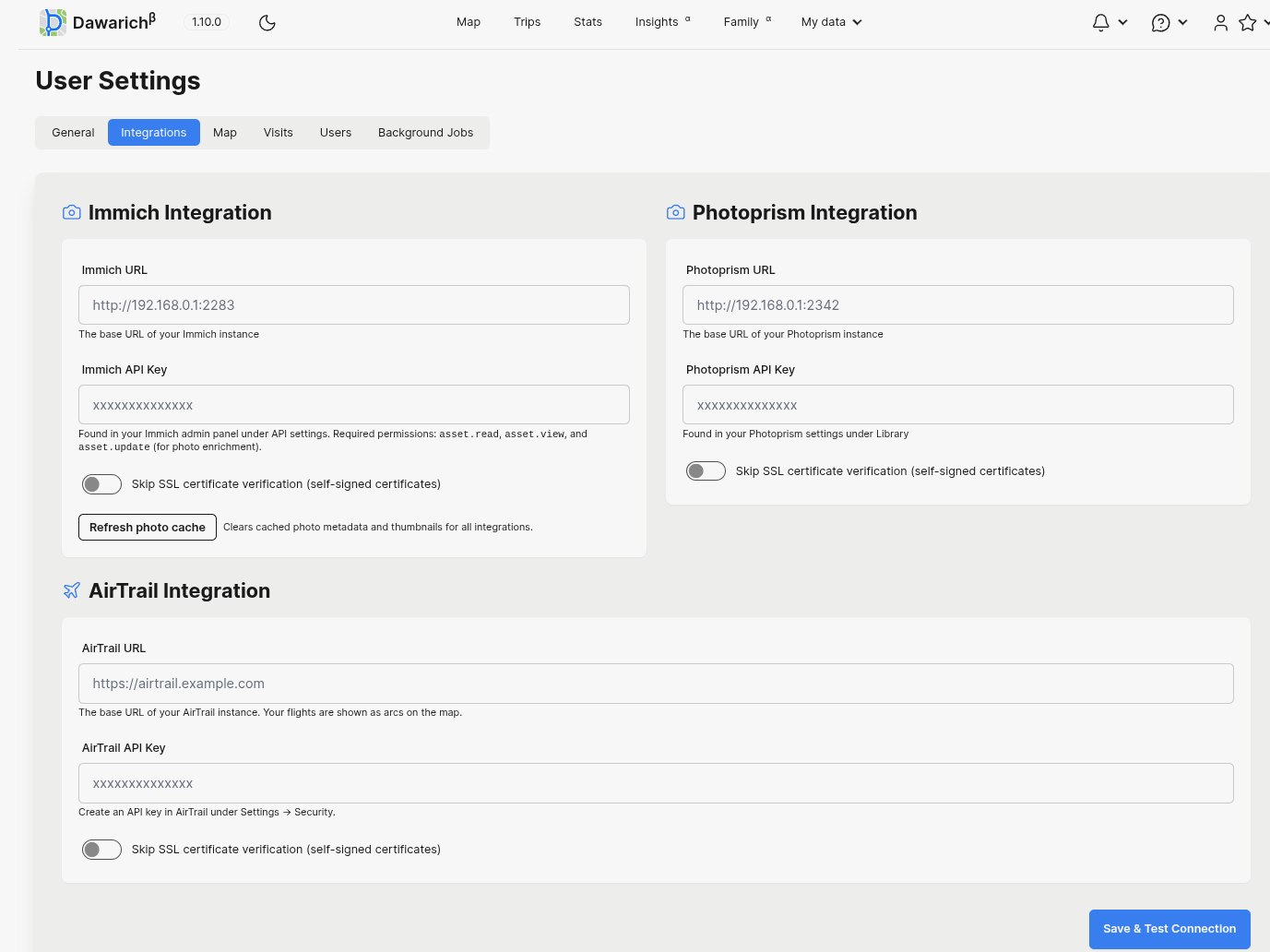
Those integrations are where Dawarich becomes more than a GPS point database:
- Immich: connects Dawarich with your self-hosted photo timeline, so location history can enrich photos and help you browse memories by place. I covered the Immich stack in Self-Hosting Immich.
- Photoprism: another self-hosted photo library option. It is useful if your photos already live in PhotoPrism and you want Dawarich to pull photo context from that existing archive.
- AirTrail: adds flight history to the map. Dawarich can use AirTrail data to show flights as arcs, which complements normal GPS traces for trips where the phone only records the airport-to-airport gaps. I also have a self-hosting AirTrail guide.
Conclusion
Dawarich is a strong fit for self-hosters who miss Google Timeline but do not want a private location archive living entirely in a third-party account.
The architecture is familiar for a home lab: Rails app, Sidekiq worker, Redis, and PostGIS.
The two things to get right are security and storage. Use real secrets, restrict exposure, add your public hostname to APPLICATION_HOSTS, and back up PostGIS before upgrades. Once that foundation is in place, Dawarich becomes a useful private timeline for GPS points, trips, visits, and travel context.
FAQ
Is Dawarich a Google Timeline alternative?
Does Dawarich need PostgreSQL?
Can I run Dawarich behind Cloudflare Tunnel?
APPLICATION_HOSTS to your public hostname and set APPLICATION_PROTOCOL=https when the app is reached through HTTPS.
Can Dawarich work with OwnTracks?
Are there Android and iOS apps for Dawarich?
Yes. Dawarich documents official iOS and Android apps. The main use case is continuous location capture from your phone: configure your Dawarich instance URL and API key, start tracking, and upload points to your self-hosted timeline.
The official apps are useful when you want a simpler setup than configuring OwnTracks, Overland, or GPSLogger manually. They also support offline tracking: points are recorded on the device and uploaded when the phone is back online.
For a clearly open-source mobile client, use Dawarich Community on Android. It is a community Flutter client available through GitHub/F-Droid/Google Play, and supports connecting by host/API key or QR code, viewing timeline/stats, managing points, and tracking new points.
Comments