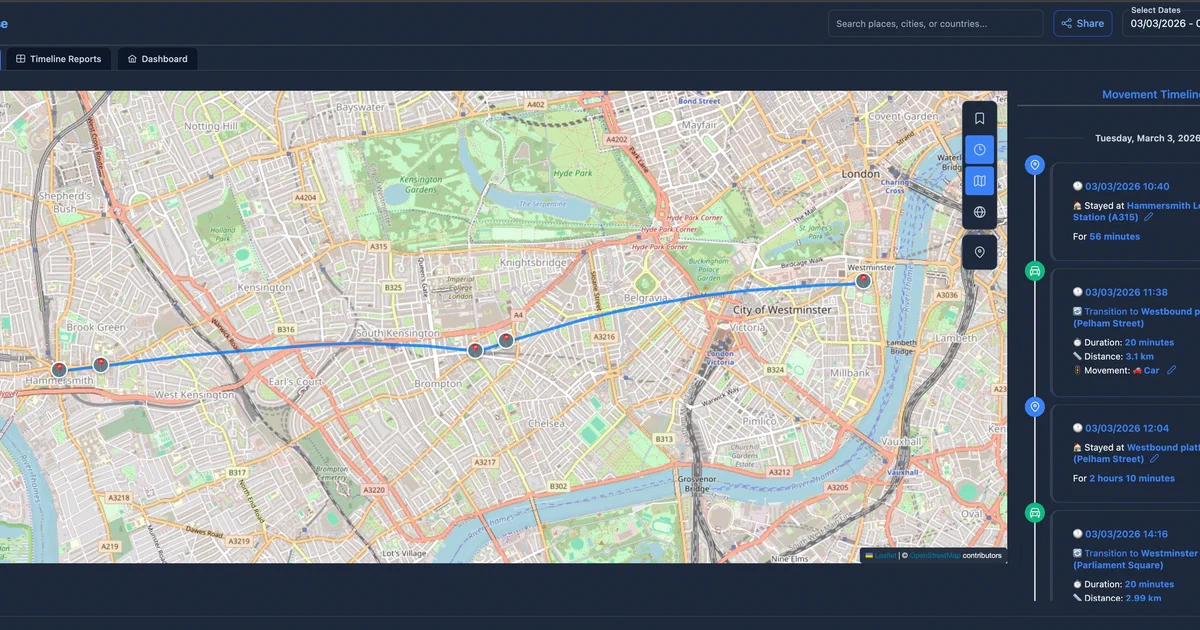

Self-hosted location history is becoming its own little category: not just “where is my phone”, but a private memory layer for trips, commutes, photos, favorite places, stats, and long-term movement patterns.
GeoPulse is another serious option in that space.
It takes raw GPS points from mobile trackers and imports, then turns them into a searchable timeline with stays, trips, analytics, map views, sharing, and Immich photo context.
What is GeoPulse?
GeoPulse
is a self-hosted location timeline platform by tess1o.
The project describes itself as a privacy-first Google Timeline alternative, and the feature set backs that up: GPS source ingestion, import/export, trip detection, journey insights, friends, share links, OIDC, admin settings, geofences, notifications, and optional AI-assisted insights.
The important licensing detail: GeoPulse is source-available under BSL 1.1, not a permissive or copyleft open-source license in the normal OSI sense.
The license grants personal, private, educational, and non-profit use. Commercial use requires a separate license. The change date listed in the repository is 2075-01-01, when it changes to AGPL-3.0 only.
For a personal home lab, that may be fine.
For business use, read the license before deploying it.
Why Self-Host GeoPulse?
- Own your location archive: GPS history is sensitive enough that keeping it on your own PostGIS database matters.
- Use different trackers: GeoPulse supports OwnTracks, Overland, GPSLogger, Home Assistant, Traccar, Dawarich, Colota, and bulk imports.
- Get more than raw points: It builds stays, trips, movement types, insights, reports, and analytics on top of the data.
- Connect your photo library: Immich integration can bring photo context into your location timeline.
- Run a multi-user setup: Friends, sharing, invitations, admin roles, OIDC, and audit logs make it more than a single-user map toy.
Tech Overview of GeoPulse
GeoPulse has a clean split between backend, frontend, and database.
The backend is a Java/Quarkus application, shipped as a native container image.
It uses PostgreSQL with PostGIS for geospatial persistence, Flyway for migrations, Hibernate Spatial/JTS for geometry work, JWT auth, optional OIDC, MQTT support, and Prometheus metrics.
The frontend is Vue 3 with Vite, PrimeVue, Pinia, Tailwind, Chart.js, Leaflet, and MapLibre GL.
That stack fits the product: the app is map-heavy, dashboard-heavy, and form-heavy.
The Docker setup has three mandatory services and one one-shot helper:
- GeoPulse UI: nginx-served Vue frontend and same-origin API proxy.
- GeoPulse backend: Quarkus API and processing service.
- PostGIS database: stores users, GPS points, timeline entities, geofences, trips, places, settings, and spatial indexes.
- Key generator: creates JWT keys and an AI settings encryption key under
./keys.
Optional pieces include Mosquitto for OwnTracks MQTT mode and Apprise for geofence notifications.
Self-Hosting GeoPulse with Docker
The official repository ships Docker Compose files for a regular deployment and a complete MQTT-enabled deployment.
For the Foss Engineer/Home-Lab version, I kept the regular deployment shape and made the database password explicit instead of inheriting upstream placeholder secrets.
Pre-Requisites - Docker
Install Docker on your system before proceeding:
- Linux: Official Docker Engine install guide
- Windows / Mac: Docker Desktop
Verify installation: docker --version && docker compose version
Docker Compose Configuration
The reusable Home-Lab compose is here:
GeoPulse Home-Lab Docker configAnd the site includes the same snippet below:
# https://github.com/tess1o/geopulse
# https://tess1o.github.io/geopulse/docs/getting-started/deployment/docker-compose
# Validated with: GEOPULSE_POSTGRES_PASSWORD=replace-me GEOPULSE_MQTT_PASSWORD=replace-me docker compose config

name: geopulse

services:
  geopulse-keygen:
    image: alpine:3.22
    container_name: geopulse-keygen
    restart: "no"
    volumes:
      - ./keys:/keys
    command:
      - sh
      - -ec
      - |
        set -e
        mkdir -p /keys
        if [ ! -f /keys/jwt-private-key.pem ] || [ ! -f /keys/jwt-public-key.pem ]; then
          command -v openssl >/dev/null 2>&1 || apk add --no-cache openssl
          openssl genpkey -algorithm RSA -out /keys/jwt-private-key.pem
          openssl rsa -pubout -in /keys/jwt-private-key.pem -out /keys/jwt-public-key.pem
          chmod 644 /keys/jwt-private-key.pem /keys/jwt-public-key.pem
        fi
        if [ ! -f /keys/ai-encryption-key.txt ]; then
          command -v openssl >/dev/null 2>&1 || apk add --no-cache openssl
          openssl rand -base64 32 > /keys/ai-encryption-key.txt
          chmod 644 /keys/ai-encryption-key.txt
        fi

  geopulse-postgres:
    image: postgis/postgis:17-3.5
    container_name: geopulse-postgres
    restart: unless-stopped
    environment:
      POSTGRES_USER: ${GEOPULSE_POSTGRES_USERNAME:-geopulse}
      POSTGRES_PASSWORD: ${GEOPULSE_POSTGRES_PASSWORD:?Set GEOPULSE_POSTGRES_PASSWORD in .env}
      POSTGRES_DB: ${GEOPULSE_POSTGRES_DB:-geopulse}
    volumes:
      - geopulse-postgres-data:/var/lib/postgresql/data
    command: >
      postgres
      -c timezone=UTC
      -c shared_buffers=${GEOPULSE_POSTGRES_SHARED_BUFFERS:-256MB}
      -c work_mem=${GEOPULSE_POSTGRES_WORK_MEM:-8MB}
      -c maintenance_work_mem=${GEOPULSE_POSTGRES_MAINTENANCE_WORK_MEM:-64MB}
      -c effective_cache_size=${GEOPULSE_POSTGRES_EFFECTIVE_CACHE_SIZE:-1GB}
      -c max_wal_size=${GEOPULSE_POSTGRES_MAX_WAL_SIZE:-512MB}
      -c checkpoint_completion_target=${GEOPULSE_POSTGRES_CHECKPOINT_TARGET:-0.9}
      -c wal_buffers=${GEOPULSE_POSTGRES_WAL_BUFFERS:-16MB}
      -c random_page_cost=${GEOPULSE_POSTGRES_RANDOM_PAGE_COST:-1.1}
      -c effective_io_concurrency=${GEOPULSE_POSTGRES_IO_CONCURRENCY:-100}
      -c autovacuum_naptime=${GEOPULSE_POSTGRES_AUTOVACUUM_NAPTIME:-60s}
      -c autovacuum_vacuum_scale_factor=${GEOPULSE_POSTGRES_VACUUM_SCALE_FACTOR:-0.2}
      -c log_min_duration_statement=${GEOPULSE_POSTGRES_LOG_SLOW_QUERIES:-5000}
      -c track_io_timing=on
    healthcheck:
      test: ["CMD-SHELL", "pg_isready -U $${POSTGRES_USER} -d $${POSTGRES_DB}"]
      interval: 5s
      timeout: 5s
      retries: 10

  geopulse-backend:
    image: tess1o/geopulse-backend:${GEOPULSE_VERSION:-1.35.0}-native
    container_name: geopulse-backend
    mem_limit: ${GEOPULSE_BACKEND_MEM_LIMIT:-512m}
    mem_reservation: ${GEOPULSE_BACKEND_MEM_RESERVATION:-128m}
    restart: unless-stopped
    env_file:
      - path: .env
        required: false
    environment:
      GEOPULSE_POSTGRES_HOST: geopulse-postgres
      GEOPULSE_POSTGRES_PORT: 5432
      GEOPULSE_POSTGRES_DB: ${GEOPULSE_POSTGRES_DB:-geopulse}
      GEOPULSE_POSTGRES_USERNAME: ${GEOPULSE_POSTGRES_USERNAME:-geopulse}
      GEOPULSE_POSTGRES_PASSWORD: ${GEOPULSE_POSTGRES_PASSWORD:?Set GEOPULSE_POSTGRES_PASSWORD in .env}
      GEOPULSE_POSTGRES_URL: jdbc:postgresql://geopulse-postgres:5432/${GEOPULSE_POSTGRES_DB:-geopulse}
      GEOPULSE_BACKEND_URL: http://geopulse-backend:8080
    volumes:
      - ./keys:/app/keys
      - ./import-drop:/data/geopulse-import
    depends_on:
      geopulse-keygen:
        condition: service_completed_successfully
      geopulse-postgres:
        condition: service_healthy
    healthcheck:
      test: ["CMD-SHELL", "curl -f http://localhost:8080/api/health || exit 1"]
      interval: 5s
      timeout: 3s
      retries: 30
      start_period: 10s

  geopulse-ui:
    image: tess1o/geopulse-ui:${GEOPULSE_VERSION:-1.35.0}
    container_name: geopulse-ui
    restart: unless-stopped
    env_file:
      - path: .env
        required: false
    ports:
      - "${GEOPULSE_HTTP_PORT:-5555}:80"
    depends_on:
      geopulse-backend:
        condition: service_healthy

  # Optional MQTT broker for OwnTracks MQTT mode. If enabled, set
  # GEOPULSE_MQTT_ENABLED=true and use docker-compose-complete.yml upstream
  # or extend this stack with a Mosquitto service.

volumes:
  geopulse-postgres-data:
Environment File
Create a .env next to the compose file:
cp .env.sample .env
At minimum, replace:
GEOPULSE_POSTGRES_PASSWORDGEOPULSE_ADMIN_EMAIL
For local testing:
GEOPULSE_VERSION=1.35.0
GEOPULSE_HTTP_PORT=5555
GEOPULSE_UI_URL=http://localhost:5555
GEOPULSE_POSTGRES_DB=geopulse
GEOPULSE_POSTGRES_USERNAME=geopulse
GEOPULSE_POSTGRES_PASSWORD=replace-with-a-long-random-password
GEOPULSE_ADMIN_EMAIL=[email protected]
GEOPULSE_AUTH_SECURE_COOKIES=false
GEOPULSE_MQTT_ENABLED=false
Then start it:
docker compose config
docker compose up -d
Open:
http://localhost:5555
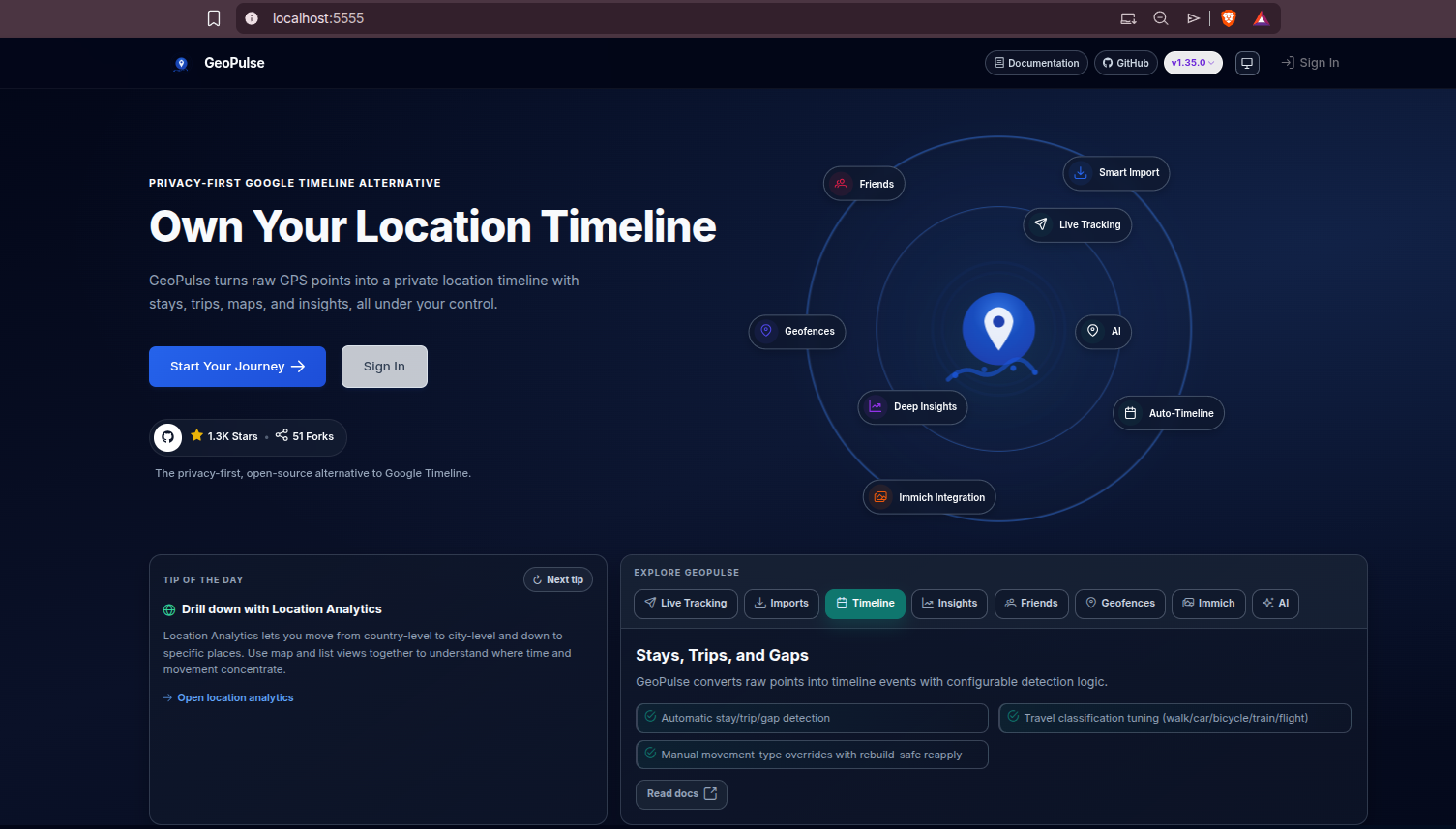
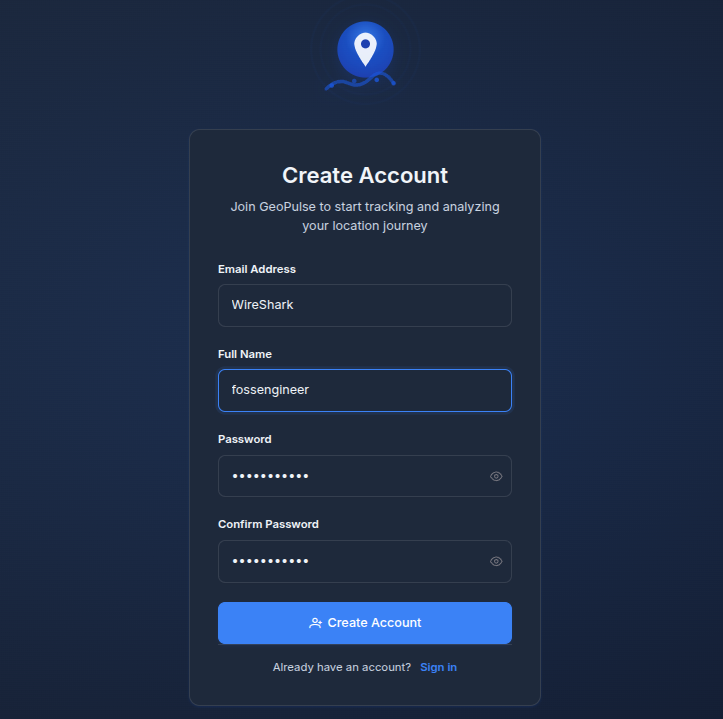
There is no fixed default admin password in the docs I reviewed.
Instead, set GEOPULSE_ADMIN_EMAIL to your email, register a user with that email, and GeoPulse promotes that account to admin.
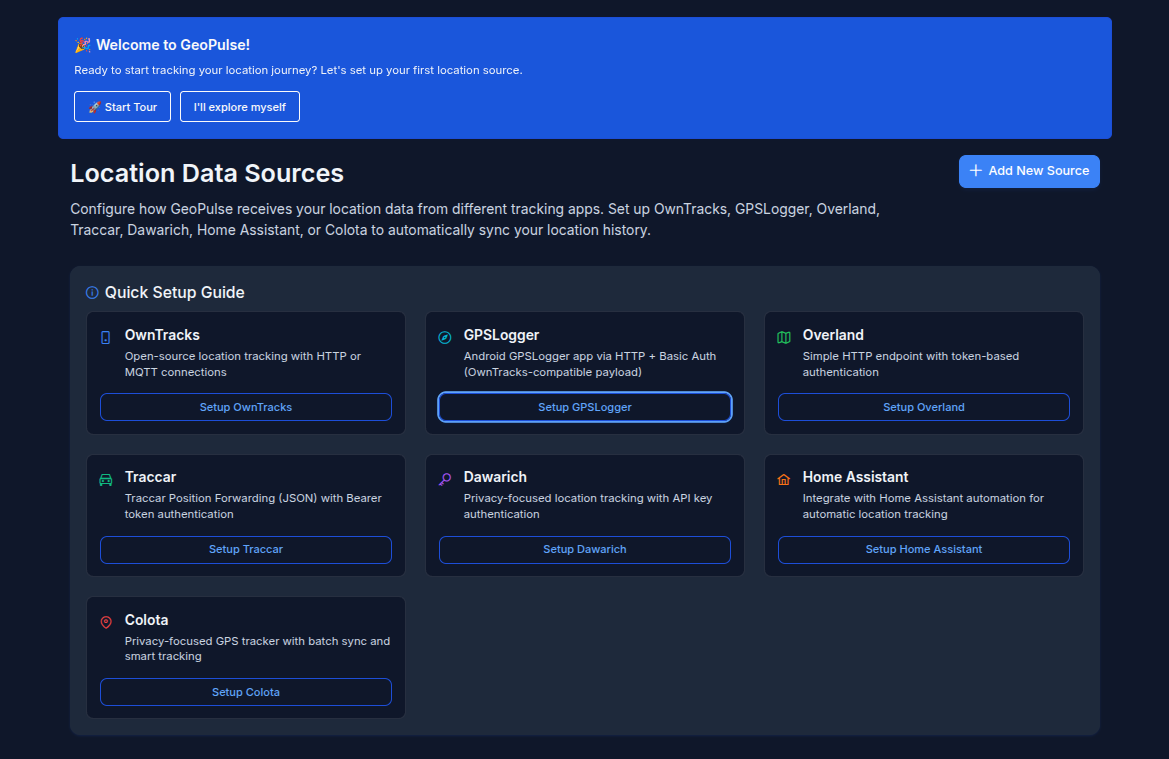
You will be greeted:
Field Note: Compose Validation
I validated the Home-Lab and site compose snippets with Docker Compose config rendering:
GEOPULSE_POSTGRES_PASSWORD=replace-me GEOPULSE_MQTT_PASSWORD=replace-me docker compose config
Local environment:
- Docker 29.6.2
- Docker Compose v5.3.1
- 11 GB free on
/, with Docker already using 22.57 GB in images and 9.959 GB in volumes - Dawarich still running locally on port
3333
Because the filesystem is tight and another location-history stack is already running, I skipped pulling/running the GeoPulse images in this pass. Treat this as compose validation and deployment review, not a completed runtime smoke test.
GPS Sources and Imports
GeoPulse is flexible about where location data comes from.
Live or app-based sources include:
- OwnTracks: open-source location tracking with either HTTP or MQTT connections. HTTP is simpler for a small deployment; MQTT is useful if you already run a broker and want queue-friendly mobile telemetry.
- GPSLogger: Android GPSLogger can send HTTP updates with Basic Auth using an OwnTracks-compatible payload. It is a pragmatic Android-first option when you want a lightweight tracker without a bigger app ecosystem.
- Overland: a simple HTTP endpoint with token-based authentication. This is a clean fit for iOS-style location logging workflows and other clients that speak the Overland format.
- Traccar: accepts Traccar Position Forwarding JSON with Bearer token authentication. That makes sense if you already use Traccar devices, vehicles, or gateways and want GeoPulse as the personal timeline/analytics layer.
- Dawarich: GeoPulse can ingest from Dawarich with API key authentication. This is useful if you are testing both tools or want a migration/mirroring path between privacy-focused timeline apps.
- Home Assistant: integrates with Home Assistant automations for automatic location tracking. It is especially interesting when your phone, router, Bluetooth presence, or smart-home automations already know whether you are home, away, or at a known place.
- Colota: privacy-focused GPS tracker with batch sync and smart tracking. I would treat it as another mobile-first source option when you want periodic sync rather than always-on direct pushes.
Import sources include:
- Google Timeline exports
- GPX
- GeoJSON
- OwnTracks exports
- CSV
For a small setup, OwnTracks over HTTP is likely the easiest first source. If you already run MQTT heavily, the MQTT-enabled compose path can make sense, but it adds Mosquitto and more credentials to manage.
Integrations Worth Noting
The Immich integration is the one I would look at first. If you already self-host Immich , GeoPulse can connect location history with photo context, which makes the map/timeline much more useful than points alone.
Home Assistant support is also interesting. If your phone, router, BLE beacons, or automations already expose location state through Home Assistant , GeoPulse can become the long-term historical layer while Home Assistant remains the automation layer.
The optional AI assistant is bring-your-own-provider. GeoPulse stores AI settings encrypted with a key generated during setup, but you should still treat location-aware AI queries as sensitive.
GeoPulse vs Dawarich
GeoPulse and Dawarich overlap, but they do not feel identical.
Pick GeoPulse if you want:
- More admin/multi-user controls.
- OIDC, invitations, audit logs, friends, and share links.
- Heavier analytics around journeys, reports, movement patterns, and dashboards.
- OwnTracks MQTT as a first-class optional deployment path.
- Quarkus/Vue/PostGIS instead of Rails/Sidekiq/Redis/PostGIS.
Pick Dawarich if you want:
- An AGPL-licensed project.
- A Rails app with a simpler mental model if you already know that stack.
- Official mobile apps as a central path.
- Photo/travel integrations around Immich, PhotoPrism, and AirTrail.
For my own homelab decision, the license is the major dividing line. GeoPulse looks feature-rich, but BSL personal-use-only terms are something to consciously accept rather than ignore.
Reverse Proxy and Security Notes
GeoPulse stores highly personal data. I would not expose it casually.
For home-lab access, prefer one of:
- VPN-only access through Tailscale, WireGuard, or similar.
- A reverse proxy with HTTPS and strong identity in front.
- A private Cloudflare Tunnel route protected with Access.
For a normal same-origin Docker deployment, keep:
GEOPULSE_COOKIE_DOMAIN=
GEOPULSE_CORS_ENABLED=false
When serving through HTTPS, set:
GEOPULSE_PUBLIC_BASE_URL=https://geopulse.example.com
GEOPULSE_AUTH_SECURE_COOKIES=true
Back up both the PostGIS volume and the ./keys directory. The database contains the timeline state; the keys are part of the auth/encryption state.
Conclusion
GeoPulse is a strong self-hosted location timeline platform if you want more than a map full of GPS dots. It has serious product surface: imports, live sources, trips, stays, analytics, sharing, friends, admin controls, OIDC, Immich, geofences, and optional AI.
The Docker architecture is also sensible for a home lab: one frontend, one backend, one PostGIS database, and generated local keys.
The main caveat is not technical. It is licensing. For personal self-hosting, GeoPulse is worth testing. For commercial or organizational use, review the BSL terms and get explicit permission where needed.
FAQ
Is GeoPulse open source?
Does GeoPulse replace Google Timeline?
Does GeoPulse need PostGIS?
What is the default GeoPulse admin login?
GEOPULSE_ADMIN_EMAIL, register with that email, and let GeoPulse promote that account to administrator.
Comments