

Testing email is one of those tasks that sounds simple until a dev environment accidentally sends real password resets, invoices, account invites, or notification spam.
Inbucket gives you a safer target.
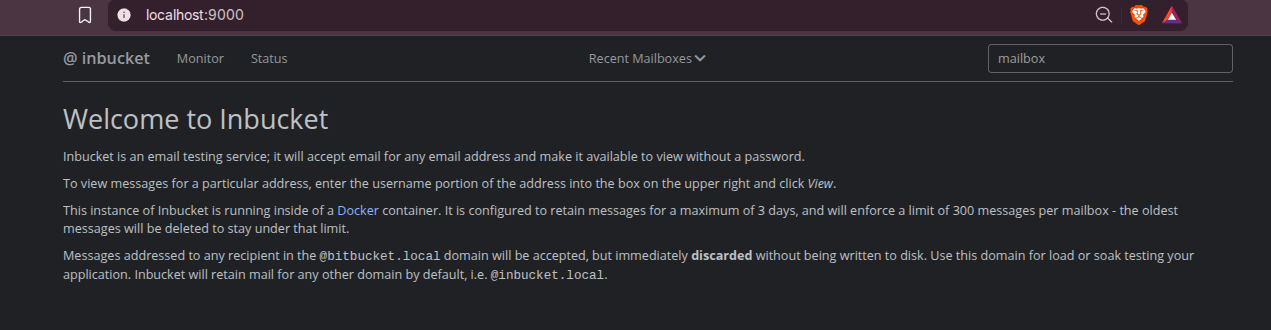
Inbucket is an email testing service; it will accept messages for any email address and make them available via web, REST and POP3 interfaces.
It behaves like a disposable mailbox service for your own development stack.
Your app sends SMTP to Inbucket, and you inspect the result in a browser or through an API.
What is Inbucket?
Inbucket is a self-hosted email testing server.
It includes:
- SMTP intake for test applications.
- A web UI for browsing mailboxes.
- REST endpoints for automated tests.
- POP3 access for mail clients and compatibility checks.
- A monitor view for recently received messages.
- Memory or file-backed storage.
- Retention cleanup so old test messages do not pile up forever.
- Lua extension hooks for advanced policy/customization.
The key difference from a real mail server is intent.
Inbucket is not trying to deliver mail to the internet.
It is trying to catch mail before it leaves your test environment.
That makes it useful for staging apps, local development, CI, QA demos, and homelab services where you want to verify email behavior without involving Gmail, Exchange, Mailgun, SES, Postmark, or real customer inboxes.
Why Self-Host Inbucket?
Self-hosting Inbucket gives you a local SMTP target that is easy to reason about.
Point your application at:
SMTP host: your-server-ip
SMTP port: 2525
TLS: off for local testing, or configure explicitly
Auth: usually not required for dev-only use
Then open the matching mailbox in the web UI.
If your app sends to [email protected], the default mailbox naming mode stores it under alice.
If you want domain-aware mailboxes, configure INBUCKET_MAILBOXNAMING=full.
This is much safer than testing against real outbound SMTP.
You can inspect HTML, plain text, headers, attachments, and application-generated links without sending anything to a real user.
Tech Overview
Inbucket is written in Go with an Elm frontend.
The backend includes built-in servers for:
- HTTP web UI and REST API.
- SMTP.
- POP3.
- Storage retention scanning.
- Message monitoring.
The Docker image ships the compiled Go daemon plus the built frontend assets.
In Docker, the image defaults to file storage under /storage, while the native binary defaults to memory storage unless configured otherwise.
The default internal ports are:
| Service | Internal Port |
|---|---|
| Web UI and REST API | 9000 |
| SMTP | 2500 |
| POP3 | 1100 |
The REST API is mounted under /api/. For example:
curl http://localhost:9325/api/v1/mailbox/alice
Self-Hosting Inbucket with Docker
The upstream README shows a direct Docker command:
docker run -d --name inbucket \
  -p 9000:9000 \
  -p 2500:2500 \
  -p 1100:1100 \
  inbucket/inbucket
That works, but I prefer not to bind default ports on a homelab server unless I know they are free.
For this field test, I used alternate host ports:
- Web UI:
9325 -> 9000 - SMTP:
2525 -> 2500 - POP3:
1115 -> 1100
services:
  inbucket:
    image: inbucket/inbucket:latest
    container_name: inbucket-safe
    restart: unless-stopped
    network_mode: bridge
    ports:
      - "9325:9000"  # Web UI and REST API
      - "2525:2500"  # SMTP intake
      - "1115:1100"  # POP3
    environment:
      INBUCKET_LOGLEVEL: info
      INBUCKET_STORAGE_TYPE: file
      INBUCKET_STORAGE_PARAMS: path:/storage
      INBUCKET_STORAGE_RETENTIONPERIOD: 72h
      INBUCKET_STORAGE_MAILBOXMSGCAP: "300"
      INBUCKET_SMTP_TIMEOUT: 30s
      INBUCKET_POP3_TIMEOUT: 30s
      INBUCKET_WEB_MONITORVISIBLE: "true"
    volumes:
      - inbucket-safe-config:/config
      - inbucket-safe-storage:/storage

volumes:
  inbucket-safe-config:
  inbucket-safe-storage:
Start it:
docker compose -f docker-compose.yml -p inbucket-safe up -d
Access it:
Web UI: http://localhost:9325/
SMTP:   localhost:2525
POP3:   localhost:1115
REST:   http://localhost:9325/api/v1/mailbox/{mailbox}
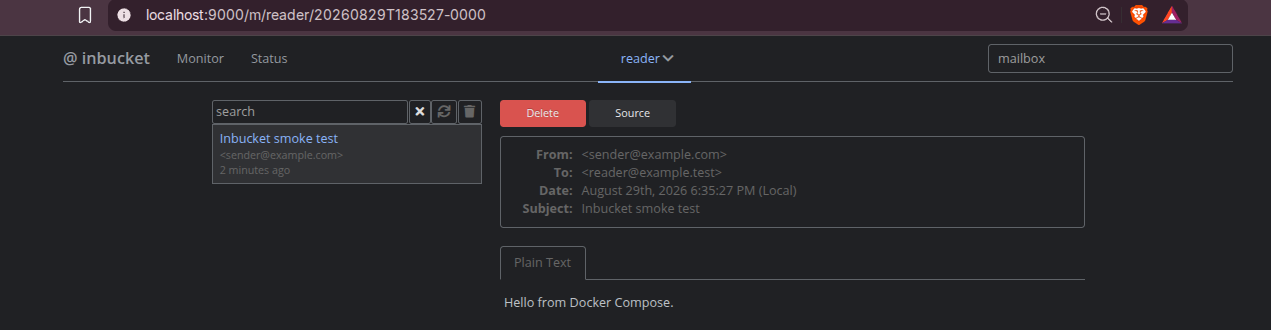
From another machine on your LAN, replace localhost with your server IP.
Field Note: Docker Network Pools
On my server, the first Compose attempt failed before creating the container:
all predefined address pools have been fully subnetted
That means Docker could not allocate another user-defined bridge network. For this single-container app, the safe workaround was to use Docker’s existing bridge network:
network_mode: bridge
On a normal Docker host, you can remove that line and let Compose create its default network. I kept it in the tested snippet because it avoided touching existing homelab containers and worked on this server.
Testing SMTP Capture
After starting the stack, send a test email:
python3 - <<'PY'
import smtplib
from email.message import EmailMessage

msg = EmailMessage()
msg["From"] = "[email protected]"
msg["To"] = "codex@localhost"
msg["Subject"] = "Inbucket smoke test from Codex"
msg.set_content("This message verifies SMTP capture through Inbucket.")

with smtplib.SMTP("localhost", 2525, timeout=10) as smtp:
    smtp.send_message(msg)
PY
Then query the mailbox:
curl http://localhost:9325/api/v1/mailbox/codex
In my field test, the API returned the captured message with this subject:
Inbucket smoke test from Codex
The container also became healthy and /debug/vars reported one received SMTP message.
Important Configuration
Most Inbucket configuration is done through environment variables.
For a small homelab or dev server, these are the ones I would review first:
| Variable | Why It Matters |
|---|---|
INBUCKET_STORAGE_TYPE |
Use file if you want messages to survive restarts |
INBUCKET_STORAGE_PARAMS |
Set path:/storage when using Docker volumes |
INBUCKET_STORAGE_RETENTIONPERIOD |
Controls how long messages are kept |
INBUCKET_STORAGE_MAILBOXMSGCAP |
Prevents one mailbox from growing forever |
INBUCKET_MAILBOXNAMING |
Choose local, full, or domain mailbox naming |
INBUCKET_SMTP_DEFAULTACCEPT |
Accept everything by default, or only configured domains |
INBUCKET_SMTP_ACCEPTDOMAINS |
Allow-list recipient domains |
INBUCKET_SMTP_REJECTDOMAINS |
Deny-list recipient domains |
INBUCKET_SMTP_REJECTORIGINDOMAINS |
Deny-list sender origin domains |
INBUCKET_WEB_BASEPATH |
Required when serving the UI under a reverse-proxy subpath |
INBUCKET_WEB_PPROF |
Keep false unless debugging privately |
For a controlled staging environment, consider:
environment:
  INBUCKET_SMTP_DEFAULTACCEPT: "false"
  INBUCKET_SMTP_ACCEPTDOMAINS: "example.test,staging.local"
That avoids turning the service into an open catch-all for any recipient domain.
Safe Exposure and Reverse Proxy Notes
Inbucket’s UI is intentionally simple. It does not provide a full user account or mailbox authentication system.
Do not expose it publicly as-is.
If you want remote browser access, put authentication in front of the web UI with something like:
- Cloudflare Access.
- Authelia.
- Authentik.
- Traefik middleware.
- Caddy auth.
- VPN-only access.
Cloudflare Tunnel can expose the web UI, but it does not expose generic SMTP or POP3 ports. Your apps still need a private path to the SMTP listener, such as the same Docker host, Docker network, LAN, or VPN.
Building Inbucket from Source
For source builds, you need Go plus Node/Yarn for the UI:
git clone https://github.com/inbucket/inbucket.git
cd inbucket/ui
yarn install
yarn build
cd ..
go build ./cmd/inbucket
In my local analysis, a backend build succeeded with:
GOFLAGS=-mod=mod go build -o ../inbucket-field-test ./cmd/inbucket
The resulting local binary was about 18 MB on Linux amd64. Because I did not inject release linker flags, inbucket -version reported undefined; the release build pipeline sets that metadata.
When Inbucket Fits
Pick Inbucket if you want:
- A lightweight SMTP sink for dev and staging.
- Disposable mailboxes without account setup.
- API-driven email assertions in integration tests.
- A simple web UI for reviewing transactional emails.
- POP3 compatibility for email-client testing.
- A self-contained service without PostgreSQL, Redis, or an external MTA.
Use something else if you need:
- Real inbound/outbound email hosting.
- User accounts and mailbox permissions.
- Long-term archival.
- Spam filtering.
- DKIM, DMARC, SPF, and delivery reputation management.
Inbucket is best understood as test infrastructure, not production mail infrastructure.
Conclusion
Inbucket is a practical tool for self-hosted email testing.
It gives developers and QA teams a real SMTP target, a browsable mailbox UI, and a REST API for automation, while keeping test emails inside your own environment. The Docker path is simple, and the service does not need a separate database.
For homelab use, the main rule is exposure control: keep SMTP and POP3 private, protect the web UI if it leaves your LAN, and set retention limits so captured messages do not accumulate forever.
The project is open source under the MIT License. ❤️
FAQ
What is the practical use case for Inbucket?
Inbucket is a fake SMTP inbox for testing.
The normal flow is:
Your app -> sends email -> Inbucket -> you inspect the email
Instead of sending real messages to users, Gmail, SES, Mailgun, Postmark, or a company SMTP server, your development or staging app sends to Inbucket.
Common use cases include:
- Testing password reset emails.
- Testing signup confirmation emails.
- Testing invoices and receipts.
- Testing notification templates.
- Checking HTML email rendering.
- Checking links inside generated emails.
- Verifying attachments.
- Letting QA review transactional emails.
- Using REST API checks in automated tests to confirm that an email was sent.
- Preventing staging or development systems from emailing real customers.
For example, configure your app with:
SMTP host: localhost or SERVER_IP
SMTP port: 2525
Username/password: none for private local testing
TLS: off unless you configure it explicitly
Then open the web UI:
http://localhost:9325/
Inbucket is not for hosting real email accounts. It is for safely catching and reviewing emails during development, staging, QA, demos, and integration testing.
Can Inbucket replace a real mail server?
Where do I access Inbucket after Docker starts?
http://localhost:9325/ on the server. From another LAN machine, use http://SERVER_IP:9325/.
What SMTP settings should my app use?
SERVER_IP or localhost, port 2525, and no authentication for private dev usage. If your app runs in Docker, you can also put it on a shared Docker network and target Inbucket internally.
How can I push test email into Inbucket with Python?
Use Python’s built-in smtplib and point it at the Inbucket SMTP listener.
This sends one message that should be retained and one message that should be discarded:
import smtplib
from email.message import EmailMessage

messages = [
    (
        "[email protected]",
        "[email protected]",
        "Retained domain test",
        "This should be stored by Inbucket.",
    ),
    (
        "[email protected]",
        "[email protected]",
        "Discard domain test",
        "This should be accepted by SMTP but not stored.",
    ),
]

with smtplib.SMTP("localhost", 2525, timeout=10) as smtp:
    for sender, recipient, subject, body in messages:
        msg = EmailMessage()
        msg["From"] = sender
        msg["To"] = recipient
        msg["Subject"] = subject
        msg.set_content(body)
        smtp.send_message(msg)
        print(f"sent {recipient}")
Then check the retained mailbox:
curl http://localhost:9325/api/v1/mailbox/keep
And check the discarded mailbox:
curl http://localhost:9325/api/v1/mailbox/drop
The expected result is that [email protected] appears in the keep mailbox, while [email protected] returns an empty list.
Do I need to own bitbucket.local or create DNS records?
No. If your application is configured to send SMTP directly to Inbucket, the recipient domain is just part of the message envelope.
For example, you can send a test message to [email protected] even if bitbucket.local does not exist in DNS. Inbucket receives the SMTP transaction first, then applies its internal rule: mail addressed to @bitbucket.local is accepted but discarded instead of being written to disk.
DNS or MX records only matter if your application tries to deliver mail itself instead of using Inbucket as its configured SMTP server.
Why can I send from [email protected] if that domain is not real?
Because this test sends directly to Inbucket, not to the public internet.
There are two separate ideas:
From address in the message: [email protected]
SMTP server receiving the message: Inbucket at localhost:2525
The Python script opens an SMTP connection to Inbucket on localhost:2525. Inbucket receives the envelope and headers as test data. It does not need the sender domain to exist.
For this local test, Inbucket is not:
- Looking up MX records for
example.test. - Verifying SPF.
- Verifying DKIM.
- Verifying DMARC.
- Sending a reply.
- Delivering the message to another mail server.
That is intentional. Inbucket is test infrastructure, so fake sender domains are useful.
The .test top-level domain is reserved for testing, which makes [email protected] a good placeholder address in examples.
If you sent the same fake sender through a real mail provider, it would likely fail validation or be rejected. It works here because your app is configured to send to Inbucket as the SMTP server.
Does Inbucket persist messages?
/storage with a named Docker volume.
Can I run Inbucket behind Cloudflare Tunnel?
Why did Compose need network_mode bridge?
network_mode: bridge reused Docker’s existing bridge network and avoided impacting other homelab containers.
Comments