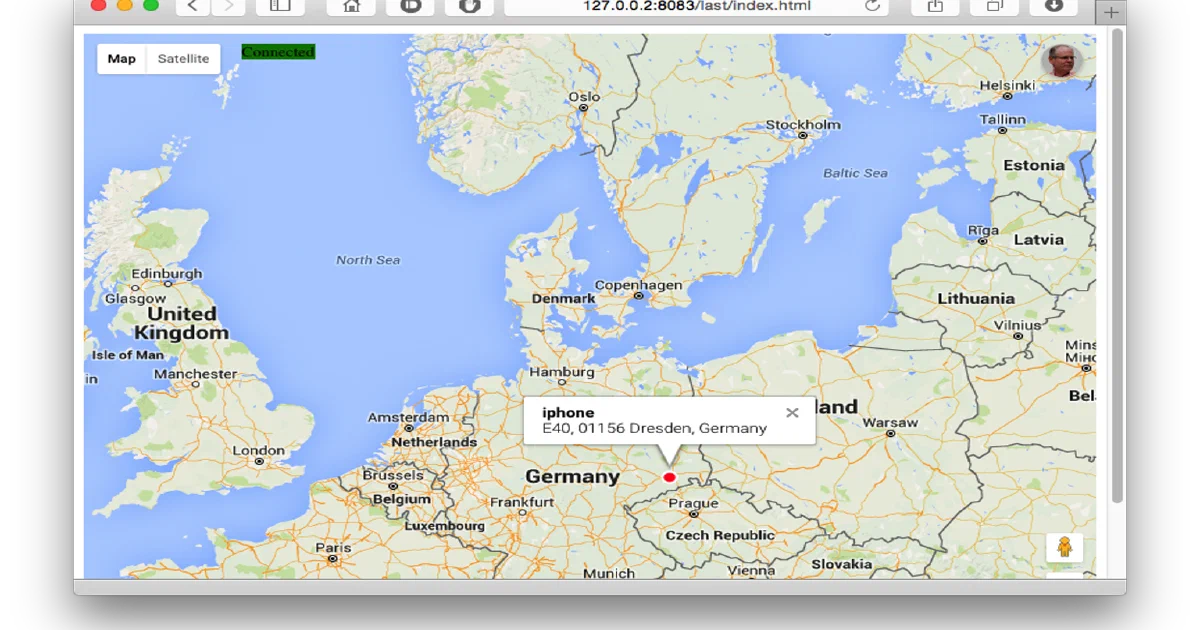

OwnTracks Recorder is for people who want phone location history without handing that history to a hosted tracking platform.
It receives location updates from the OwnTracks mobile apps over MQTT or HTTP, stores them locally, and gives you a built-in API, static map views, WebSocket live updates, and ocat, a CLI for exporting stored points as JSON, GeoJSON, CSV, GPX, XML, or raw records.
The important design choice is that Recorder does not need a traditional external database. Its store is mostly files on disk, with LMDB used for cache-like data such as reverse geocoding, timezone lookup, friends, and mappings.
Why OwnTracks Recorder?
- Local location history: keep phone position history on your own machine.
- MQTT-friendly: pair it with Mosquitto, EMQX, or another broker that already handles authentication and TLS.
- HTTP ingestion: useful for tests or proxy-protected setups where the app POSTs to
/pub. - Simple persistence: monthly
.recfiles,last/JSON files, and a small LMDB cache are easy to back up. - CLI exports:
ocatreads the store directly and can output several formats for scripts and analysis. - Maps included: Recorder ships example pages for last positions, tracks, tables, live maps, and limited views.
Docker Compose
Create the folders and a basic .env file:
mkdir -p store config

cat > .env <<'EOF'
OTR_HTTP_PORT=8083
OTR_HOST=host.docker.internal
OTR_PORT=1883
OTR_USER=owntracks
OTR_PASS=change-me-long-password
OTR_TOPICS=owntracks/#
EOF
Start Recorder:
docker compose up -d
Then check the version endpoint:
curl http://localhost:8083/api/0/version
For my local smoke test, the image returned:
{"version":"1.0.3","git":"1.0.3-0-g8518399f5a"}
MQTT or HTTP?
For real deployments, MQTT is usually the better OwnTracks path. Recorder connects out to your broker, subscribes to topics such as owntracks/#, and lets the broker handle authentication, authorization, TLS, and ACLs.
HTTP mode is available too. It accepts OwnTracks JSON at /pub:
payload='{"_type":"location","lat":52.2297,"lon":21.0122,"tst":1787903300,"acc":12,"batt":88,"tid":"JA"}'

curl --data "$payload" 'http://localhost:8083/pub?u=demo&d=phone'
That is convenient for testing, but do not expose it openly. Any client that can reach /pub can publish data to Recorder.
HTTP-only test command
This is the isolated command I used for the local trial, mapped to port 8085 to avoid touching other services:
docker run -d --name owntracks-recorder-foss-trial --network bridge \
  -p 8085:8083 \
  -v /tmp/foss-post-owntracks-recorder/store:/store \
  -e OTR_HTTPHOST=0.0.0.0 \
  -e OTR_HTTPPORT=8083 \
  -e OTR_PORT=0 \
  -e OTR_STORAGEDIR=/store \
  owntracks/recorder
With OTR_PORT=0, MQTT is disabled and Recorder only serves HTTP.
Querying Data
Recorder exposes a REST API under /api/0.
After posting the sample payload above, this returned the last known position:
curl 'http://localhost:8083/api/0/last?user=demo&device=phone'
The same data is available directly through ocat:
docker exec -it owntracks-recorder ocat -S /store --last --user demo --device phone
Other useful endpoints:
/api/0/listlists users, devices, or stored monthly files./api/0/locationsreturns historical records with optional date ranges and formats./api/0/monitorreturns the last received topic timestamp./api/0/versionreturns version metadata./api/0/qqueries the reverse-geocode cache by coordinates.
Storage Layout
The compose file mounts ./store to /store. That is the directory to back up.
Important paths:
rec/<user>/<device>/YYYY-MM.recstores monthly history.last/<user>/<device>/<user>-<device>.jsonstores the current last location.ghash/stores the LMDB reverse-geocode and metadata cache.monitorstores the last received topic and timestamp.cards/,photos/,waypoints/, andconfig/hold optional OwnTracks metadata.
Recorder lowercases usernames and device names, so Jane/Phone becomes jane/phone on disk.
Security Notes
Recorder is not an authentication system. In MQTT mode, secure the broker. In HTTP mode, secure the reverse proxy.
The project documentation is direct about this: clients that can access /pub can publish, clients that can access /api can read location data, and clients that can access /ws can see live last-location updates.
For a private home setup:
- Bind Recorder to a private network or localhost where possible.
- Put Caddy, Nginx, Traefik, or another reverse proxy in front of HTTP access.
- Require TLS and authentication at the proxy.
- Use MQTT credentials and ACLs.
- Keep
OTR_PASS,OTR_GEOKEY, browser map keys, and stored remote configs out of git. - Protect the
store/directory because it contains sensitive movement history.
Payload encryption can help on the transport/publish side, but Recorder decrypts payloads when it can and stores the resulting data in clear, so filesystem security still matters.
Project Links
- OwnTracks project
- OwnTracks Recorder source code
- OwnTracks Recorder GPL-2.0-or-later license
- OwnTracks Recorder Docker image
- Home-Lab OwnTracks Recorder compose reference
- Recorder security notes
Conclusion
OwnTracks Recorder is a good fit when you want location history to be local, inspectable, and easy to back up. It is small enough to run on modest hardware, and its storage model makes it easier to understand than a full tracking platform backed by a database stack.
The tradeoff is that you must handle the security boundary yourself. Use MQTT with a properly configured broker, or put the HTTP interface behind a real reverse proxy with TLS and authentication.
Pair it with EMQX or Mosquitto for MQTT, Home Assistant for automation around presence, and Dawarich if you want a more application-like personal timeline UI.
FAQ
Does Recorder need PostgreSQL?
Can I use it without MQTT?
OTR_PORT=0 and post OwnTracks JSON to /pub. For production, put HTTP mode behind a reverse proxy with authentication.
Can I browse maps in the container?
Where is my data?
store/ directory. Back up rec/, last/, and ghash/ at minimum.
Comments