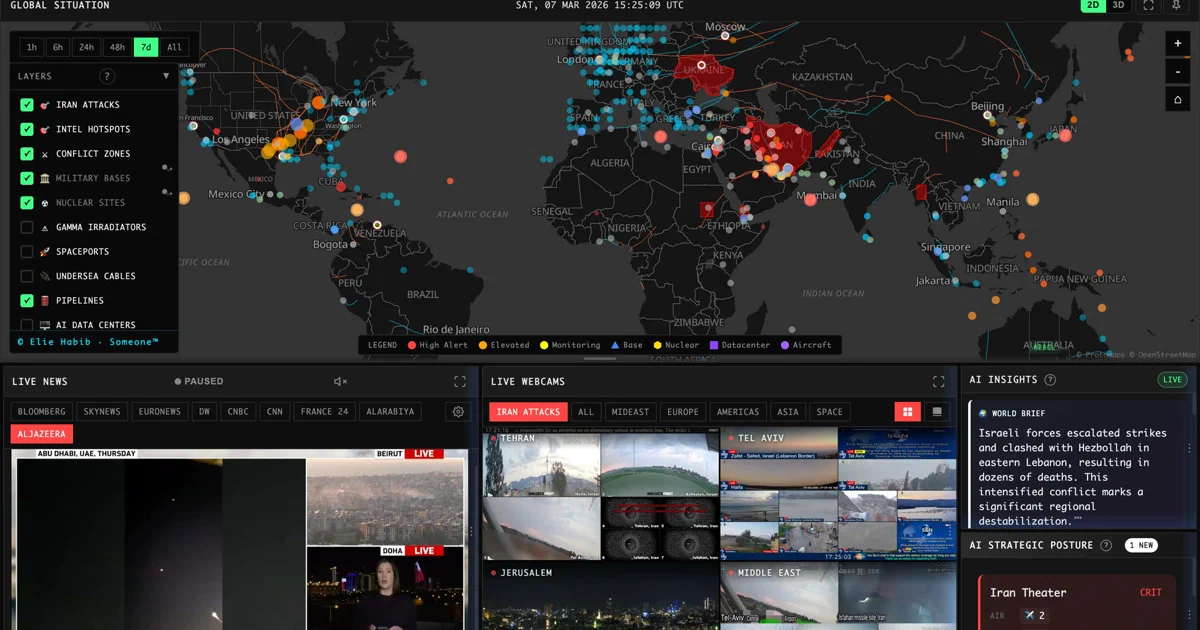

World Monitor is the kind of project that looks simple from a screenshot and then turns out to be a full intelligence platform when you open the repo.
It is a live dashboard for global signals: news, conflict events, military activity, shipping chokepoints, aviation, markets, commodities, infrastructure, cyber, climate, and AI-generated briefs. It also ships programmatic surfaces: REST, MCP, CLI, SDKs, and a Tauri desktop app.
World Monitor - A real-time global intelligence dashboard with AI-powered news aggregation, geopolitical monitoring, and infrastructure tracking.
- World Monitor GitHub Source Code
- World Monitor Live App
- World Monitor Documentation
- World Monitor Self-Hosting Guide
- License: AGPL-3.0-only ✅
What is World Monitor?
World Monitor is an open-source situational awareness dashboard. It combines an interactive map, many specialized panels, source feeds, risk scores, AI summaries, and a programmable API layer into one interface.
The dashboard has several variants from the same codebase: world, tech, finance, commodity, happy, and energy. It also has a native desktop app through Tauri 2, plus MCP, REST API, npm CLI, and SDKs for Python, Ruby, and Go.
This is not just “a map with news pins.” The repository includes Vercel Edge Functions, Redis cache contracts, Railway-style seeders and relay services, Convex product state, billing integrations, OpenAPI generation, Protocol Buffer contracts, CI gates, Docker images, and self-hosting docs.
Why Self-Host World Monitor?
- Run your own dashboard: keep a local OSINT-style monitoring surface available on your network.
- Choose your data sources: start with no-key public feeds, then add API keys for richer coverage.
- Control secrets: keep AI and feed credentials in your own environment.
- Use local AI paths: configure an OpenAI-compatible local endpoint when appropriate.
- Inspect the stack: the AGPL source exposes the app, API handlers, seed scripts, cache contracts, and deployment model.
The main caveat is operational complexity. A serious intelligence dashboard has moving parts: data freshness, Redis persistence, upstream API quotas, scheduled seeders, rate limits, auth boundaries, and reverse proxy behavior.
Tech Overview of World Monitor
World Monitor is primarily TypeScript and JavaScript. The frontend uses Vite, deck.gl, MapLibre GL, globe.gl, Three.js, i18next, Transformers.js, and a large panel/map system.
The backend surface is split between Vercel-style api/ functions and shared server handlers. The repository uses sebuf and Protocol Buffers to generate contract-backed API surfaces, while hand-written endpoints cover auth, bootstrap, health, billing, MCP, OAuth, notifications, and operational workflows.
The data layer is cache-first. Seed scripts fetch upstream data, normalize it, and publish Redis keys. The dashboard then hydrates fast, slow, or on-demand data tiers instead of making every panel call every upstream API directly.
Architecture & Components
The browser app initializes storage, i18n, workers, bootstrap hydration, map/panel layout, UI components, data loading, and refresh loops. The architecture docs describe this as an eight-phase startup.
The map layer has two engines: a flat WebGL map using deck.gl + MapLibre GL, and a 3D globe using globe.gl. Layer definitions decide which variants and renderers each layer supports.
The Docker self-hosting stack has four core services:
worldmonitor: nginx static app plus Node.js API sidecar.redis: Redis cache/data store with required AUTH.redis-rest: an Upstash-compatible REST proxy bound to localhost.ais-relay: live vessel relay and related backend loops.
There are also cloud-native pieces in the hosted deployment: Vercel, Railway, Upstash Redis, Convex, Cloudflare/R2, and Mintlify docs. Self-hosting replaces part of that topology locally, but optional cloud APIs and source keys still matter depending on the features you enable.
Self-Hosting World Monitor with Docker
World Monitor has an official Docker/Podman Compose path. Unlike many small dashboards, this one deliberately refuses to start without several secrets.
Pre-Requisites - Docker!
Install Docker on your system before proceeding:
- Linux: Official Docker Engine install guide
- Windows / Mac: Docker Desktop
Verify installation: docker --version && docker compose version
Required Secrets
Before starting Compose, create a .env with these values:
echo "RELAY_SHARED_SECRET=$(openssl rand -hex 32)" >> .env
echo "REDIS_PASSWORD=$(openssl rand -hex 32)" >> .env
echo "REDIS_TOKEN=$(openssl rand -hex 32)" >> .env
echo "WM_SESSION_SECRET=$(openssl rand -hex 32)" >> .env
Those are not decorative. The Compose file uses required interpolation so unset values fail early:
RELAY_SHARED_SECRETauthenticates non-public app requests to the AIS relay.REDIS_PASSWORDprotects Redis with AUTH.REDIS_TOKENprotects the Redis REST proxy.WM_SESSION_SECRETsigns anonymous browser sessions in Docker mode.
Upstream Quick Start
The upstream self-hosting guide shows this flow:
git clone https://github.com/koala73/worldmonitor.git
cd worldmonitor
npm install

echo "RELAY_SHARED_SECRET=$(openssl rand -hex 32)" >> .env
echo "REDIS_PASSWORD=$(openssl rand -hex 32)" >> .env
echo "REDIS_TOKEN=$(openssl rand -hex 32)" >> .env
echo "WM_SESSION_SECRET=$(openssl rand -hex 32)" >> .env

docker compose up -d
./scripts/run-seeders.sh
Then open:
http://localhost:3000
I am not embedding a Home-Lab Compose file here because I did not run or validate the stack in this pass. Use the upstream docker-compose.yml until you have tested the exact services, ports, secrets, and seed cadence you want.
Optional API Keys
World Monitor can run with public data sources, but many panels improve when you add keys. Examples include:
- AI summaries: Groq, OpenRouter, or an OpenAI-compatible local endpoint.
- Markets and macro: Finnhub, Alpha Vantage, FRED, EIA.
- Conflict and unrest: ACLED, UCDP.
- Earth observation: NASA FIRMS.
- Aviation and maritime: AviationStack, Travelpayouts, AISStream.
- Internet outages: Cloudflare Radar.
Put sensitive overrides in docker-compose.override.yml or Docker secrets, not in a public Compose snippet.
Safe Exposure Notes
Do not expose the stack casually just because it starts on port 3000.
World Monitor has auth boundaries, source keys, API quotas, seeders, Redis state, and direct-LLM limits. The self-hosting docs also call out WM_TRUSTED_PROXY_CIDRS for deployments behind another reverse proxy. Set it only to trusted proxy addresses or networks; trusting a client-reachable network lets callers forge forwarded IPs and evade per-IP limits.
For a private homelab, start with LAN-only access. If you later put it behind Caddy, Traefik, Nginx, or Cloudflare Tunnel, review session behavior, rate limits, API-key handling, source-key exposure, and logs first.
AGPL also matters. Personal and research usage is allowed under the AGPL, but if you modify and network-serve the application, understand the source-availability obligations.
Programmatic Access
World Monitor is built for agents as well as humans.
The README documents:
- MCP server at
https://worldmonitor.app/mcp. - REST API at
https://api.worldmonitor.app. - OpenAPI spec at
https://worldmonitor.app/openapi.yaml. - npm CLI package named
worldmonitor. - Python, Ruby, and Go SDKs.
Example CLI commands:
npx worldmonitor tools
npm install -g worldmonitor
worldmonitor risk IR --api-key wm_xxx
This agent/API surface is a major differentiator. For builders, World Monitor can be a dashboard and a data substrate.
Field Note: Static Non-Container Trial
For this analysis I did not run Docker, Podman, Compose, seeders, or any existing containers.
I cloned the repo to /tmp/worldmonitor-foss-post, inspected the README, self-hosting guide, Compose file, Dockerfiles, architecture docs, package metadata, source layout, and recent commits. I also ran a syntax-level JavaScript check with the host Node version:
node --version
find api server scripts docker cli src-tauri workers -type f \
  \( -name '*.js' -o -name '*.mjs' -o -name '*.cjs' \) \
  -not -path '*/node_modules/*' -print0 | xargs -0 -n 1 node --check
The host reported v18.19.1. The check hit syntax errors on modern JSON import attributes such as:
import iso3ToIso2 from './shared/iso3-to-iso2.json' with { type: 'json' };
                                                    ^^^^
SyntaxError: Unexpected token 'with'
That is an environment mismatch, not a conclusion that the project is broken. World Monitor’s self-hosting guide requires Node.js 22+, and the checked machine had Node 18.
Conclusion
World Monitor is worth looking at if you want an open-source OSINT-style dashboard with maps, panels, data pipelines, AI briefs, MCP, SDKs, and Docker self-hosting.
It is also a project to treat with operational respect. The interesting part is not only the UI; it is the seed pipeline, cache freshness model, Redis persistence, required secrets, source-key management, and exposure policy.
For a first deployment, follow upstream’s self-hosting guide closely. Generate real secrets, seed Redis, keep optional API keys scoped, and run it privately before exposing it anywhere.
FAQ
Is World Monitor self-hostable?
SELF_HOSTING.md and a docker-compose.yml stack for Docker or Podman.
Does World Monitor need API keys?
Can I use World Monitor with local AI?
LLM_API_URL, LLM_API_KEY, and LLM_MODEL. The README also describes local AI with Ollama.
Is World Monitor just a frontend?
Can I expose World Monitor publicly?
WM_TRUSTED_PROXY_CIDRS, source-key handling, AGPL obligations, and whether Redis/API surfaces are reachable only through intended paths.
Comments