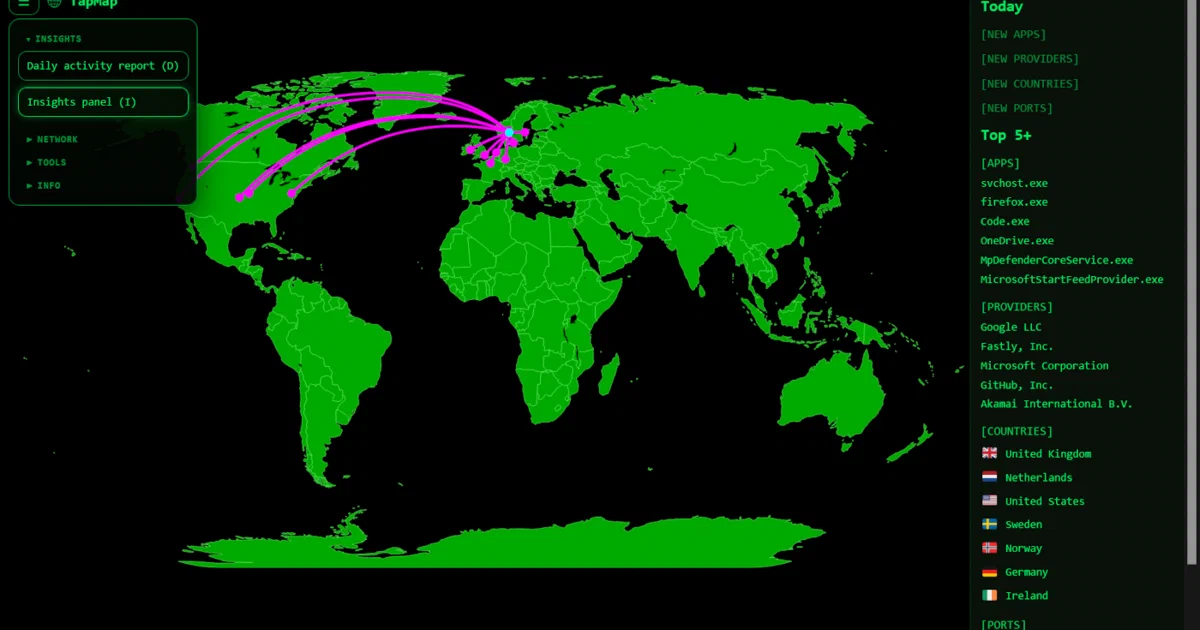

You open Activity Monitor. There are 184 connections.
You have no idea where most of them go.
Your phone might be talking to seventeen ad networks; your laptop is probably leaking telemetry to four cloud regions you’ve never heard of.
TapMap is the small awareness tool that puts every active connection on a live world map — markers for destinations, arcs from your location, an Insights panel surfacing what’s new and what’s frequent over the last 30 days.
What is TapMap?
TapMap is a local network-connection visualizer. It scans active sockets on your machine, enriches each IP with MaxMind GeoLite2 geolocation, and renders the results on an interactive Dash + Plotly world map.
Crucially, it is read-only — an awareness tool, not a firewall.
It shows you the world your computer is connecting to; it doesn’t block anything.
“Watch your computer connect across the internet in real time. Discover the world behind your apps.”
TapMap on GitHub TapMap Documentation TapMap on Docker Hub
What makes it different
- 🗺️ Live world map of every outbound connection your machine is making right now
- 📊 30-day Insights + Daily Activity Report — highlights new countries / ASNs / ports / apps, frequent destinations, application patterns, provider concentration, and recent activity timelines
- 🏠 100% local — connection data and GeoIP lookups both happen on your machine
- 🚫 No telemetry — confirmed in the README; the only outbound call is optional public-IP detection, which you can avoid with fixed
TAPMAP_LONandTAPMAP_LAT - 📦 Native binaries + Docker — single-file executable for Windows / Linux / macOS, Docker image for Linux hosts
- 🧭 Network side panels — inspect unmapped public services, LAN/local services, and local open ports
- 🗃️ GeoIP database management — install, update, verify, and switch supported GeoIP providers from the UI
- ⌨️ Keyboard-driven —
Dopens the Daily Activity Report,Itoggles Insights,Uunmapped services,LLAN,Oopen ports,GGeoIP database management,Ecache export,Cclear cache - 🆓 MIT licensed — fully open source
How it actually works
socket scan → IP extraction → GeoIP lookup → map rendering
- Socket scan:
psutilon Windows/Linux,lsofon macOS — reads the OS-level table of active TCP and UDP connections - GeoIP lookup: local GeoIP databases. TapMap supports MaxMind GeoLite2 and DB-IP Lite, and current builds include a GeoIP Database Management screen for installation, updates, provider status, and manual rechecks.
- Render: Dash + Plotly serve an interactive map at
http://127.0.0.1:8050/that you open in your browser
The whole thing is a Python 3.10+ process; there’s no packet capture daemon, no system tray dependency, and no kernel module.
It reads the OS socket table, not packet payloads.
Self-Hosting TapMap
There are three deployment options depending on your OS and preferences.
Get Docker 🐋
Install Docker on your system before proceeding:
- Linux: Official Docker Engine install guide
- Windows / Mac: Docker Desktop
Verify installation: docker --version && docker compose version
Option 1 — Native binary (recommended)
Download from GitHub Releases for your OS.
Extract and run:
./tapmap                # Linux / macOS
tapmap.exe              # Windows
The browser tab opens automatically at http://127.0.0.1:8050/.
If not, open that URL manually.
First-run security prompts — the binaries are unsigned, so:
- Windows SmartScreen — “More info” → “Run anyway”
- macOS Gatekeeper — System Settings → Privacy & Security → “Open anyway” (or in Terminal:
xattr -d com.apple.quarantine tapmap)
Option 2 — Docker (Linux hosts only)
The Docker image needs --network host and --pid host to see the host’s sockets and processes, which Docker Desktop on Windows / macOS doesn’t expose. So this path is Linux-only:
# TapMap stores GeoIP databases and local history here:
mkdir -p ~/tapmap-data

docker run --rm \
  --network host \
  --pid host \
  --cap-add=SYS_PTRACE \
  --security-opt apparmor=unconfined \
  -v ~/tapmap-data:/data \
  -e TAPMAP_IN_DOCKER=1 \
  olalie/tapmap:latest
Open http://127.0.0.1:8050/ on the host.
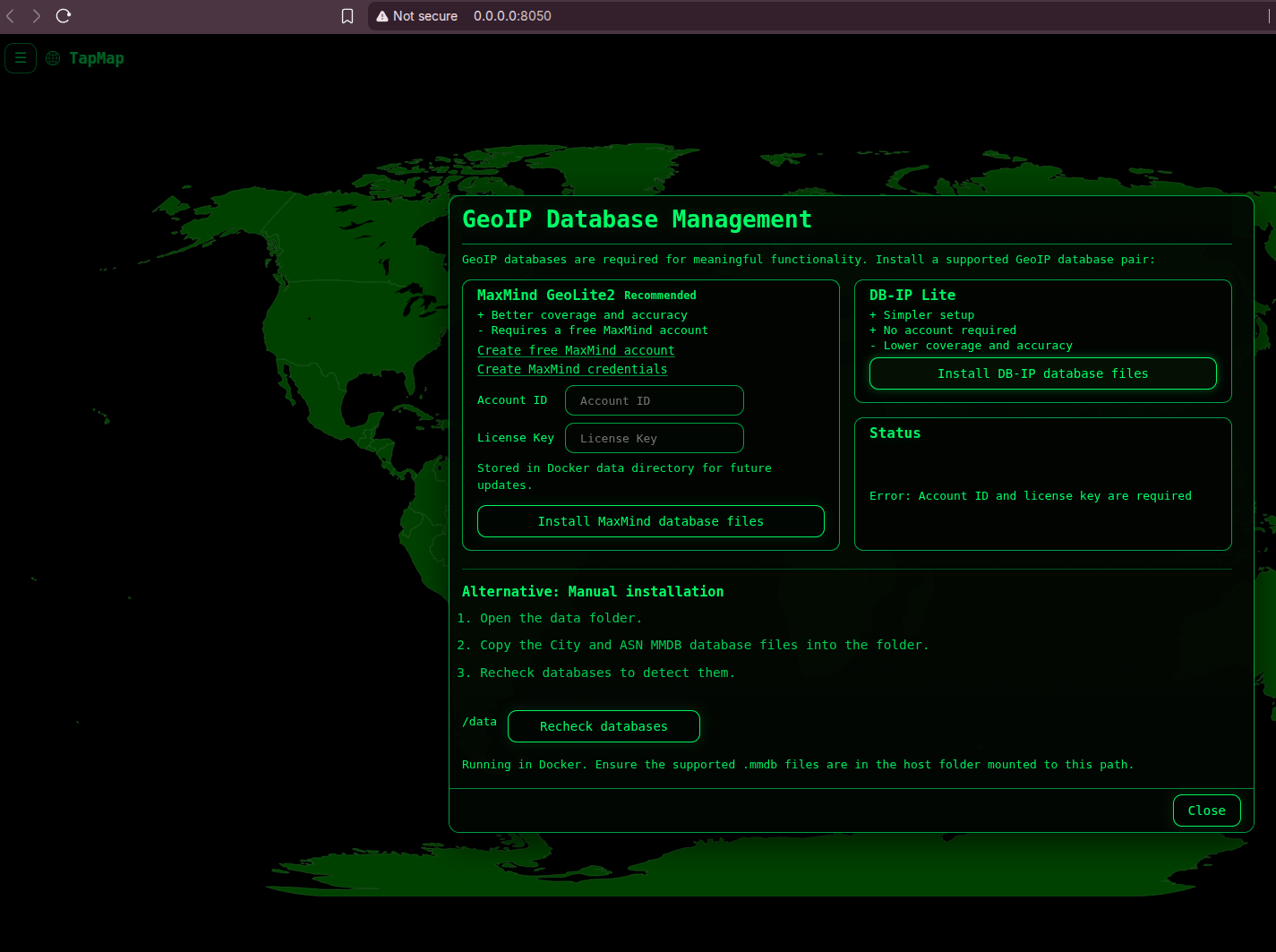
Once you select the local db option:
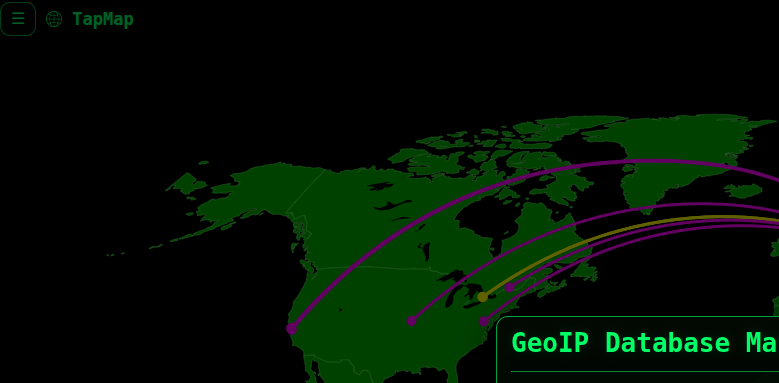
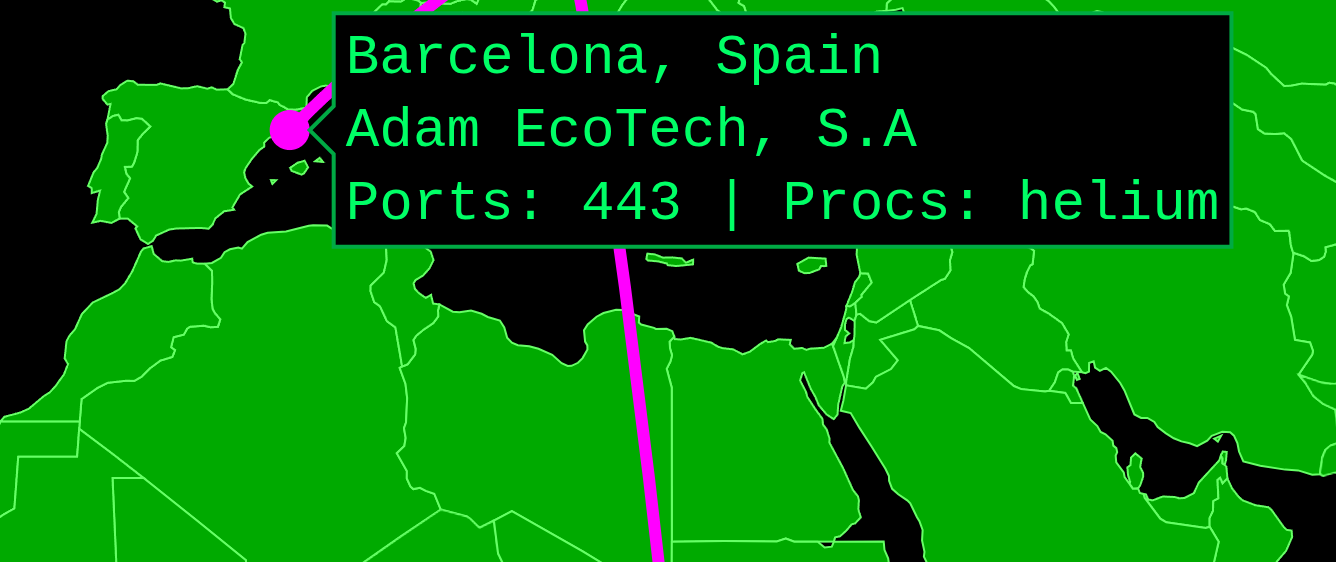
Where you can see per process connections:
Process visibility on Ubuntu + AppArmor
TapMap always shows network activity in Docker, but process names depend on host security policy.
On Ubuntu with the default Docker AppArmor profile, SYS_PTRACE alone may be insufficient. The upstream Docker notes use:
--cap-add=SYS_PTRACE
--security-opt apparmor=unconfined
Behavior varies across distros; the maintainer is upfront that “process information may be unavailable in Docker mode, depending on host security policies.”
If you can’t see process names, this is the most common fix.
Option 3 — From source
Python 3.10+, then:
git clone https://github.com/olalie/tapmap
cd tapmap
python -m venv .venv
source .venv/bin/activate   # or .venv\Scripts\activate on Windows
pip install -r requirements.txt
pip install -e .
python -m tapmap
Getting the GeoIP databases
TapMap does not bundle GeoIP databases.
Without a supported database, TapMap still runs, but the map cannot place public IPs geographically.
Current TapMap builds include GeoIP Database Management.
If no supported databases are found, the setup window opens automatically.
You can also open it later from the Tools menu or with the G keyboard shortcut.
Supported providers:
- MaxMind GeoLite2: recommended for coverage and accuracy. Requires a free MaxMind account, account ID, and license key.
- DB-IP Lite: simpler setup and no account required, but lower coverage and accuracy.
Manual install still works. For MaxMind, download GeoLite2-City.mmdb and GeoLite2-ASN.mmdb. For DB-IP, extract and rename the city/ASN Lite databases to DBIP-City.mmdb and DBIP-ASN.mmdb.
Then place them in TapMap’s data folder and click Recheck databases.
The database manager can also check for updates and install newer database files when available.
Configuring the port
Default is 8050. Override at runtime via env var:
TAPMAP_PORT=8060 tapmap
For Docker:
docker run ... -e TAPMAP_PORT=8060 ...
If you do not want TapMap to use public-IP based location detection for the local marker, provide fixed coordinates:
TAPMAP_LON=10.7522 TAPMAP_LAT=59.9139 tapmap
In Docker, pass the same variables with -e.
TapMap vs the Alternatives
TapMap occupies a specific niche — read-only visualization, not enforcement.
The category map:
| TapMap | OpenSnitch | Little Snitch | netstat / ss | |
|---|---|---|---|---|
| Visualize on map | Yes | No (per-app rules UI) | No | No |
| Block connections | No (deliberately) | Yes | Yes | No |
| Cross-platform | Win / Linux / macOS | Linux only | macOS only | Yes (CLI) |
| GUI | Browser | GTK | Native macOS | None |
| GeoIP | MaxMind GeoLite2 / DB-IP Lite | No | No | No |
| 30-day insights/report | Yes | No | Partial | No |
| License | MIT | GPL | Commercial | BSD |
The honest read:
- Pick TapMap if you want to see where your traffic goes without blocking anything — the awareness tool angle
- Pick OpenSnitch if you want per-app interactive blocking on Linux
- Pick Little Snitch if you’re on macOS and want commercial-grade firewalling with a polished UI
- Pick netstat / ss if you don’t need a GUI and just want quick CLI snapshots
The three tools also compose: TapMap to find suspicious destinations, OpenSnitch / Little Snitch to block them.
Conclusion
TapMap fills a small but valuable niche: a polished, cross-platform, local-only network visualizer that doesn’t try to be a firewall.
The 30-day Insights panel and Daily Activity Report are the genuinely interesting features — most users don’t know what their machine talks to in steady state, and “new destination this week” is the kind of signal that makes you actually look.
The maintainer is upfront about the project’s scope (no blocking, no alerts, no policy) and about the GeoIP database licensing constraints, which is the right way to ship a small open-source tool.
Related tools worth knowing: it reminded me to PortMaster in a way
- OpenSnitch — Linux per-app interactive firewall; the blocking counterpart to TapMap’s visibility
- Little Snitch — commercial macOS firewall with a similar visibility-then-block model
- GlassWire — Windows-focused network monitor; broader feature set, freemium
- MaxMind GeoLite2 and DB-IP Lite — supported GeoIP database providers for map locations
- Dawarich — different angle: maps where you have been, not where your connections go
Frequently Asked Questions
Will TapMap block any connections?
No. The README is explicit: it’s an awareness tool, not a firewall.
Use OpenSnitch (Linux), Little Snitch (macOS), or your OS firewall for enforcement.
Do I really need the MaxMind account?
For the map view, yes — TapMap needs a supported local GeoIP database.
Current builds include GeoIP Database Management, which can guide you through MaxMind GeoLite2 or DB-IP Lite setup.
TapMap will run without databases, but public IP locations will appear as unmapped.
Why doesn’t Docker work on Windows or macOS?
The container needs --network host and --pid host to see the host’s active sockets and process tree. Docker Desktop on Windows and macOS runs the daemon in a Linux VM, so those flags expose the VM’s network/processes, not the host’s. The native binaries are the right path on those platforms.
Will it slow down my machine?
TapMap polls the OS socket table periodically (POLL_INTERVAL_MS in config). Default settings are low-overhead — the scan reads in-kernel data, not network packets, so there’s no packet inspection or kernel module involved. On a normal desktop you won’t notice it running.
What’s the difference between Insights and the main map?
The main map shows connections observed since TapMap started or since the cache was cleared. The Insights panel and Daily Activity Report use 30-day rolling history — new and frequent countries, ASNs, ports, apps, provider concentration, and application recurrence patterns. To build a useful history, the project recommends running TapMap at startup.
Is the public-IP location lookup a privacy issue?
It is used to place your local marker and draw arcs from “you” to each destination on the map. If you do not want public-IP based location detection, set fixed coordinates with TAPMAP_LON and TAPMAP_LAT.
How does TapMap differ from netstat or ss?
Same data source — both use the OS socket table — but TapMap adds geolocation, persistent insights, and a visual map UI. If you’re comfortable with ss -tunap | sort and have a mental model of where your traffic goes, you don’t need TapMap. If you want to see it instead, that’s the value add.
How does TapMap compare with Wireshark?
They answer different questions. Wireshark is a packet analyzer: it captures traffic, decodes protocols, inspects payloads, filters conversations, and helps debug low-level network behavior.
TapMap is lighter and higher-level: it reads active sockets, geolocates remote IPs, and shows where your machine is connecting over time.
Use TapMap for awareness and pattern discovery; use Wireshark when you need packet-level evidence.
How do TapMap and similar network tools differ?
- Wireshark — packet analyzer for deep protocol inspection; TapMap is higher-level and shows socket destinations on a map.
- SimpleWall — lightweight Windows firewall GUI for controlling and blocking network activity; TapMap observes but does not block.
- TinyWall — minimal Windows Firewall companion for allow/block rules; TapMap is not a firewall and focuses on visual awareness.
- OpenSnitch — Linux per-application outbound firewall; TapMap is cross-platform and map-first, but read-only.
- IPBan — automated IP blocker for Windows/Linux based on abusive log patterns; TapMap shows active local connections, not log-driven banning.
- iplock — Linux firewall rule manager for quickly blocking IPs; TapMap can help notice destinations, but blocking happens elsewhere.
- Portmaster — privacy-focused desktop firewall with per-app connection control; TapMap is simpler and focused on visualization/history.
- Pi-hole — DNS-level blocker for the whole network; TapMap does not block DNS or ads, and instead shows active destinations from one machine.
- TapMap — map-based network visualizer showing where your computer connects around the world; best used for awareness before deciding whether a firewall tool is needed.
Can I run TapMap headless / over SSH?
Yes for the Docker setup on a Linux server. Bind to 0.0.0.0 and access from a remote browser. Add a reverse proxy with auth + TLS if exposing publicly — TapMap itself has no built-in auth.
Comments