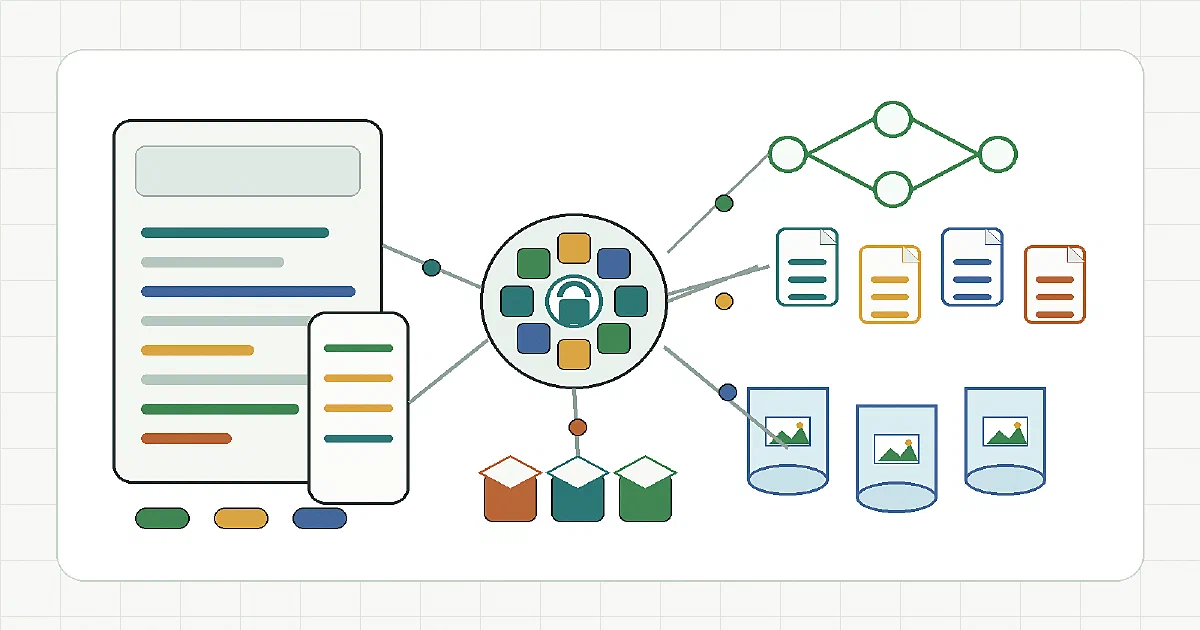

After looking at Monolith, EmDash, EdgeEver, CloudflareBase, Feedlog, Inkstone, Memos Worker, and a few other Cloudflare-native apps, my opinion has become clearer.
For my ideal publishing workflow, I would not make the CMS database the source of truth.
I would make Git the source of truth, keep content as .md or .mdx, store photos in R2, and use a PWA only as the authenticated editing and syncing layer.
The target architecture:
PWA editor -> IndexedDB drafts -> Hono Worker sync API -> Git commits / PRs
                                      |
                                      +-> R2 media uploads
                                      |
                                      +-> D1 metadata, locks, audit, queue state

Git repo -> Astro static build -> Cloudflare Pages
R2       -> public or signed media URLs
That is the stack I would bet on.
The Goal
The goal is not “a CMS on Cloudflare” in the generic sense.
The goal is more specific:
- write posts from a browser;
- install the editor as a PWA;
- keep writing when offline;
- store canonical content as Markdown files in Git;
- upload photos to Cloudflare R2;
- build the public site with Astro;
- deploy static output to Cloudflare Pages;
- give trusted users authenticated publishing access;
- keep rollback and backup simple.
In other words:
dynamic editor, static website
That distinction matters.
Monolith and EmDash are both useful references, but neither is exactly this architecture. Monolith is closer in editor feel and Cloudflare media handling. EmDash is closer in Astro integration. The design I would build takes parts from both, then changes the publishing model to Git-first.
My Recommended Stack
| Layer | Choice | Why |
|---|---|---|
| Public site | Astro static output | Fast, simple, Git-friendly, Markdown-native |
| Hosting | Cloudflare Pages | Static deploys, Git-triggered builds, CDN/TLS handled |
| Editor app | React + Vite PWA | Strong browser app ecosystem, service worker, offline shell |
| Markdown editor | CodeMirror 6 | Keeps Markdown as Markdown; good diffs and predictable output |
| Preview | Astro-compatible Markdown/MDX renderer | Preview should match the final site as closely as practical |
| Offline storage | IndexedDB through Dexie | Drafts, asset queue, sync state, and conflict metadata |
| API framework | Hono on Cloudflare Workers | Small, fast, already fits the Cloudflare projects we reviewed |
| Auth | Better Auth | Users, sessions, roles, OAuth, invitations, audit-friendly model |
| Media | Cloudflare R2 | Photo/object storage separate from Git |
| Metadata | D1 | Locks, drafts index, user settings, audit log, sync queue |
| Cache | KV only if needed | Useful for read-heavy public metadata, not primary state |
| Publishing | GitHub/GitLab API or GitHub App | Commits, branches, pull requests, review flow, rollback |
The important opinion: Git and R2 should be the durable storage surfaces.
D1 should not become the place where the finished content lives forever. It should support the editor: locks, audit logs, sync state, local draft indexes, upload sessions, and publishing metadata.
Inspiration Map
This stack is not copied from one project. It is assembled from the best parts of the projects reviewed in this run.
| Stack Part | Inspiration | What I Would Take |
|---|---|---|
| Astro site layer | EmDash | Astro-centered CMS thinking, schemas, admin/site integration ideas |
| Static publishing model | Existing Hugo/Astro static workflows | Git as durable content history, static output as the public runtime |
| Cloudflare deployment | Monolith and Cloudflare serverless stack | Pages, Workers, D1, R2, and Wrangler-friendly deployment ergonomics |
| Markdown writing experience | Monolith and Inkstone | Markdown-first writing, preview, notebook/editor ergonomics |
| Offline editor behavior | EdgeEver and Inkstone | Local drafts, sync queue thinking, explicit offline/online state |
| Media uploads | Monolith and Memos Worker | R2-backed uploads, Worker-mediated media handling, image URLs inserted into content |
| Auth model | CloudflareBase | Better Auth on Cloudflare, real users, roles, sessions, and project-friendly permissions |
| API shape | Monolith, EdgeEver, Memos Worker | Hono-style Worker API, small request handlers, Cloudflare bindings as infrastructure |
| Editorial workflow | FeedLog | Roadmap/changelog/feedback thinking that can become editorial states and publication history |
| Local fallback storage | RustFS and Slite-style local stacks | Replace R2 with self-hosted S3-compatible storage when the app is moved out of Cloudflare |
The thing I would not take wholesale is the database-first publishing model.
That is the main architectural fork:
Monolith / EmDash style:
CMS database -> rendered site or SSR app

My preferred version:
PWA editor -> Git Markdown + R2 media -> Astro static site
The projects are valuable as references, but the final design should keep one strict invariant:
published content must be recoverable from Git and object storage without the CMS database
Why Astro Static Instead of Astro SSR?
I would use Astro for static output, not SSR, for this specific project.
EmDash shows why Astro SSR can be powerful: the CMS and the site can run together, with content coming from a database at request time.
But for this workflow, static is the advantage:
- every published post is a file in Git;
- every content change has a commit;
- rollback is a revert;
- the public site works even if the CMS API is down;
- Cloudflare Pages can build from the repository;
- the site does not need a database on every reader request.
So I would keep the public surface boring:
src/content/posts/*.md
src/content/pages/*.md
Astro build
static HTML/CSS/JS
Cloudflare Pages
The editor can be dynamic. The public website does not need to be.
How This Differs from Monolith and EmDash
This proposed stack is not a replacement for Monolith or EmDash. It is a narrower publishing architecture with a different source of truth.
The simplest comparison:
| Question | Monolith | EmDash | This Git-Based Stack |
|---|---|---|---|
| Primary goal | Cloudflare-native blog CMS | Astro-integrated CMS framework | Offline-capable Git-backed static publishing |
| Public site model | Dynamic Cloudflare app | Astro SSR / CMS-backed app | Astro static output |
| Content source of truth | Database-backed CMS content | Database-backed CMS content | Markdown files in Git |
| Media storage | R2/S3-compatible storage | R2 or local/media storage depending deployment | R2 object storage, referenced from Markdown |
| Editing model | Browser admin dashboard | CMS admin integrated with Astro app | PWA editor with local drafts and sync queue |
| Offline editing | PWA shell/reading behavior, not full offline publishing | Not the main design center | Core requirement |
| Publishing action | Save into CMS database | Save into CMS/database layer | Commit/PR to Git, then Pages build |
| Rollback | CMS backup/export/database restore | CMS/database restore or app-level rollback | Git revert plus R2 media retention |
| Best fit | Cloudflare-native blog that runs as an app | Astro site with CMS-managed content | Static site owner who wants Git history and offline writing |
The architectural difference is this:
Monolith:
React admin -> Worker API -> D1 database + R2 media -> Cloudflare app renders content

EmDash:
Astro CMS/admin -> database/media backend -> Astro SSR/CMS runtime

This proposal:
PWA editor -> IndexedDB drafts -> Git Markdown + R2 media -> Astro static build -> Cloudflare Pages
Monolith is stronger if you want a ready Cloudflare-native blog app with a dashboard, media handling, comments, backups, and analytics.
EmDash is stronger if you want a CMS deeply shaped around Astro and you are comfortable with a CMS/runtime database model.
This proposed stack is stronger if the top priority is:
- Git remains the canonical backup and history;
- the public site remains static;
- writing can happen offline;
- the CMS can disappear without taking the published content with it;
- rollback is normal Git rollback.
The cost is that the sync layer becomes harder. You need Git provider integration, branch/PR handling, conflict resolution, R2 upload state, and build-status tracking. Monolith and EmDash avoid some of that complexity by keeping content inside the CMS runtime.
The Editor I Would Choose
I would choose CodeMirror 6 as the canonical editor, with a polished side panel for frontmatter and media.
That is less fancy than a full Notion-style block editor, but it fits the data model better.
Why CodeMirror:
- the saved format stays Markdown;
- Git diffs stay readable;
- frontmatter can be serialized deterministically;
- offline drafts are easy to store;
- merge conflicts are easier to explain;
- power users can paste Markdown directly;
- the editor does not invent a hidden document model that later needs conversion.
I would still borrow UX ideas from the richer projects:
| Project | Part I would borrow |
|---|---|
| Monolith | Markdown writing flow, preview, R2/S3 media handling, Cloudflare deployment ergonomics |
| EmDash | Astro CMS thinking, content schemas, admin structure |
| EdgeEver | Offline queue discipline, notes/editor polish, attachment handling |
| Feedlog | Roadmap/changelog/editorial workflow ideas |
| CloudflareBase | Better Auth plus Cloudflare-native backend patterns |
| Inkstone | Markdown notebook ergonomics and offline write queue ideas |
For non-technical users, I would add toolbar buttons and a preview pane.
But I would resist making TipTap or ProseMirror the source of truth unless the product explicitly needs a rich block document model. The project goal is Git-backed Markdown, not a collaborative Notion clone.
Auth: Better Auth, With Optional Cloudflare Access
I would use Better Auth for the application auth layer.
Cloudflare Access is useful, but it is better as a perimeter gate than as the whole CMS permission model.
The CMS needs app-level concepts:
- author;
- editor;
- admin;
- draft owner;
- reviewer;
- publish permission;
- media upload permission;
- Git commit attribution;
- audit history;
- optional OAuth login.
That is where Better Auth fits.
Recommended model:
Cloudflare Access: optional outer gate for owner/private deployments
Better Auth: real CMS users, sessions, roles, organizations, OAuth
For a solo personal deployment, Cloudflare Access plus a single admin account could be enough.
For anything multi-user, I would use Better Auth from the beginning.
Offline PWA Behavior
The PWA must be honest about offline state.
It should not say “published” when something is only saved locally.
I would use four visible states:
| State | Meaning |
|---|---|
| Local draft | Stored in IndexedDB only |
| Asset staged | Photos exist locally but are not yet in R2 |
| Synced | Markdown committed or PR created, photos uploaded |
| Live | Cloudflare Pages build completed and the public URL is available |
Offline data should live in:
IndexedDB / Dexie
For large images, I would consider OPFS where browser support and UX justify it, but IndexedDB is the practical baseline.
The sync model should be explicit:
- save drafts locally immediately;
- queue image uploads while offline;
- upload images to R2 when back online;
- replace local blob placeholders with final R2 URLs;
- write the final Markdown file to Git;
- trigger or wait for the Cloudflare Pages build;
- show build and publish status.
Browser background sync is nice, but I would not depend on it as the only publishing mechanism. There should be a clear Sync button and a visible outbox.
R2 Photo Strategy
Photos should not live in Git.
Git is excellent for Markdown and small metadata. It is not where I want years of images, screenshots, and camera uploads.
I would store media in R2 with deterministic keys:
media/YYYY/MM/post-slug/original-file-name.webp
media/YYYY/MM/post-slug/original-file-name.avif
media/YYYY/MM/post-slug/original-file-name.jpg
The editor API should handle:
- upload authorization;
- file size/type validation;
- image normalization;
- derivative generation if needed;
- final public URL creation;
- metadata recording in D1;
- insertion into Markdown.
The Markdown should contain stable URLs:

For backup, keep:
- Git repository for text;
- R2 bucket export or replication for media;
- D1 export for editor metadata, audit logs, and queues.
If I wanted local object storage instead, RustFS or MinIO could replace R2 for a homelab version. But for a Cloudflare Pages site, R2 is the natural media store.
Publishing Flow
I would support two publishing modes.
For solo admin use:
Edit -> Sync -> Commit to main -> Cloudflare Pages build
For multi-user use:
Edit -> Sync -> Commit to branch -> Pull request -> Review -> Merge -> Pages build
That gives a clean safety ladder.
Admins can move quickly. Contributors get review.
The Worker should only write to allowlisted paths:
src/content/posts/
src/content/pages/
public/content-index/
It should never be a generic Git write proxy for the whole repository.
What I Would Not Do
I would not make D1 the canonical content database.
That is tempting because it makes the CMS feel simpler at first. But then the static site becomes an export target rather than the source of truth.
I would not put photos in Git.
That works for tiny sites, but it gets ugly with real image volume.
I would not start with collaborative real-time editing.
It adds a lot of complexity. Local-first drafts plus branch/PR conflict handling are enough for the first version.
I would not build the editor around a rich JSON document model unless Markdown export is perfect and deterministic.
The whole point is that the Git repository remains understandable without the CMS.
MVP I Would Build First
The first version should be deliberately small:
- Better Auth login.
- List Markdown posts from Git.
- Open one post into a CodeMirror editor.
- Save draft to IndexedDB.
- Upload one image to R2 through the Worker.
- Insert the R2 URL into Markdown.
- Commit the Markdown file to a branch.
- Trigger or observe a Cloudflare Pages build.
- Show sync state clearly.
Only after that works would I add:
- PR review mode;
- roles and invitations;
- image resizing pipeline;
- scheduled publishing;
- reusable blocks;
- preview deployments;
- comments/editorial notes;
- AI writing assistance.
FAQ
Is this closer to Monolith or EmDash?
It is closer to Monolith in editor feel and Cloudflare media handling, but closer to EmDash in wanting Astro as the site layer.
The big difference is that this design is Git-first. Monolith and EmDash can store content in databases. This design treats the Git repository as canonical and uses the CMS as an editor/sync tool.
Should the editor use TipTap, ProseMirror, or CodeMirror?
I would start with CodeMirror 6.
TipTap and ProseMirror are excellent when the source document is a rich structured document. But if the durable format is Markdown in Git, CodeMirror keeps the system simpler, more transparent, and easier to recover without the CMS.
A polished Markdown editor with toolbar buttons, frontmatter forms, media picker, and preview is enough.
Why use Better Auth instead of Cloudflare Access only?
Cloudflare Access can protect the admin app, but it does not give the CMS a rich internal permission model.
Better Auth is better for real app users, sessions, OAuth, roles, invitations, and audit-friendly author identity.
My preferred setup:
Cloudflare Access: optional perimeter protection
Better Auth: actual CMS identity and permissions
Does D1 still matter if Git is the source of truth?
Yes, but D1 becomes support infrastructure rather than canonical content storage.
Good D1 use cases:
- user settings;
- auth/session tables;
- draft index metadata;
- sync queue records;
- upload records;
- publish/build status;
- audit events;
- edit locks.
The finished post should still land in Git as Markdown.
How does offline publishing work?
Offline editing works by saving drafts, image blobs, and sync operations locally in IndexedDB.
Publishing only completes when the browser is online again:
local draft -> upload media to R2 -> commit Markdown to Git -> Pages build -> live site
The UI must show the difference between saved locally, synced, and live.
Can this be fully serverless?
Yes, if you accept Cloudflare as the runtime.
The Cloudflare version would use:
Workers + D1 + R2 + KV if needed + Cloudflare Pages
That matches the pattern from the Cloudflare serverless stack post.
The local/homelab version would replace Cloudflare pieces with:
Hono/Node or Bun API
SQLite
RustFS or MinIO
Git over SSH or Forgejo/Gitea API
static build pipeline
The architecture survives either way because Git and object storage remain the durable surfaces.
What is the best backup story?
Back up three things:
| Data | Backup |
|---|---|
| Markdown and site config | Git remote mirror |
| Photos and attachments | R2 lifecycle/export/replication, or S3-compatible backup |
| CMS metadata | D1 export |
If Git and R2 are healthy, the public site can be rebuilt even if the CMS database is lost.
That is exactly why I prefer this design over a database-first CMS for a personal publishing system.
What should be borrowed from the projects reviewed so far?
My shortlist:
- Monolith for Cloudflare-native CMS ergonomics, Markdown preview, and R2 media handling.
- EmDash for Astro-centered CMS thinking.
- EdgeEver for offline queue discipline and polished editor behavior.
- CloudflareBase for Better Auth on Cloudflare patterns.
- Inkstone for Markdown notebook and offline write queue ideas.
- Feedlog for editorial workflow ideas such as changelog, feedback, and roadmap surfaces.
I would not copy any one project wholesale. The best version is a narrower product with a stricter invariant: Markdown in Git, media in R2, public site static.
Conclusion
The stack I would choose is:
Astro static site
Cloudflare Pages
React/Vite PWA editor
CodeMirror 6 Markdown editor
IndexedDB/Dexie offline drafts
Hono Worker sync API
Better Auth
D1 for metadata/audit/queues
R2 for photos
GitHub/GitLab commits or PRs
That gives the best tradeoff from the projects we reviewed.
The CMS can be modern, authenticated, offline-capable, and Cloudflare-native. But the public website stays static, portable, recoverable, and Git-backed.
Comments