

Email-driven login flows are easy to break locally.
You click Continue with email, the app says it sent a link, and then nothing useful happens unless you have SMTP configured.
MailDev gives you a development inbox for that exact moment.
Point your app at MailDev’s SMTP port, open the web UI, and inspect the message before it ever reaches a real mailbox.
MailDev is a local SMTP server and browser inbox for testing generated emails during development.
What is MailDev?
MailDev catches outgoing email from your application and shows it in a browser UI.
It is useful for magic links, password resets, signup emails, notifications, transactional templates, and any workflow where you want to prove the app generated the right message without sending mail to real users.
The default ports are:
1025for SMTP1080for the web UI and REST API
For a host app, configure SMTP like this:
SMTP_HOST=localhost
SMTP_PORT=1025
SMTP_SECURE=false
For an app running in the same Docker Compose network, use the service name:
SMTP_HOST=maildev
SMTP_PORT=1025
SMTP_SECURE=false
Why Use MailDev?
MailDev is a good fit when you need a no-drama email catcher in a development or homelab test environment:
- Magic-link testing: receive login and verification links locally.
- Template inspection: check rendered HTML, plain text, headers, raw source, and attachments.
- Responsive preview: resize the email preview to catch mobile layout issues.
- No accidental delivery: keep test messages away from real inboxes.
- API access: query captured emails from integration tests or scripts.
- Relay support: optionally forward selected messages through a real SMTP server when you explicitly configure it.
- Agent workflows: MailDev 3 can expose an MCP endpoint for development agents that need to inspect verification emails.
Do not run MailDev as your production mail server. It is a local testing tool.
Tech Overview of MailDev
MailDev 3 is a TypeScript monorepo. The current project layout separates the SMTP server, API server, UI, shared storage/types, CLI, and MCP integration into packages.
The web interface is built with React.
The API layer uses Fastify, real-time updates are delivered over WebSockets, and the SMTP parsing stack builds on the Nodemailer ecosystem.
At runtime, the flow is simple:
Your app -> SMTP maildev:1025 -> MailDev storage -> Web UI/API at :1080
If you enable persistence with MAILDEV_MAIL_DIRECTORY, messages survive container restarts. If you leave the retention limit at MailDev’s default, it keeps every message, so a long-running setup should set MAILDEV_MAX_EMAILS.
Self-Hosting MailDev with Docker
The Home-Lab compose file keeps MailDev local by default and caps the inbox at 1000 messages.
Home-Lab MailDev compose referenceservices:
maildev:
image: maildev/maildev:latest
container_name: maildev
restart: unless-stopped
ports:
- "${MAILDEV_WEB_PORT:-127.0.0.1:1080}:1080"
- "${MAILDEV_SMTP_PORT:-127.0.0.1:1025}:1025"
environment:
TZ: ${TZ:-Europe/Warsaw}
MAILDEV_WEB_PORT: 1080
MAILDEV_SMTP_PORT: 1025
MAILDEV_WEB_IP: 0.0.0.0
MAILDEV_IP: 0.0.0.0
MAILDEV_MAX_EMAILS: ${MAILDEV_MAX_EMAILS:-1000}
MAILDEV_MAX_MESSAGE_SIZE: ${MAILDEV_MAX_MESSAGE_SIZE:-52428800}
Pre-Requisites - Docker
Install Docker on your system before proceeding:
- Linux: Official Docker Engine install guide
- Windows / Mac: Docker Desktop
Verify installation: docker --version && docker compose version
Start it:
cp .env.sample .env
docker compose up -d
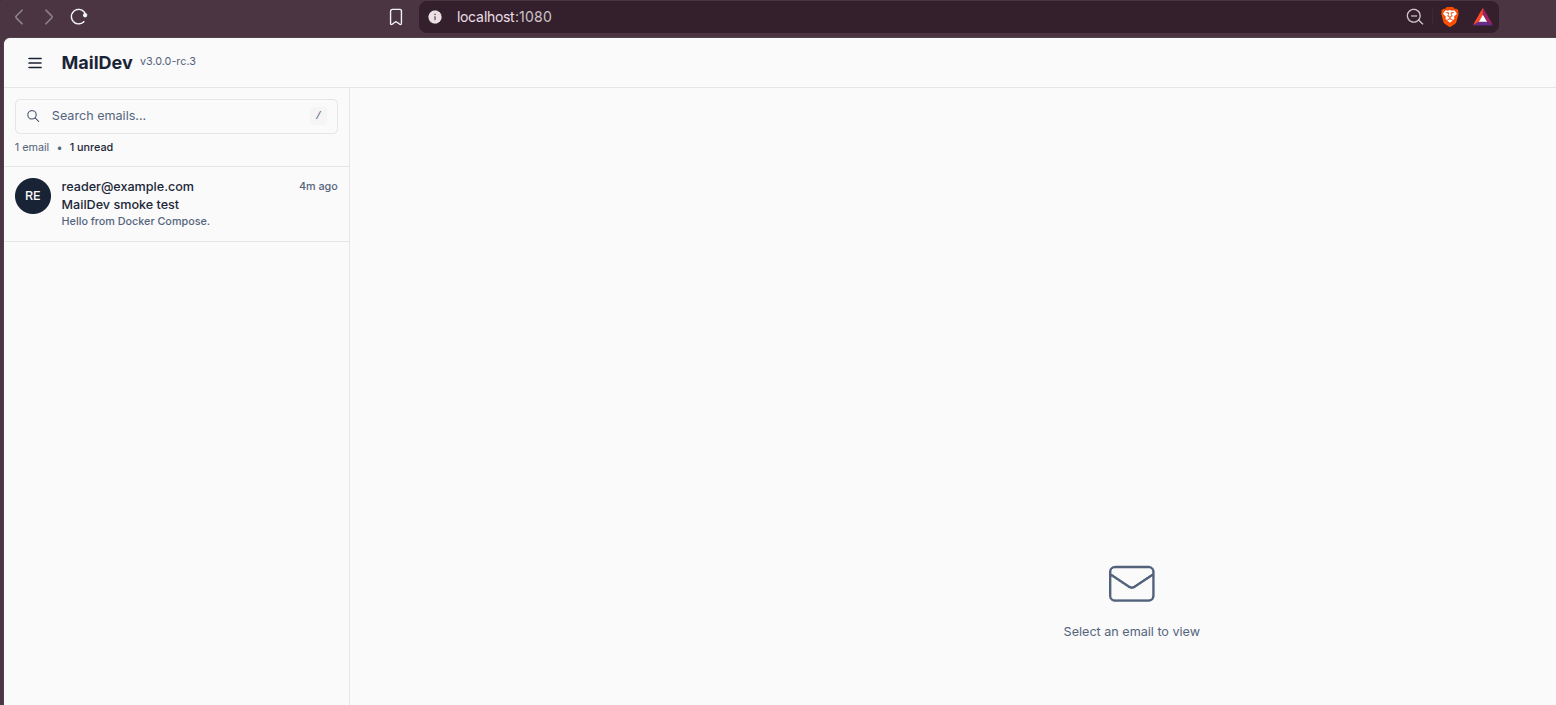
Then open:
http://localhost:1080
Point a host app at:
SMTP_HOST=localhost
SMTP_PORT=1025
SMTP_SECURE=false
Or, if your app is another service in the same Compose project:
SMTP_HOST=maildev
SMTP_PORT=1025
SMTP_SECURE=false
Testing a Message
From a container on the same Docker network, you can send a tiny smoke-test message:
docker run --rm --network maildev_default alpine:3.20 sh -c '
  apk add --no-cache busybox-extras >/dev/null &&
  {
    sleep 1;
    printf "HELO local.test\r\n";
    sleep 1;
    printf "MAIL FROM:<[email protected]>\r\n";
    sleep 1;
    printf "RCPT TO:<[email protected]>\r\n";
    sleep 1;
    printf "DATA\r\n";
    sleep 1;
    printf "Subject: MailDev smoke test\r\n";
    printf "From: [email protected]\r\n";
    printf "To: [email protected]\r\n";
    printf "\r\n";
    printf "Hello from Docker Compose.\r\n";
    sleep 1;
    printf ".\r\n";
    sleep 1;
    printf "QUIT\r\n";
  } | nc maildev 1025
'
Then refresh http://localhost:1080 and the message should be visible.
You can also query the REST API:
curl http://localhost:1080/api/email/summary
That makes MailDev useful for automated tests that need to confirm a signup, invite, or reset email was generated.
Using MailDev with Self-Hosted Apps
MailDev works well with apps that require SMTP but do not need real delivery during testing:
- Rallly magic-link login
- Listmonk campaign template checks
- Mautic form and automation testing
- Ghost membership email previews
- Any app with password reset or invite emails
The important Docker rule is the same as with Mailpit: if the app and MailDev run in the same Compose network, the SMTP host is maildev, not localhost.
Safe Exposure Notes
Keep MailDev private. Captured messages often include login links, password reset URLs, invite tokens, internal hostnames, and test user data.
For local use, bind the ports to loopback:
ports:
  - "127.0.0.1:1080:1080"
  - "127.0.0.1:1025:1025"
If you expose MailDev on a LAN or behind a tunnel, configure authentication first and remember that the inbox content is sensitive.
Conclusion
MailDev is a practical local inbox for development email. It is easy to run with Docker, simple to wire into most apps, and useful when testing magic links or transactional templates without configuring a real SMTP provider.
If you already use Mailpit, MailDev is not a mandatory replacement. Think of it as another good local email catcher, especially interesting now that MailDev 3 has a refreshed TypeScript/React stack and MCP support.
FAQ
Is MailDev a real SMTP server for production?
What ports does MailDev use?
1025 for SMTP and 1080 for the web UI/API.
Do I need a real email address?
[email protected]. If the app sends through MailDev, the message appears in the MailDev inbox.
How is MailDev different from Mailpit?
Both MailDev and Mailpit are local email catchers: your app sends SMTP mail to them, and you inspect captured messages in a web UI.
MailDev is Node.js/TypeScript-based, has a React UI, supports rendered HTML/plain text/headers/source inspection, attachments, responsive preview, REST API access, WebSocket updates, relay options, config files, and optional MCP support.
Mailpit is Go-based and ships as a small static binary or Docker image. It has a broader email QA surface: advanced search, POP3, tagging, HTML compatibility checks, link checks, optional spam checks, HTML screenshots, relay/forwarding, API support, and automatic pruning.
Use MailDev when you want the Node/TypeScript-native tool, the classic MailDev workflow, responsive visual preview, or MCP-backed development inbox access. Use Mailpit when you want deeper email QA beyond previewing the message.
Does MailDev check whether email HTML is good?
MailDev lets you inspect the email: rendered HTML, plain text, headers, raw source, attachments, and responsive preview sizes. That is enough to catch many obvious template issues.
Mailpit goes further. Its HTML check, link check, optional spam check, and screenshot features make it better suited when you want to validate email-client compatibility and catch broken links or rendering problems more systematically.
In short: MailDev previews the email; Mailpit helps QA the email.
What are the pros and cons of MailDev vs Mailpit?
MailDev pros: very simple Docker and npm workflow, familiar to Node developers, responsive previews, relay support, REST API, and MCP support in MailDev 3.
MailDev cons: MailDev 3 is still release-candidate work, and Mailpit currently has more built-in email QA tools.
Mailpit pros: small Go binary, mature Docker/runtime story, advanced search, POP3, tagging, HTML/link/spam checks, screenshots, pruning, and strong API-first testing features.
Mailpit cons: if your team prefers JavaScript-native tooling or wants MailDev’s MCP workflow, MailDev may feel closer to the development stack.
Can MailDev forward emails to a real SMTP provider?
Can I use MailDev with Rallly?
SMTP_HOST=maildev, SMTP_PORT=1025, and SMTP_SECURE=false.
Should I expose MailDev publicly?
127.0.0.1, a private Docker network, or behind authentication.
Comments