
You have been using Python for a while and now you want to share some cool apps with your colleagues.
The moment to be an enabler is really close, but your colleagues might now be that confortable with code.
Fortunately, there are couple of libraries that we can use in Python that will leverage our coding and provide user friendly UI’s, so we can share our code as a Web App.
Let's double check you are ready... 🐍⏬
If you have these ready, you are prepared to create AI Apps
- Have Python Installed
- Get GIT ready for cloning code
- Install the Python dependencies of the project
- Choose a Library to make the UI of your project
Get final user fast in the loop with this UI’s in Python.
We will cover several of them:
F/OSS Libraries to Create Quick AI Apps
Streamlit
| Project Details | References |
|---|---|
| Official Site | Streamlit Site |
| Code Base | Streamlit Source Code at Github |
| License | License Apache v2 ✅ |
- Example Project done in Python Streamlit ✅

Awsome Streamlit Public Resources
You can use Streamlit together with PyGWalker - Example -> https://github.com/Jcharis/Streamlit_DataScience_Apps/blob/master/Using_PyGWalker_With_Streamlit/app.py
Make a better Streamlit UI with a navigation menu - https://github.com/Sven-Bo/streamlit-navigation-menu/blob/master/streamlit_menu_demo.py and https://www.youtube.com/watch?v=hEPoto5xp3k
Other Projects with Gen AI using Streamlit 👇
To use Github Actions to build your Streamlit container👇
What kind of AI-Apps can you do with Streamlit?
You can Create a ChatGPT Clone with Streamlit
Even an App to Summarize YouTube Videos
- RAGS with Streamlit
A very interesting analysis ( This Streamlit App Not F/OSS Unfortunately) - https://state-of-llm.streamlit.app/
Chainlit
Like Streamlit, but Chainlit is for Pure AI Apps:
| Project Details | References |
|---|---|
| Official Docs | The Chainlit Project Documentation |
| Code Base | The Chainlit Source Code at GitHub |
| License | Apache v2 ✅ |
- Fast Development: Chainlit boasts seamless integration with existing codebases, allowing you to incorporate AI functionalities quickly. You can also start from scratch and build your conversational AI in minutes.
- Multi-Platform Support: Write your conversational AI logic once and deploy it across various platforms effortlessly. This flexibility ensures your AI is accessible from wherever your users interact.
- Data Persistence: Chainlit offers functionalities for data collection, monitoring, and analysis. This allows you to analyze user interactions, improve your AI’s performance over time, and gain valuable insights from user behavior.
Example ChainLit Apps
Chainlit with OpenAI>1.0 Sample ⏬
export OPENAI_API_KEY="sk-..." #linux
Requirement files:
openai==1.37.0
chainlit==1.1.306
python-dotenv
The chainlit code:
from dotenv import load_dotenv
import chainlit as cl
from openai import AsyncOpenAI

load_dotenv()

client = AsyncOpenAI()

cl.instrument_openai()

@cl.on_message
async def on_message(message: cl.Message):

    response = await client.chat.completions.create(
        model="gpt-3.5-turbo",
        messages=[
            {
                "role":"system",
                "content": "You are a helpful assistant."
            },
            {
                "role":"user",
                "content": message.content,
            }
        ]
    )

    await cl.Message(
        content=response.choices[0].message.content
    ).send()
This is a sample chainlit.md
Welcome to QA Chatbot
To run Chainlit, we need:
chainlit run app.py --port 8090 #defaults to 8000
Chainlit is now ready at
localhost:8090
Gradio
Gradio is a fantastic open-source Python library that streamlines the process of building user interfaces (UIs) for various purposes.
It empowers you to create interactive demos, share your work with ease, or provide user-friendly interfaces for your machine learning models or Python functions.
Certainly! Below is a simple Markdown table with two columns and two rows:
| Project Details | References |
|---|---|
| Official Web | The Gradio Site |
| Code Base | The Gradio Source Code at Github |
| License | Apache v2 ✅ |
You can fill in “Data 1” and “Data 2” with whatever specific information you need. This format is a straightforward way to organize and present data clearly in Markdown-supported environments.
Why should I care about Gradio? 👇
- Rapid UI Prototyping: Quickly create web-based UIs with just a few lines of code, ideal for testing and demonstrating your machine learning projects.
- Pre-built Components: Gradio offers a variety of built-in UI components like text boxes, sliders, image uploaders, and more, simplifying UI construction.
- Customization and Flexibility: Combine these components to create tailored interfaces for your specific needs. You can even create custom components if the pre-built options are insufficient.
- Deployment Options: Gradio UIs can be integrated seamlessly within Jupyter Notebooks or deployed as standalone web applications. Built-in sharing features allow you to share your UI with others using a simple link.
Example of Gradio Apps
Using Gradio to Interact with Groq API from Google Colab ⏬
We were already using groq API here -> summarize-yt-videos#faq
Thanks to TirendazAcademy ❤️
The good thing is that we can run Python gradio apps from google colab:
!pip install -q -U langchain==0.2.6 langchain_core==0.2.10 langchain_groq==0.1.5 gradio==4.37.1
from google.colab import userdata
groq_api_key = 'your_groq_API'

from langchain_groq import ChatGroq

chat = ChatGroq(
    api_key = groq_api_key,
    model_name = "mixtral-8x7b-32768"
)

from langchain_core.prompts import ChatPromptTemplate

import gradio as gr

def fetch_response(user_input):
  chat = ChatGroq(
    api_key = groq_api_key,
    model_name = "mixtral-8x7b-32768"
  )
  system = "You are a helpful assistant."
  human = "{text}"

  prompt = ChatPromptTemplate.from_messages(
      [
          ("system", system), ("human", human)
      ]
  )
  chain = prompt | chat | StrOutputParser()
  output = chain.invoke({"text": user_input})
  return output

iface = gr.Interface(
    fn = fetch_response,
    inputs = "text",
    outputs = "text",
    title = "Groq Chatbot",
    description="Ask a question and get a response."
)

iface.launch()
Other Quick UI for AI Apps in Python
Taipy
Data and AI algorithms into production-ready web apps with Taipy. With Python only.
| Project Details | References |
|---|---|
| Official Web | The Taipy Site |
| Code Base | The Taipy Source Code at Github |
| License | Apache v2 ✅ |
Turns Data and AI algorithms into production-ready Web-Apps with only Python
Why Taipy? ⏬
- It allows visualizing streaming data - https://docs.taipy.io/en/latest/gallery/visualization/pollution_sensors/
- Integrate Taipy - https://docs.taipy.io/en/latest/tutorials/integration/
- Pipeline & DataFlow orchestration
- Scenario Management (what if analysis)
- Want to use Taipy? You will need the PyPi Package: https://pypi.org/project/taipy/
pip install taipy
Get a Taipy working example ⏬
Taipy allows for Real Time Data Streaming (Taipy and WebSockets):
git clone https://github.com/Avaiga/demo-realtime-pollution
cd demo-realtime-pollution
pip install taipy=3.1.1 #pip install -r requirements.txt
python receiver.py
python sender.py
A Sample of Taipy:
Mesop
With Mesop, you can Build delightful web apps quickly in Python
Why Mesop to build UI's with Python? 👇
- Write UI in idiomatic Python code
- Build custom UIs without writing Javascript/CSS/HTML
- Easy to understand reactive UI paradigm
- Ready to use components
It even works in Google Colab!
How to Make the most of your AI-Apps Project
Learning how to effectively use and manage AI applications can significantly increase the efficiency and success of your projects.
Learn to use Docker
By using Docker, you can ensure that your AI application will run the same way, regardless of the environment it’s deployed in.
This significantly reduces the potential for bugs caused by differences in local development environments, and makes it easier to collaborate with others.
You can consider Podman as an alternative
Leverage CI/CD
You dont have to, but it will make your workflow faster.
- Use Github Actions to make them build for you the x86 container images of your projects
- If you need ARM32/64, you can:
- Build your container image manually
- Use Jenkins together with Gitea
- If you need ARM32/64, you can:
Interesting LLMOps F/OSS (✅) Tools ⏬
-
PezzoAI - Designed to streamline prompt design, version management, instant delivery, collaboration, troubleshooting, observability and more
-
DifyAI - Open-source framework aims to enable developers (and even non-developers) to quickly build useful applications based on large language models, ensuring they are visual, operable, and improvable.
-
https://github.com/msoedov/langcorn - MIT Licensed
⛓️ Serving LangChain LLM apps and agents automagically with FastApi.
- https://github.com/langfuse/langfuse - Manage and version your prompts
🪢 Open source LLM engineering platform: Observability, metrics, evals, prompt management, playground, datasets. Integrates with LlamaIndex, Langchain, OpenAI SDK, LiteLLM, and more. 🍊YC W23
- Interesting LLMOps Resources
Vector Stores for AI
Vector stores play a crucial role in RAG systems by enabling efficient storage and retrieval of high-dimensional vectors representing text or other data.
They provide a foundation for similarity search and help in finding relevant information quickly. Here are some comments on vector stores and the provided links:
More about Vector DataBases ⏬
-
The Vector Admin Project
- Vector Admin is an open-source project that simplifies the management and visualization of vector databases.
- It provides a user-friendly interface for interacting with vector stores and performing tasks like indexing, querying, and monitoring.
-
FOSS Vector DBs for AI Projects: FOSS Vector DBs for AI Projects
- There are several open-source vector database options available for AI projects.
- These vector stores offer scalability, fast similarity search, and integration with various programming languages and frameworks.
- Some popular FOSS vector databases include Faiss, Pinecone …
-
ChromaDB
- ChromaDB is an open-source vector database designed for easy integration and fast similarity search.
- It provides a simple and intuitive API for storing and retrieving vectors.
- ChromaDB supports various distance metrics and offers features like filtering and metadata handling.
- It can be self-hosted using Docker, making it convenient for deployment and management.
Vector stores are essential components in RAG systems as they enable efficient retrieval of relevant information based on the similarity of vectors.
They help in scaling the retrieval process and improving the overall performance of RAG applications.
RAGs
RAG (Retrieval-Augmented Generation) is a technique that enhances the capabilities of large language models (LLMs) by allowing them to access and process information from external sources.
It follows a three-step approach:
- Retrieve relevant information based on the user query
- process the retrieved information and formulate additional questions - ask
- use the retrieved and processed information to generate a comprehensive response.
RAGs...? I Am still Lost 👇
Dont worry, there are already F/OSS RAG implementations, like EmbedChain that you can use.
-
LangChain is a Python library that focuses on the retrieval aspect of the RAG pipeline. It provides a high-level interface for building RAG systems, supports various retrieval methods, and integrates well with popular language models like OpenAI’s GPT series.
- However, there are other open-source options available, such as LLama Index, which is designed specifically for building index-based retrieval systems and provides a simple API for indexing and querying documents.
- You have here an example of a Streamlit Project using LangChain as RAG
-
LangFlow is another option, which is a visual framework for building multi-agent and RAG applications.
- It offers a visual programming interface, allows for easy experimentation and prototyping, and provides pre-built nodes for various tasks.
How to get HTTPs to your AI App
Feel free to use Cloudflare Tunnels or a Proxy like NGINX
FAQ
- PyGWalker - Interact with your Data with Python in Jupyter NB’s
How to Install Python for AI Projects ⏬
Python is a F/OSS and with a large communitty.
You will need just a second to install Python
python --version #this will output your version
You can also refresh some Python 101 skills.
If you need data for your projects, you can have a look to: RapidAPI
F/OSS IDE's and extensions for AI Projects ⏬
- MIT License ❤️
- You can support your development with Gen AI thanks to F/OSS extensions
- Tabby - Apache License ✅
- Continue Dev - Apache License ✅
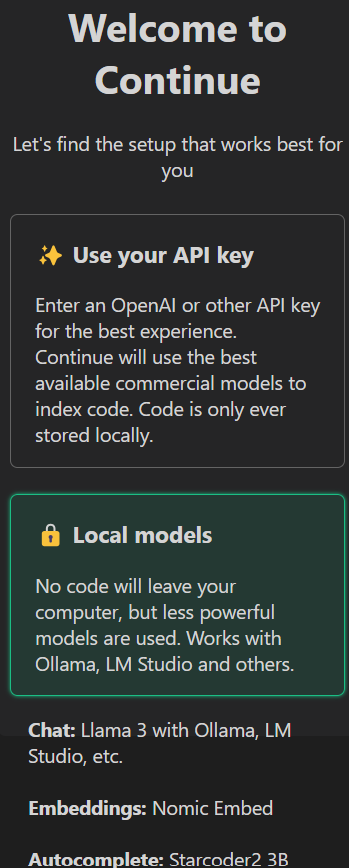
You can install vscodium with one command:
flatpak install flathub com.vscodium.codium
How to Install Python Dependencies ⏬
Whenever you are coding something, make sure to place the version of the Python libraries in the requirements.txt file, so that others will be able to replicate it in the future - Avoid that pain!
pip install pandas #install latest version at PyPi
#pip install pandas==2.2.2 #https://pypi.org/project/pandas/2.2.2/

pip install -r requirements.txt #install all at once
You will want to get familiar with the PyPi repository to find awsome Python Packages
How to Install GIT for AI Projects ⏬
sudo apt-get update
sudo apt-get install git
How to Take Gen AI Apps one Step further?
- Master Prompt Engineering
- Example of a F/OSS RAGs framework:
- EmbedChain : Framework to create ChatGPT like bots over your dataset.
- LangChain - Building applications with LLMs through composability
- Manage VectorStores with UI - With Vector Admin
- AgentOps / LLMOps
- CrewAI together with AgentOps - https://github.com/AgentOps-AI/agentops
- https://docs.agentops.ai/v1/quickstart - Build reliable AI agents with monitoring, testing, and replay analytics. No more black boxes and prompt guessing.
- Build Scale and Serve AI Apps with bentoML -
Running GenAI Apps in the Cloud ⏬
- Amazon Bedrock
- Google Vertex AI
What are some bundled Gen AI Apps to use with Docker?
PrivateGPTWhat are the best F/OSS LLMs right now?
Sure, here are the links formatted using your Hugo component:
Qwen2 Mistral LLama3 Nemotron-4-340B-Instruct Yi-1.5-34B-Chat LLM For CodingExpect new models to take the lead, check them 👇
Have a look to the LLMs leaderboards:
BTW, the chat bot arena is a Gradio App itself :)
You can run LLMs locally with Ollama and Open Web UI
What it is Hugging Face
Hugging Face is a multifaceted platform that caters to the needs of developers and researchers working with artificial intelligence
-
Model Hub: The Model Hub serves as a central repository for pre-trained LLMs in various domains like text generation, translation, and question answering. You can explore these models, download them for use in your projects, and even fine-tune them on your own data to improve their performance for specific tasks.
-
Datasets: Hugging Face provides access to a rich collection of datasets specifically designed for training and evaluating LLMs. This includes datasets for text summarization, sentiment analysis, dialogue systems, and more.
-
Build Your Own AI Applications: Use these pre-trained models as building blocks to create your own custom AI applications without starting from scratch.
-
Share and Collaborate: Share your own AI models and projects with the Hugging Face community, and learn from what others are building.
Useful F/OSS VSCode Extensions
If you are new with these Python Frameworks to build cool UI’s, you can get help from these extensions:
Continue Dev
⏩ Continue is the leading open-source AI code assistant. You can connect any models and any context to build custom autocomplete and chat experiences inside VS Code and JetBrains
- Continue Dev Source Code at Github
- License Apache v2 ✅
- Continue Dev Docs
- It works with Ollama / KoboldCpp / TextGenWebUI !
- You can install it as extension of VSCodium
The easiest way to code with any LLM - An open-source autopilot in your IDE
https://continue.dev/docs/reference/Model%20Providers/ollama
TIP: ollama run starcoder2:3b (for code autocomplete) + ollama run llama3 (as chat)
AI-Genie
A Visual Studio Code - ChatGPT Integration.
Supports, GPT-4o GPT-4 Turbo, GPT3.5 Turbo, GPT3 and Codex models (Not F/OSS Models ❎)
Create new files, view diffs with one click; your copilot to learn code, add tests, find bugs and more.
Alita Code
How to use AI to Code
Specify what you want it to build, the AI asks for clarification, and then builds it.
Comments